In a browser
cctop serve
cctop: serving on http://127.0.0.1:7777/?t=9f3ac1de…
cctop: read-only link — no actions: http://127.0.0.1:7777/?t=71b02ee4…
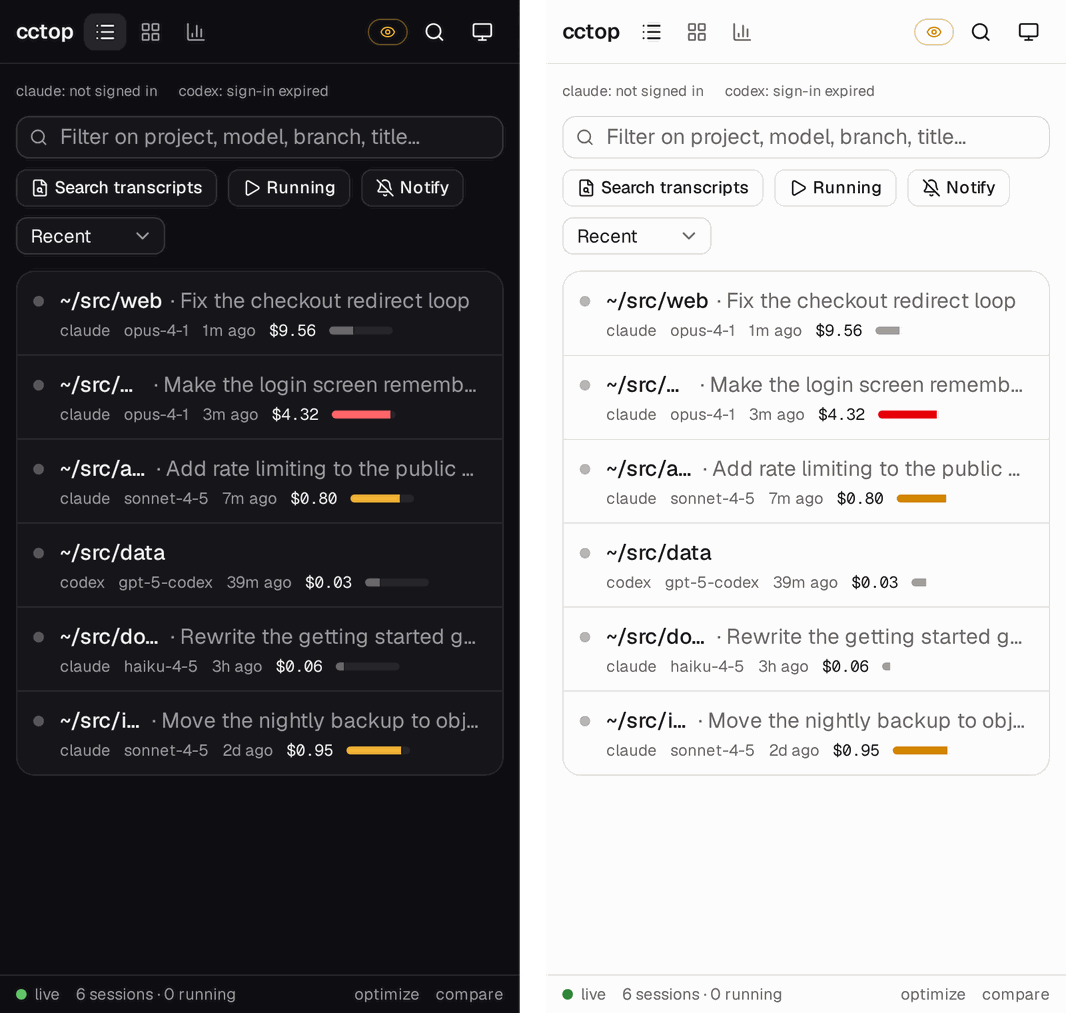
Open that link and you get the table cctop draws in the terminal, streamed live,
plus what the terminal has no room for: per session, the conversation itself,
what it edited, what it can reach, a report that says where an afternoon’s money
went, and each account’s rate-limit windows at /api/quota.

It can also answer an agent. A page that tells you a session has been waiting twenty minutes and cannot do anything about it has shown you a problem and withheld the fix, so the page can send a prompt to a live session, resume a dead one, and hand one’s work to a different harness. Nothing destructive: no route stops an agent, kills a process or deletes a transcript — those stay in the TUI, where the confirmation prompt is.
A permission prompt gets a different pair of buttons. Allow and Deny are not
words typed at the agent — a prompt is a menu, and a word plus Enter picks
whatever is highlighted — so the page presses the key that harness’s own menu
names: 1 to allow in Claude Code, y in Codex, Esc to deny either. The two
harnesses only, because those are the menus cctop has actually driven; for
anyone else the prompt still shows, with what it is asking where the hook or
the screen could name it, and the answer stays in the terminal. The asking
state itself arrives over the hooks, or — with read_screen = true in the
settings file — read off the agent’s screen, which is how a session no hooks
cover still puts the buttons on the page. See
Reading the agents’ screens.
The whole authorisation for that is the token in the URL, so it is worth stating
plainly: whoever holds the link can drive the agents on this machine. Hence
the defaults — loopback, a token, and --no-actions to serve the pages without
the buttons.
The second link is for showing, not driving. Each run also mints a read-only
token, printed as a labelled second line. It opens every page and answers every
GET — the same dashboard, the same reports, the same search — but every
/api/act/* request it makes is refused with 403 this link is read-only, and
the pages it serves are wired to it, so the prompt box never appears. It is a
different credential rather than a flag on the first one: “read-only” is not
something a request can assert about itself, it is a property of the token it
carries. Hand it to a colleague who wants to watch a run, or a status board that
has no business typing at your agents.
From inside cctop, with the table still there
cctop serve takes over the terminal it runs in and draws nothing — which is
the wrong shape when you want the page and the dashboard. B in the TUI
serves the same page while cctop keeps running. l puts it on this machine,
t also opens a tunnel, o opens it in your browser, y copies the link, and
x stops it. With a tunnel up, c draws the tunnel link as a QR code for a
phone to scan.
╭ Serve this table to a browser ─────────────────────────────╮
│ This machine                                               │
│  http://127.0.0.1:7778                                     │
│                                                            │
│ The internet                                               │
│  https://supplemental-belt-spare-reflect.trycloudflare.com │
│                                                            │
│ Anyone holding it reads every session here,                │
│ and can type at your agents. Cloudflare carries it.        │
│                                                            │
│ Read-only — watches, never acts                            │
│  https://supplemental-belt-spare-reflect.trycloudflare.com │
│                                                            │
│ o open · y copy · c QR code · l local · t + tunnel · x stop│
╰────────────────────────────────────────────────────────────╯
The panel shows each link as its origin and not in full, because the full link
carries the token — a credential that would otherwise be sitting in every
screenshot of the panel. o and y use the whole thing, and so does c: a QR
code is the link in a form a camera reads, so it waits to be asked for, goes
when the panel closes, and is not drawn at all on a terminal too small to hold
all of it — the panel says so instead.
It is the same server, reached differently, with one difference worth knowing: it does not scan for sessions. The dashboard already walks them several times a second, so the page is fed from the rows on screen — one pass over the disk instead of two, and no way for the page and the table beside it to disagree.
Stopping it, or quitting cctop, revokes every link handed out — unless it is on
your own Cloudflare account’s tunnel, whose
links come back with the next serve until r replaces them. A tunnel lasts
exactly as long as the cctop that opened it.
Why you would want it
The table’s headline is which session is waiting on you, and that only pays off
while somebody is looking at the terminal. Agents sit amber for twenty minutes
because the person who could answer them is in a meeting. cctop serve puts the
same fact on a surface you carry.
Sessions that need a person are pulled out into their own block at the top of the page. The Notify button asks for browser notification permission and then fires one the moment a session crosses into waiting — not for the ones already sitting there when you opened the page, which would be a notification about nothing.
The same edge can leave the browser entirely. --notify <URL> (or
CCTOP_NOTIFY_URL, which a dashboard-hosted serve also reads since it has no
flag) POSTs one JSON event per crossing:
{
  "event": "waiting",
  "session_id": "…",
  "project": "cctop",
  "title": "…",
  "url": "https://…/session/…?t=…"
}
event is waiting or asking; url links the session page, on the tunnel
origin when there is one so the link works from wherever the webhook lands.
Edge-triggered means exactly that: the first snapshot fires nothing, a session
sitting waiting fires once rather than once per refresh, and it fires again only
after it leaves the state and re-enters. The POST is made on a spawned thread
with a five-second deadline, and a dead endpoint is reported once on stderr and
then stays silent — a webhook that never answers costs the refresh loop nothing.
The report
Click any row, or go straight to /session/<id> (any unambiguous prefix of the
id works, so a link is short enough to paste into chat).
The report is built from a full transcript read, which is why it happens for one session on request rather than for all of them on a timer. It answers three questions, in the order they are usually the answer:
What failed, repeatedly. Failed tool calls are grouped by tool and by the
argument they were called with. Eleven failures of Bash is a session having a
bad afternoon; eleven failures of Bash running the identical command is a loop,
and the agent paid for every attempt. Every per-tool error count there is renders
those two identically. This one does not.
Where the context window went. The stacked bar says what is in the window now — startup, tool output, attachments, and an Unaccounted slice that never pretends to be smaller than it is. The chart under it says how it got there, with compactions marked: a window that climbed steadily is a conversation growing, and one that jumped is a single tool result that will do it again.
What it cost, split by model. Plus spend per hour, the slowest individual calls by wall time, the full tool table, and the files the session wrote.
Reaching it from your phone
The default bind is 127.0.0.1, so out of the box nothing but this machine can
open it. Two ways to go further, in the order you should prefer them:
A tunnel you already have. Tailscale, or plain ssh:
ssh -L 7777:127.0.0.1:7777 devbox
Now http://127.0.0.1:7777 on the laptop is the devbox’s cctop, authenticated by
ssh, encrypted by ssh, and exposed to nobody.
Or a tunnel cctop opens for you, when there is no ssh to hand and the phone is not on the same network:
cctop serve --tunnel
cctop: opening a trycloudflare quick tunnel…
cctop: serving on https://particular-words-here.trycloudflare.com/?t=9f3ac1de…
cctop: also on http://127.0.0.1:7777/?t=9f3ac1de…
cctop: read-only link — no actions: https://particular-words-here.trycloudflare.com/?t=71b02ee4…
cctop: that first link is on the public internet. Anyone who has it can read
       every session on this machine — and, unless --no-actions, type at your
       agents, which runs commands as you. Cloudflare carries the traffic and
       can read it. The tunnel ends when this process does.
This needs nothing installed: cctop speaks Cloudflare’s tunnel protocol itself
rather than shelling out to cloudflared, and the tunnel’s data path runs inside
the cctop process, landing on the same loopback listener a local browser uses. So
the token, the connection cap and the request deadlines all still apply — the
tunnel adds a route in, not a second server.
What it is not is a private channel. Cloudflare terminates the TLS, which is
worth saying because the opposite is easy to assume of anything with an https://
URL. The hostname is new every run, it stops existing when cctop does, and
--tunnel refuses --no-token outright: a public URL with no token is a prompt
box for your agents that anyone who finds it can use.
Or bind wider, and understand what that means:
cctop serve --bind 0.0.0.0
cctop: serving on http://0.0.0.0:7777/?t=9f3ac1de…
cctop: this is reachable from your network — anyone who can open that link can
       read every session on this machine.
cctop terminates no TLS of its own on that socket. A loopback listener does not
want it, and doing it for the LAN case means certificates cctop has no business
managing — which is why an ssh tunnel is still the better answer here, since it
authenticates rather than merely encrypting. --tunnel gets its https:// by
borrowing Cloudflare’s certificate and Cloudflare’s edge, which is a different
trade, not a stronger one.
Your own Cloudflare account
A quick tunnel is the right shape for ten minutes from a phone and the wrong one for anything you keep. Cloudflare documents its limits: no Server-Sent Events (the live table is one, so it works unsupported and can stall), at most 200 requests in flight, no uptime promise, and a new hostname every run, so a bookmark or a home-screen shortcut dies with the process.
A named tunnel on your own free Cloudflare account has none of those: Server-Sent Events are supported, there is no request cap, and the hostname is yours and stays. What stays the same: Cloudflare still terminates the TLS and can read the traffic, cctop’s token is still what opens the page, and the free plan’s limits are a ~100 s origin response time (the live table’s keepalive is 15 s, so the stream is fine) and 100 MB per upload.
It needs a domain whose DNS is on Cloudflare. A tunnel is reached through a DNS record, so this is the one thing cctop cannot do for you. A cheap domain works, and DNS on Cloudflare is free; add one at https://dash.cloudflare.com/?to=/:account/add-site. Setup checks first and says so if you have none, and quick tunnels keep working either way.
The quickest way is to log in through the browser, the way cloudflared tunnel login does:
cctop tunnel setup --browser
Cloudflare’s login page opens; log in and pick the domain for the tunnel there.
Over ssh, or with no browser on the machine, the address is printed instead —
open it in any browser, and leave cctop running: the login comes back to it.
Cloudflare hands cctop a certificate with an API token in it, cctop keeps only
that token (owner-only, in config.toml, never logged), and goes on as below
to the hostname. That token is made for tunnels: cctop routes the hostnames the
way cloudflared tunnel route dns does, and cctop tunnel remove deletes the
tunnel and its records but cannot revoke the token itself — that is done on
your profile’s API Tokens page, which remove points at.
Or make a token yourself and paste it:
cctop tunnel setup
It prints a link to Cloudflare’s create-token page with the permissions and the
name cctop filled in, and the three permissions in words in case the page does
not take them:
- Account · Cloudflare Tunnel · Edit
- Zone · DNS · Edit
- Zone · Zone · Read
Paste the token (it is not shown as you type), pick a domain if you have more
than one, and accept the suggested hostname — cctop.<your domain>, or
cctop-<machine>.<your domain> when another machine has that one. cctop creates
the tunnel, sets its configuration, and adds two proxied DNS records: the page’s
hostname and a -share one beside it for terminal shares. A name that already
has a record cctop did not make is never overwritten, a deeper name than one
label under the domain is refused (Cloudflare’s free certificate covers
*.example.com, not a.b.example.com), and if a step fails halfway, what was
created is deleted again so a retry starts clean.
From then on cctop serve --tunnel, and t in the dashboard’s serve panel, come
up on that hostname:
cctop: opening your Cloudflare tunnel…
cctop: tokens from ~/.config/cctop/serve-tokens — links from earlier runs still work
cctop: serving on https://cctop.example.com/?t=9f3ac1de…
cctop serve keeps its tokens across restarts once an account is connected,
exactly as --token-file does, in
~/.config/cctop/serve-tokens — a stable hostname with a new token every run
would still be a dead bookmark. --rotate-token replaces them. The dashboard’s
serve keeps them too when it is on your tunnel, in the same file, so a bookmark
opens whichever of the two is running; r in its panel serves on new tokens,
which revokes every link handed out before.
From the dashboard, the same setup is the [tunnel] section of Settings
(,, or a in the serve panel B, which jumps there). With no account it has
two rows: login opens Cloudflare’s login page and copies its address — over
ssh, paste it into a browser wherever you are — and waits for it; token takes
an API token or a tunnel token in a masked field (Ctrl+O copies the link that
makes an API token with the right permissions). Then a zone row, which Enter
cycles when the token reaches more than one domain, and a hostname field,
pre-filled; Enter creates the tunnel. Backspace on any of them gives up.
With an account connected, every part of it is a row: status, hostname
(Enter renames the dashboard’s address, as e on it in the serve panel does),
qr (Enter draws the served link, token and all, as a QR code over the page
until any key), zone (fixed at setup), share_hostname (Enter renames the
default share hostname — every share link already handed out on the old one
stops working, which the row says; agents with a name of their own keep it),
access, and remove, which asks y / n and deletes what setup made, as
cctop tunnel remove does. While a browser login is waited for, q on login
draws its address as a QR code. A call to Cloudflare spins in its row, and what
it came to — a refusal above all — is that row’s description until the next
change.
While that serve runs, terminal shares (W in the dashboard) ride the same
tunnel on the -share hostname instead of opening a quick tunnel of their own —
see Sharing an agent to a browser. A share link never uses the page’s
hostname, which would want the page’s token. CCTOP_TUNNEL_TOKEN alone names
no share hostname, so shares keep their quick tunnel there.
Choosing addresses. With an API token connected, the page’s hostname and
each agent’s share hostname can be renamed where they are shown: e or a
right-click on the internet link in the serve panel, or on the Address line
of a share’s panel; on the page, the address in the header and the Address
row of a session (full link only — the read-only link has neither, and the
server refuses it). A name is one label under your domain. It is refused,
before anything is written, when it is not a usable label, when another of
cctop’s names has it, or when the domain already has a record cctop did not
make. The new record is made first and the old one deleted last, so a failure
leaves the old name working. Renaming the dashboard moves the page while it
runs and keeps its token: links to the old hostname stop working, which the
field says before Enter, and the page you renamed it from goes to the new one.
Agents’ names live in the [tunnel] table beside the records cctop made, and
cctop tunnel remove deletes them with the rest.
--tunnel=quick asks for a quick tunnel even with an account connected. And if
your tunnel cannot come up — its token revoked, the edge unreachable, or another
cctop on this machine already serving it (two would become replicas, and
Cloudflare would send half the requests to each) — a quick tunnel stands in, and
cctop says why rather than hand out a different link without a word.
A tunnel token works too. If you made a tunnel in the Cloudflare dashboard,
paste its token (the long string under its install command, starting eyJhIjoi)
instead of an API token. Nothing is created: cctop stores the token, and learns
the hostname from the configuration Cloudflare pushes when the tunnel connects
— or give it with --hostname, or in the prompt.
Without a config file, for a service: CCTOP_TUNNEL_TOKEN (a tunnel token)
and CCTOP_TUNNEL_HOSTNAME. They win over what setup stored. No flag takes a
credential, so none ends up in ps or your shell history. Piped, cctop tunnel setup reads one token from stdin, and --zone and --hostname answer its
questions.
cctop tunnel status     # what is connected
cctop tunnel remove     # delete what setup made, and forget it
QUIC or HTTP/2. The tunnel reaches Cloudflare over QUIC, which is UDP. On a
network that blocks UDP to port 7844, or drops it for seconds at a time — WSL2
behind Windows’ NAT is one — QUIC connections die and every terminal on them
with it, so the tunnel moves to HTTP/2 over TCP: at once when QUIC cannot connect
at all, and after three timeouts within half an hour when it connects but does
not stay up. It tries QUIC again at a reconnect after half an hour on HTTP/2;
it never cuts a working connection to do so. To choose yourself, as cloudflared’s
--protocol does:
[tunnel]
protocol = "http2"   # or "quic", or "auto" (the default)
or CCTOP_TUNNEL_PROTOCOL=http2, which wins over the file. It applies to quick
tunnels too, and cctop tunnel remove leaves it in place.
remove deletes only what setup created — the DNS records and the tunnel, by
the ids it stored — then clears the [tunnel] table of config.toml. If the API
token has been revoked since, it lists what is left for you to delete in the
dashboard. A tunnel connected from a pasted tunnel token was made in the
dashboard, so it is forgotten and left there. Stop any cctop serving over it
first; remove refuses while one is.
The tokens live in ~/.config/cctop/config.toml, which cctop keeps at mode 600,
beside the account tokens it already holds.
Cloudflare Access in front
Cloudflare Access puts a login in front of the dashboard’s hostname, so you open it with your email instead of a token, and colleagues you invite do the same — none of them needs a Cloudflare account. cctop sets it up:
cctop tunnel access on --owner you@example.com   # or `setup --access <email>`
cctop tunnel invite add @company.com             # everyone there, read-only
cctop tunnel invite add boss@company.com --full  # one person, full access
cctop tunnel invite remove @company.com
cctop tunnel invite list
cctop tunnel access links off                    # token links: login only
cctop tunnel access off                          # delete it again
The same list is in the dashboard — the [tunnel] rows in Settings: access
turns it on (asking for the owner’s email) or off (asking y / n), owner
moves it, each invite row flips read and full on Enter and goes on Backspace,
and invite + add takes a new one — and on the web
page, behind the shield beside the address in the header. The web page shows it
only to the full link or the owner’s own login: a read-only link, a read-only
login and a full invite who is not the owner all get 403, from the list as well
as from the edits. A full invite may act on sessions; it may not hand out
access.
access on creates three things on the account, and remembers their ids in
[tunnel.access] of config.toml: an Access application on the dashboard’s
hostname, a policy allowing your email and the invites, and a one-time-PIN
login (a code emailed to whoever asks) when the account has none of its own.
Beside them it makes the token hostname, cctop-link.<your domain> — a DNS
record and an entry in the tunnel’s ingress list, outside the Access
application — which is where token links go from then on (see public token
links below).
access off and cctop tunnel remove delete exactly those. It needs two more
permissions on the API token — Access: Apps and Policies · Edit and Access:
Organizations, Identity Providers, and Groups · Edit. The link setup prints
asks for them; a token made before can be given them in the dashboard
(Edit keeps the token the same). A tunnel connected by browser login has
no token Cloudflare lets do this, so connect with an API token for Access. The
account also needs a Zero Trust team: open
one.dash.cloudflare.com once and pick a
team name and the free plan.
Three ways in, then:
- You, through Access. Open
https://<your hostname>and log in with the code emailed to you. You get full access, with no token in the URL. - An invited colleague, through Access. The same login, with their email.
Read-only unless the invite says
--full; read-only is exactly what the read-only link gets. - A token link, for anyone else or a computer without your login, on the
token hostname:
https://cctop-link.<your domain>/?t=…. That hostname asks for no login, and a login is worth nothing there either — only the token is read, so nothing an invite allows is ever mixed into a token link.cctop serveand the serve panel print token links on it while Access is on. On the dashboard’s own hostname the edge asks for a login first, so a token there helps only someone who can also log in.
Public token links: on or off. public_links in [tunnel.access], on
unless turned off; cctop tunnel access links on|off, the
public_links row in Settings, or the switch on the web page. Off:
- the token hostname’s DNS record and ingress entry are deleted, and the tunnel stops routing it;
- and cctop refuses a token that came through the tunnel on any hostname —
the dashboard’s, the token hostname, a quick tunnel’s — as a second lock. A
request came through the tunnel when its
Hostis one the tunnel routes to the page, or it carries theCf-Ray/Cf-Connecting-Ipheaders the edge adds. Only an Access login gets in from outside.
A token on this machine (127.0.0.1) always works. Turning links back on makes
the token hostname again. A serve already running picks the change up by
itself: the page’s server re-reads config.toml at its next request, and the
tunnel’s routing follows within two seconds.
How cctop knows who logged in: the edge sends a signed Cf-Access-Jwt-Assertion
with every request, and cctop checks its RS256 signature against your team’s
published keys, that it was issued for this application (its AUD tag), by
your team, and is not expired — and then that the email is on cctop’s own list,
so removing an invite takes effect at the next request. The
Cf-Access-Authenticated-User-Email header beside it is never trusted: anything
that reaches the local port could write it. A page that got in on a login is
handed no token, since a token would outlive the invite.
- Access goes on the page’s hostname only, never on the
-shareone. A shared terminal opens its socket from rmux’s page on another site, Access’s cookie does not go with it, and the terminal would never connect. - When the Access session expires (after a day), the page’s requests get Access’s login page instead of cctop’s answers, and the page says it cannot reach cctop. Reload it to log in again.
ponytail: renaming the dashboard while Access is on moves neither the Access application nor the token hostname; turn Access off and on again after a rename.
The token
Each run generates an access token and puts it in the URL it prints. Every
request needs it, including the ones that only return HTML, so a wrong token
cannot be used to find out which routes exist. The one exception is
GET /metrics, which carries no transcript and answers without one — see
Scraping it.
The URL being the whole credential is deliberate: it makes the link shareable
over whatever channel you already trust, and it is why --no-token is a thing to
justify rather than a convenience. Without it, every process and every user on
the machine can read your sessions — and a later --bind exposes them to the
network with no gate at all.
Restarting cctop serve mints a new token and invalidates the old link —
unless --token-file keeps them, below.
Either token is accepted in three places, all checked by the same gate: the
?t= query parameter a link carries, the cookie a page hands back so a reload
still gets in, and an Authorization: Bearer <token> header — for a script or
an HTTP client, and it keeps the token out of the URL they log and display.
Keeping them across restarts
A token minted per run is right for a link that can type at your agents, and
wrong for a bookmarked dashboard or a read-only link pinned to a status board,
which then break on every restart. --token-file is the opt-in:
cctop serve --token-file ~/.config/cctop/serve-tokens
cctop: new tokens written to /home/you/.config/cctop/serve-tokens — they outlive this run; --rotate-token replaces them
When the file exists its tokens are served; when it does not, fresh ones are
minted and written to it — created with O_EXCL and mode 600, so there is no
moment at which they sit in a file someone else can read. The next run says
tokens from … and every link from the last one still works.
A file that is not plainly yours is refused rather than repaired:
- readable or writable by group or others — anyone who could read it already holds the credential, and tightening the mode now does not un-leak it;
- owned by another user — they can rewrite it, and a token someone else chose is one they know;
- a symlink, or not a regular file — the file checked has to be the file read, and a link can be repointed in between.
Each refusal says so and names the way out. Rotating is
cctop serve --token-file <path> --rotate-token, or deleting the file: both
mint new tokens and revoke every link built on the old ones. The directories above the file are not checked, so put it somewhere only
you can write.
The dashboard’s B reads no token file of yours: stopping that serve revokes
every link it handed out — except over your own Cloudflare tunnel, where it keeps
its tokens as described above and r revokes
them.
Several machines at once
--host works the same as it does in the terminal, and composes with everything
above:
cctop serve --host devbox --host build-01
Remote rows are read over ssh and merged into the same table. A host that cannot be read shows a banner saying which one and why, rather than quietly going missing and leaving the totals looking complete.
A remote row’s report page works too: /api/report, /api/chat and
/api/access are answered by asking the cctop on the machine the session lives
on — ssh <host> cctop --report <id> over the same channel the rows arrive by —
and relaying the document it prints. Nothing is parsed at the row’s path on
this filesystem, which would report whatever happens to live there locally.
When the far side cannot answer — the host is down, or its cctop is older than
these flags — the route says so with a 502 rather than an empty page.
Machines on the same Cloudflare account find each other
Every machine you ran cctop tunnel setup on, against one Cloudflare account,
has a tunnel there called cctop-<machine> at a hostname of its own. That is
already the list, so there is nothing to type: cctop lists the account’s
cctop-* tunnels, and every other machine’s sessions appear in the table — the
dashboard’s and the page’s — with the machine’s name on the row and a dot that
is green while it answers and red when it stops. A machine that goes offline is
shown offline, with the reason, never silently dropped.
What you need: each machine connected to the account with an API token or the
browser login (cctop tunnel setup either way — a pasted tunnel token holds
nothing that can list the account), and cctop serving on its tunnel there (the
dashboard’s B, or cctop serve --tunnel) for it to be read. A machine whose
tunnel has no connector is shown as offline.
From the page you can open a sibling’s session as if it were local: its
conversation, report and access, its terminal, and the actions. The page only
ever talks to the machine you opened it on, which relays to the other at
/api/peer/<machine>/… — so the content policy is unchanged, and the terminal
frame is the same same-origin frame as a local one. Who may act is decided
where you are: a read-only link reads a sibling and cannot act on it.
How one cctop proves itself to another, with nothing configured: being on the
same account is the trust. Each machine holds its own tunnel’s token, a secret,
and any API token on the account can fetch any tunnel’s token. So the caller
fetches the other machine’s token and signs each request with it —
Authorization: cctop-peer <time>.<HMAC-SHA256(token, time + method + path)> —
and the other checks it against its own, within a minute either way. Nobody off
the account can get that token. A signature is never handed a token of the
page’s, and a rotated tunnel token is refetched on the refusal that follows.
When Access fronts a machine’s page, siblings
reach it on its -link hostname, which is outside Access; with public token
links off there is no such hostname, and that machine shows as offline with the
reason.
A sibling’s terminal in a tab survives its connection dropping — the tunnel moving, the edge restarting, a network change. The tab gets back to the same terminal and is sent what it missed. A drop that is over within two seconds shows nothing; a longer one shows a single line on the tab’s bottom row, which is painted back as it was once the tab is back. Keys typed while the tab is away are not sent — they were typed at a screen that has since moved on — and the tab says so, even after a drop too quick to show anything else. Both ends ping a quiet socket every 30 seconds, and give up on one that has said nothing for longer than any live one would. A ping unanswered for five seconds — and a key typed at a socket silent that long sends one — puts “not answering” on the bottom row until it answers.
To see why a tab keeps dropping, create cctop/ws-trace.log in the runtime
directory ($XDG_RUNTIME_DIR, or the cache directory without one) on either
machine, or start cctop there with CCTOP_TRACE_WS=1. Each drop, its reason,
and how long getting back took are appended to that file, which cctop keeps
readable by you alone.
Flags
--bind <ADDR> | Address to listen on. Default 127.0.0.1 |
--port <PORT> | Default 7777. Without this flag a busy port is stepped past; with it, a busy port is an error |
--no-token | Serve with no access token. Also turns actions off — the token is what authorises one |
--no-actions | Serve the pages without the buttons: no prompts, no resuming, no handoff |
--tunnel | Also reach the page from anywhere: over your own Cloudflare tunnel when one is connected, else a trycloudflare quick tunnel. Refuses --no-token and --bind |
--tunnel=quick | A quick tunnel even when your own is connected |
--plan <PLAN> | retail, max or included, as elsewhere |
--delay <SECS> | Seconds between refreshes. Default 2 |
--host <HOST> | Also serve another machine’s sessions. Repeatable |
--notify <URL> | POST a JSON event when a session crosses into waiting or asking. Also read from CCTOP_NOTIFY_URL, including by a dashboard-hosted serve |
--token-file <PATH> | Keep the tokens across restarts: read them from PATH, or mint them and write it with mode 600. Refuses a file others can read or do not own, and --no-token — see the token |
--rotate-token | With --token-file: replace the tokens in it, revoking every link built on the old ones |
What it serves
GET / | The dashboard |
GET /session/<id> | The report page for one session |
GET /analytics | The fleet’s history, filtered and charted in the page |
GET /api/sessions | The same document cctop --json prints |
GET /api/analytics | The whole fleet’s history as one document, untrimmed — the page fetches it on its own cadence rather than every refresh |
GET /api/report/<id> | The report, as JSON |
GET /api/chat/<id> | The conversation, as JSON — what cctop --chat prints |
GET /api/chat/<id>?agent=<agent> | One subagent’s own conversation, by the id its Agent call names — what cctop --chat <id> --agent <agent> prints; 404 for an id the session does not list |
GET /api/access/<id> | What one session can reach: instructions, skills, MCP servers — what cctop --access prints |
GET /api/events | Server-sent events; one sessions event per refresh |
GET /api/hosts | Which --host machines and sibling machines on the account could not be read, and why |
/api/peer/<machine>/<path> | A sibling machine’s /api/<…> or terminal socket, relayed and signed. Reads for any link; a POST and a terminal only for one that may act. Not its pages or its event stream |
GET /api/agents | What this run can hand work to, and whether it will act at all — the page hides the controls it cannot use rather than offering buttons that answer 403 |
GET /api/tabs | The tabs cctop is running, for the page’s tab strip |
GET /api/quota | Each account’s rate-limit status and windows — {"claude":[…],"codex":[…]}, each profile with status, detail, plan and windows |
GET /api/provider-status | What the Anthropic and OpenAI status pages last said, set against the sessions failing now: {pages, alerts, line, verdict}. Each page has label, site and state — pending, unavailable with a reason, or ok with level, description, incidents and degraded; each alert has confirmed and probably_local; line is the TUI footer’s sentence, or null when it would say nothing |
GET /api/search?q=<query> | Both search tiers over every session: {"hits":[{key, session_id, snippet, score}]}. Literal matches carry the matching text; topical-only hits carry ~NN% plus the chunk head |
GET /metrics | The same table as Prometheus text exposition. Needs no token — see Scraping it |
GET /insight/optimize | The text cctop optimize prints, as text/plain |
GET /insight/compare | The text cctop compare prints, as text/plain |
GET /favicon.svg | The page’s icon |
GET /manifest.webmanifest | Installable-page metadata, so a browser can add the dashboard as an app |
The routes that act rather than read, all POST, all refused on a read-only link and on a --no-actions serve:
/api/launch | Start an agent. Not under /api/act/, because a launch names no session. A cwd of host:path starts it on that ssh host under cctop sandbox, in an rmux session — claude and opencode only, as in the terminal’s launcher |
/api/ssh/hosts | The hosts in ~/.ssh/config, names and aliases only |
/api/ssh/complete | {host, path} → the folders under path on the host, and for a bare name its git repositories, newest first |
/api/ssh/check | {host, path} → whether the folder can be worked in, in the words the terminal uses (read-only on the host) |
/api/tab/<name>/terminal | The link that reaches one tab’s terminal |
/api/act/send/<id> | Type a prompt into a live session’s terminal |
/api/act/answer/<id> | Answer a permission prompt |
/api/act/resume/<id> | Resume a dead session |
/api/act/handoff/<id> | Hand one session’s work to another agent |
/api/act/image/<id> | File a pasted image and say where. Names a session, but the file lands on this machine |
/api/act/terminal/<id> | The link that reaches one session’s terminal |
The /api/ssh/* routes start ssh connections from a request, which is why they
are behind the full token like the actions — and why the host list is: the names
in ~/.ssh/config are internal hostnames, and a read-only link is the one that
gets handed around. Connections never prompt. A host that wants a password, a
passphrase or a host-key answer comes back offline with that reason, and a
launch there goes ahead anyway: the sandbox connects inside the rmux session,
and the prompt appears in the session page’s terminal. No password ever goes
through the page. Each connection takes a lease on the shared ssh master, given
back when cctop serve exits on Ctrl-C, SIGTERM or SIGHUP, or when the
dashboard hosting it quits.
/api/sessions is byte-for-byte the document --json prints and --host parses
— one builder, so a browser is never shown different figures than the terminal.
/api/quota is served from memory: a standalone serve polls the usage
endpoints itself on a 60-second cadence — slower than the two-second session
refresh, because they throttle hard — and a dashboard-hosted one serves the
reading the TUI’s own poller already made. Either way a request never triggers a
fetch.
/api/provider-status works the same way. A standalone serve asks each status
page on the TUI’s schedule — every two minutes after an answer, five after a
page could not be reached — and one the TUI started is handed the TUI’s answers
instead, so one process never asks the vendor twice. Nothing a browser sends
makes cctop ask sooner. The dashboard re-reads it every 30 seconds and shows the
footer’s line above the table, which opens the ! panel’s account in a dialog.
/api/search runs the same two tiers the TUI’s s does: the literal byte scan,
then the embedding index when the model is installed and the query earns it —
an empty literal answer, or a sentence-length question. Queries under three
characters answer {"hits":[]}, hits are capped at 25, and a missing or
unloadable index simply means the literal tier answered alone.
The insight routes re-parse every transcript on request, the same cost the CLI pays — they are asked for, not polled.
Scraping it with Prometheus
/metrics is the snapshot every other route serves, summed into gauges in the
Prometheus text format. It says nothing /api/sessions does not, and leaves
out titles, prompts and full paths on purpose, since a metrics store keeps what
it is sent for months and shows it to anyone with a dashboard login.
It is the one route that needs no token. What is left is aggregate counts,
costs, model names, project directory names and eight-character session ids —
nothing a token would be protecting — and a scrape config is the file that gets
copied into config repositories and Helm values, which is the last place a
credential that also opens your transcripts should live. It also means a
restart never breaks the scrape. Every other route keeps its check, and only
GET (or HEAD) is answered. The cost: whoever can reach the port can read
the numbers — this machine’s users on the default loopback bind, your network
under --bind, and anyone with the hostname under --tunnel.
| Metric | Labels | |
|---|---|---|
cctop_build_info | version | Always 1 |
cctop_remote_hosts_unreadable | --host machines that could not be read | |
cctop_sessions | provider, state | state is working, waiting, asking, error, or idle for a session with no live process. Every state is present, at 0 when empty, so an alert on waiting always evaluates |
cctop_cost_usd | provider, included | Estimated cost at retail rates of every session in the table |
cctop_cost_today_usd, cctop_cost_this_hour_usd, cctop_cost_last_hour_usd | provider, included | Since local midnight, in the current local clock hour, and in the last 60 minutes rolling |
cctop_cost_burn_usd_per_hour | provider, included | The smoothed live spend rate |
cctop_model_cost_usd, cctop_model_cost_today_usd | provider, model, included | The same, by model |
cctop_tokens | provider, model, kind | kind is input, output, cache_read or cache_write |
cctop_tool_calls, cctop_tool_call_errors | provider | Errors only for providers whose transcripts record a per-call outcome — a zero elsewhere would claim “nothing failed” |
cctop_context_used_tokens, cctop_context_max_tokens, cctop_context_fill_ratio | session, project, provider | Live sessions only |
Cost is reported whatever the plan, with included="true" marking usage the
plan bundles — a retail equivalent rather than money spent, as the analytics
page labels it incl.
Everything is a gauge, even the totals. They are sums over the sessions in the
table, and a session can leave it — a host goes dark, a transcript is deleted —
which a counter would report as a reset and rate() would turn into a spike.
Cardinality is bounded. Labels take values from small, closed sets — provider, state, model, token kind. The one exception is the context window, which only means anything per session: those series carry the id’s first eight characters and the project’s directory name, and exist only while the session is live. A session that ends drops out of the next scrape instead of leaving a series behind for every session ever run.
A remote row’s transcript is not on this machine, so its tokens and cost are
filed under the model it is on, with its input kinds folded into input.
scrape_configs:
  - job_name: cctop
    scrape_interval: 30s
    static_configs:
      - targets: ["127.0.0.1:7777"]
No authorization: and no params: — a plain cctop serve is scrapeable as
it is, and stays so across restarts.
Notes
The pages carry their own CSS and JavaScript and fetch nothing at all, which is
what lets every response send default-src 'none'. The only same-origin
exceptions are img-src 'self' for the favicon and manifest-src 'self' for
the manifest — the two requests an installable page cannot inline. There is no
build step, no CDN, and no assets on disk: an installed cctop is one binary, and
a page that loaded its own stylesheet would break the moment that binary moved.