cctop



htop for your AI coding agents. One terminal screen listing every Claude Code, Codex, Cursor, Devin, Gemini CLI, Mistral Vibe, OpenCode, Pi and Windsurf session on your machine, and on your other machines: what each is doing, what it has cost, and which one is waiting on you. You can open any of them in a tab and type into it.
Quick start: install with the one line under Install, then run
cctop. Nothing to configure first.
Every screenshot on this page is cctop drawing made-up sessions. Want it
moving? A recording, or
the same in a terminal with asciinema play.
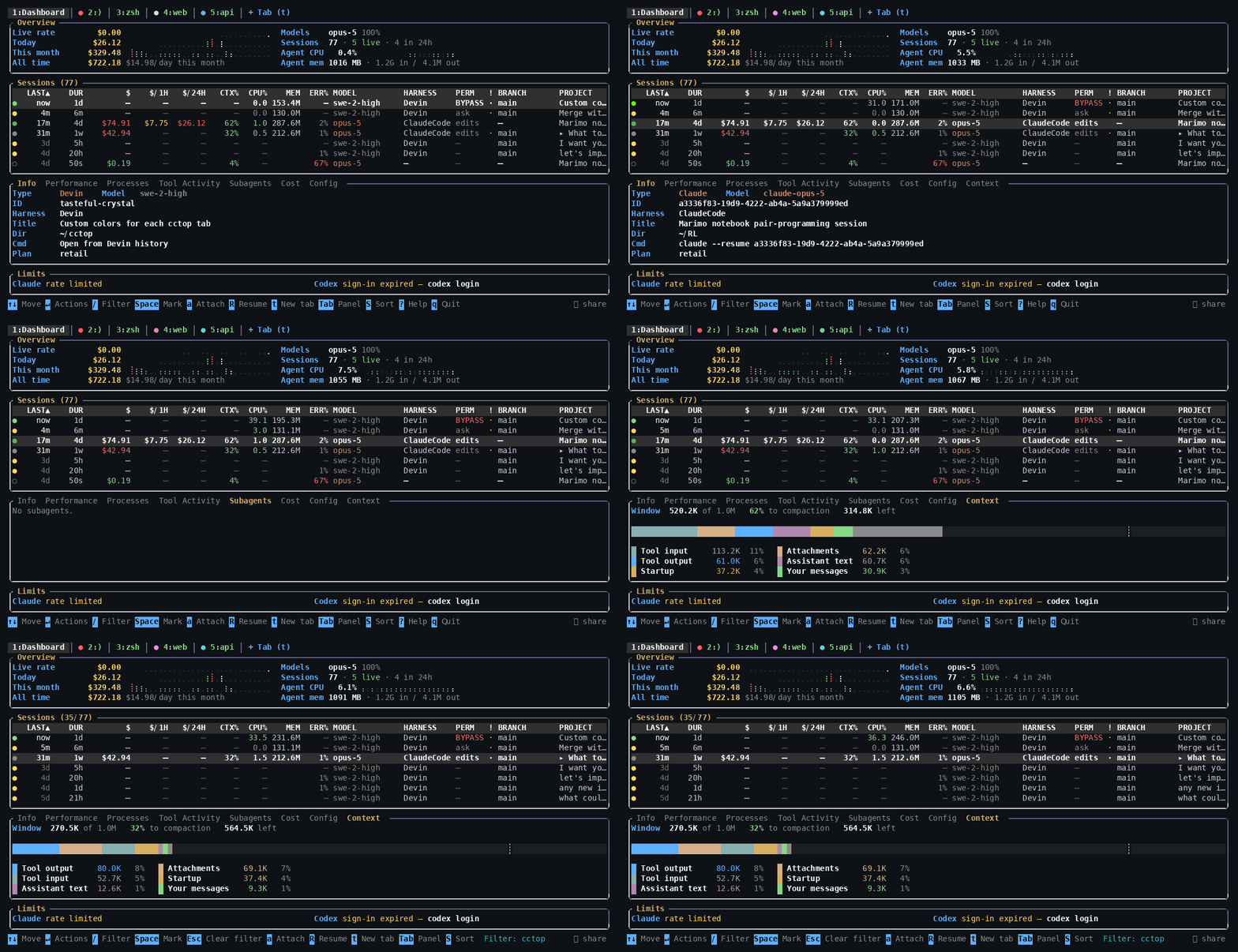
It reads what the agents already write to disk, so it sees sessions it did not start, including ones that ended weeks ago.
Install
Linux only, WSL included. There is no macOS or Windows build.
curl -fsSL https://raw.githubusercontent.com/flolep2607/cctop/main/install.sh | sh
The script picks the x86_64 or aarch64 release, checks its checksum and puts
one static binary in /usr/local/bin (or ~/.local/bin). It then offers to
install sshfs, which only cctop sandbox needs; Enter says no.
Other ways to install
From the release archive, by hand (swap in aarch64 on ARM):
d=$(mktemp -d)
curl -fsSL https://github.com/flolep2607/cctop/releases/latest/download/cctop-x86_64-unknown-linux-musl.tar.gz | tar xz -C "$d"
sudo install -m755 "$d/cctop" /usr/local/bin/cctop && rm -rf "$d"
With cargo:
cargo binstall cctop           # the release binary
cargo install cctop --locked   # compile it; needs Rust 1.89 or newer
From source
git clone https://github.com/flolep2607/cctop && cd cctop
cargo build --release          # binary in target/release/cctop
Checksums and updating (cctop --update) are in
Installing cctop.
First steps
1. Run it
cctop
It finds your sessions, prices them and draws the table. On its first run it
also installs its hooks into every agent it finds a config directory for, so
Claude Code, Codex, Gemini CLI, Cursor and OpenCode report their state as it
happens instead of cctop inferring it from disk. cctop --hooks-status shows
what is installed, and cctop doctor says what is wrong when something looks
off.
The keys to start with:
| Key | |
|---|---|
↑ ↓ | move between sessions |
Enter | everything you can do to the selected session, in one menu |
/ | filter on anything in a row |
R | resume the selected session in a tab of its own |
s | type a line into a running agent |
t | new tab: an agent or a shell, here or on another machine |
Alt+b | jump to the tab that is waiting on you |
F12 or Alt+1 | back to the dashboard; the tab keeps running |
, | settings |
? | every key |
q | quit |
Agents in cctop’s tabs run in its built-in multiplexer, so they keep running after you quit and are back in their tabs next time.
2. Use it from your phone
Press B in the dashboard for the browser panel, then t to serve the same
table, and a page per session, over a public Cloudflare link (l serves it on
this machine only). c shows the link as a QR code to scan. Or run
cctop serve --tunnel directly. Whoever holds the link can drive your agents;
a second, read-only link is printed beside it.
For a link that stays the same across runs, connect your own free Cloudflare account once (it needs a domain whose DNS is on Cloudflare):
cctop tunnel setup --browser
Details, Cloudflare Access logins and invites: In a browser.
3. Several machines, one table
Run cctop tunnel setup --browser on each machine, against the same Cloudflare
account, and keep each one serving on its tunnel (B then t, or
cctop serve --tunnel). Each then shows the others’ sessions in its table,
with the machine’s name on the row. No ssh route is needed. R opens a remote
session in a tab here, and t starts a new agent on any of them.
Over ssh instead: cctop --host devbox adds another machine’s sessions,
read-only.
Features
Every machine, one table
Machines connected to one Cloudflare account find each other: their sessions
are rows here, with the machine in the HOST column. R on one of them opens
it in a tab on this screen, and t starts a new agent or a shell over there.
A tab on another machine says how it gets there: ☁ through a sibling’s
tunnel, ⇄ over ssh.
A remote tab is built for a link that is slow or flaky:
- Local echo. Each key would wait a round trip through Cloudflare (around
120 ms) before its letter appeared. cctop draws the letter at once,
underlined, and lets the far side’s echo confirm it, as mosh does.
predictive_echoin settings:auto(on above 60 ms),alwaysoroff. - Resume on drop. When the connection drops (the tunnel moves, the network changes) the tab gets back to the same terminal and is sent what it missed. A drop shorter than two seconds shows nothing at all.
A new tab, anywhere, set up the way you want
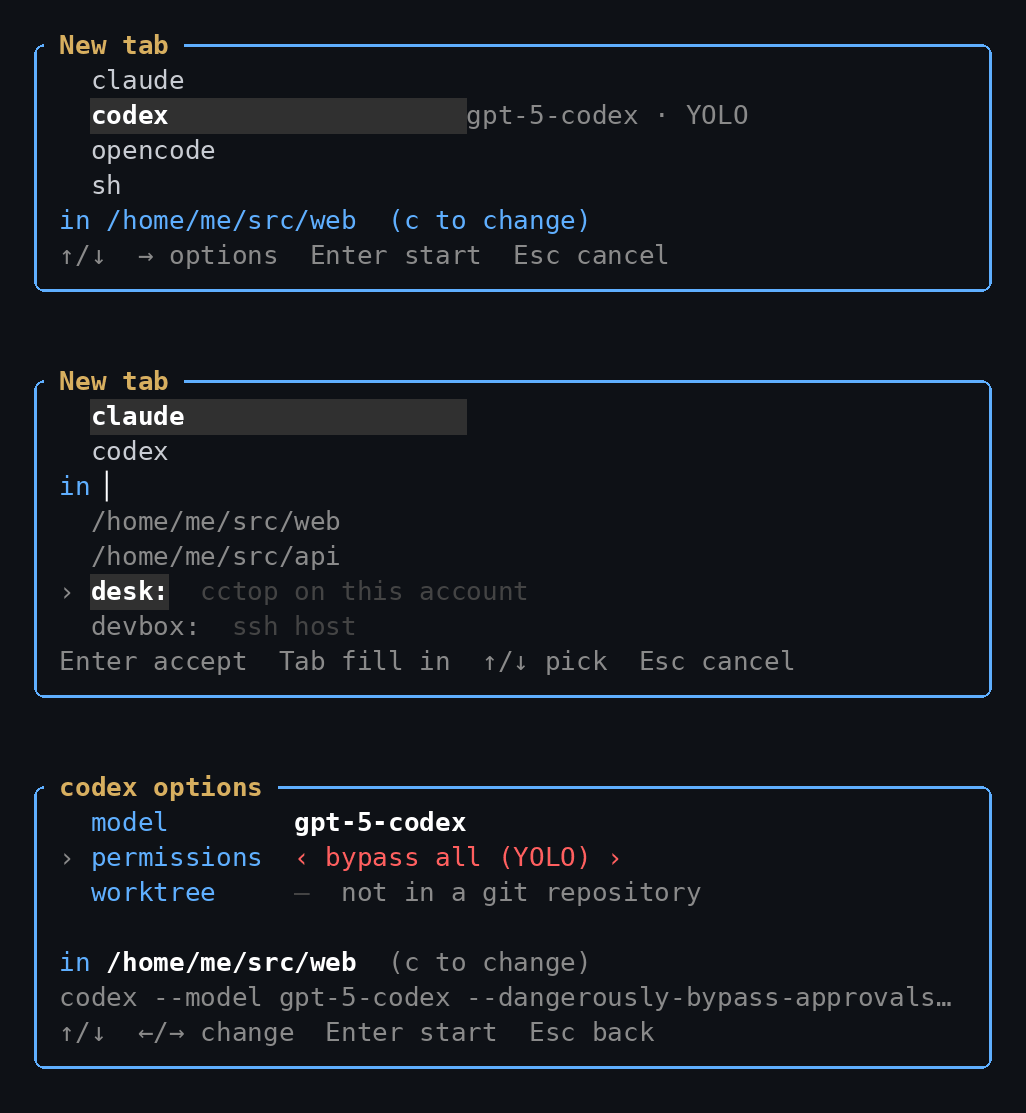
t (or Alt+n) lists the agents installed here and a shell. c changes
where it starts: a directory here, a machine on your Cloudflare account, or an
ssh host. → opens the agent’s options before it starts: its model, which
account it spends, its permission mode (YOLO is drawn in red) and a fresh git
worktree. The line under them is the exact command Enter runs.
The web dashboard

cctop serve (or B in the dashboard) puts the same sessions in a browser,
with a page per session for its conversation, its changes and its tools, a
workspace of live terminals, and analytics. It follows your system’s light or
dark theme.
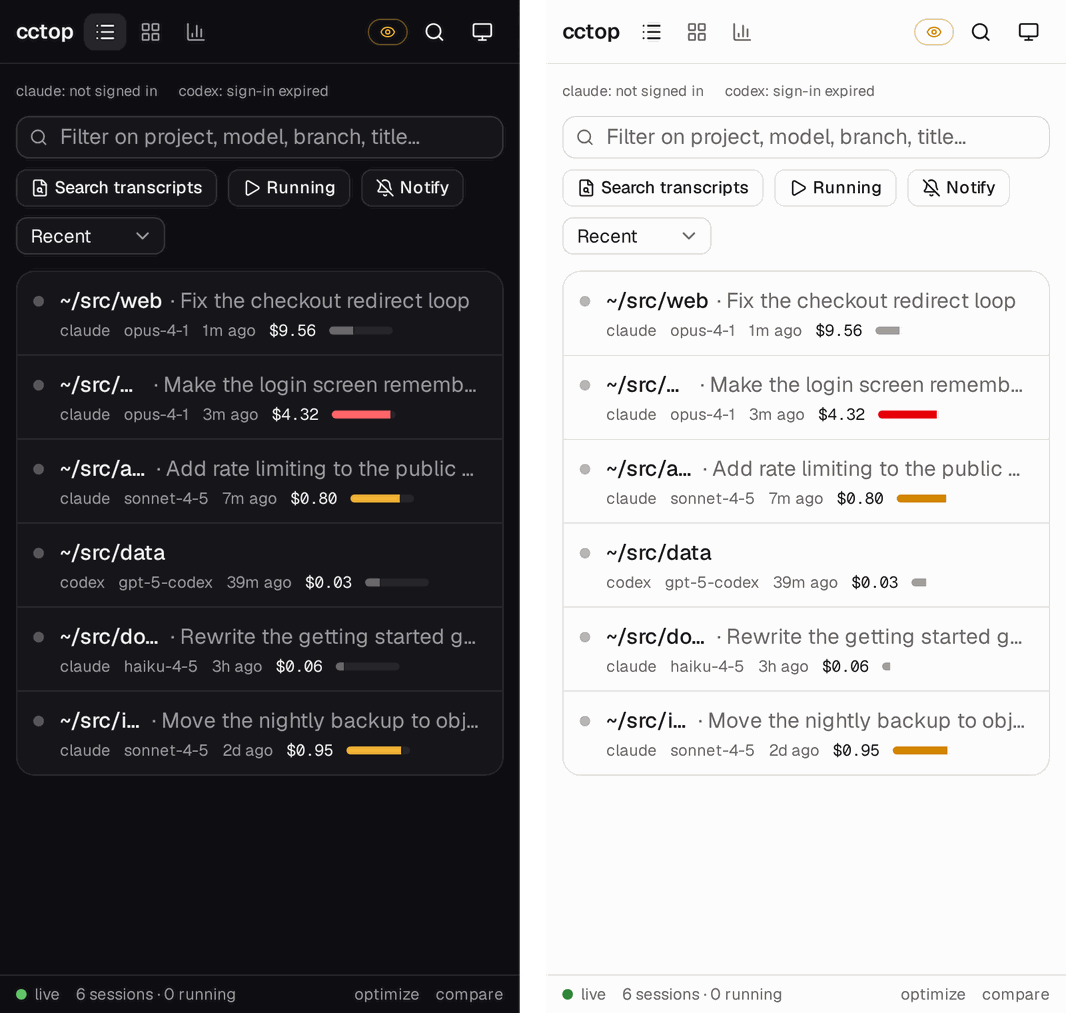
On a phone it is one column. Over your Cloudflare tunnel, the agent waiting on you can reach you wherever you are.
Your tunnel, inside Settings
, opens every setting on one filterable page. Type /tunnel and the
Cloudflare tunnel is right there as rows: whether it is connected, its
hostnames, who Cloudflare Access lets in (an email, or a whole @domain, read
or full), and the button that deletes it with its DNS records.
Graphs in braille, octants or sextants
The charts are braille by default, since every font has it. graph_glyphs in
settings switches them to solid octants (Unicode 16) or sextants, if your
terminal font has them; the setting’s row draws a sample of each before you
choose.
Updates you can trust
cctop updates itself when it starts, once it knows a newer release exists, and
cctop --update does it on demand. The archive comes from a mirror on
Cloudflare’s edge, or from GitHub if the mirror cannot serve it, and is checked
against the ed25519 signature the release was published with, whichever one
served it. Then it tells you what changed. A cargo install or a distro
package is left to whatever installed it.
And everything else
- Cost. Tokens times published rates, per session, hour, day and model.
- Context.
CTX%shows how full each context window is; the Context panel shows what fills it. - Waiting on you. The status dot goes amber when an agent needs a reply,
and turns to
✓when a turn ended while you were looking elsewhere. - Stuck work.
ERR%is the share of a session’s tool calls that failed. - Collisions. The
!column warns when two agents edit the same files in one checkout. - Terminals. Tabs are real terminals you can type into, split and drag.
- Handoff.
Ohands a session’s context to a different agent or account. - What the money bought.
cctop optimizefinds spend that bought nothing,cctop compareputs your models side by side on your own work, andcctop yieldchecks which sessions’ work reached the default branch. - Recall.
cctop recall "<query>"finds what past sessions said about something;cctop --install-mcpgives the agents the same.
Note
Costs are estimates: tokens times published per-token rates. Subscription plans (Claude Max, Pro, Team) bill differently, so the
$column will not match your invoice.--plan maxshows bundled usage asincl. What the cost figures mean.
Which agents it reads, and what each one records
| Agent | Cost | Tokens | Context | Tools | Live process |
|---|---|---|---|---|---|
| Claude Code | estimated | ✓ | ✓ full breakdown | ✓ | ✓ |
| Codex | estimated | ✓ | ✓ | ✓ | ✓ |
| OpenCode | reported | ✓ | ✓ | ✓ | ✓ |
| Pi | reported | ✓ | ─ | ✓ | ✓ |
| Gemini CLI | estimated | ✓ | ─ | ✓ | ─ |
| Devin | ─ | ✓ | ✓ | ✓ | ✓ |
| Mistral Vibe | estimated | ✓ | ✓ | ✓ | ✓ |
| Cursor | ─ | ─ | ✓ | ✓ | inferred |
| Windsurf | ─ | ─ | ─ | ✓ | ─ |
A ─ marks something the harness does not record. Each
provider’s page has the detail.
Commands
cctop                 # interactive UI
cctop --list          # print a table and exit
cctop --json          # dump full session data as JSON
cctop --statusline    # one line for a status bar: "3 working · 1 waiting · $4.12/h"
cctop --plan max      # treat Claude usage as bundled
cctop --host devbox   # also show another machine's sessions, read over ssh
cctop sandbox devbox:/srv/api   # Claude here, its commands and files on devbox
cctop doctor          # check this installation and say what is wrong with it
cctop serve           # the same table in a browser
cctop tunnel setup    # your own Cloudflare tunnel, for a link that stays the same
cctop claude          # start an agent on a pty cctop can watch and type into
cctop --update        # update now, rather than at the next start
cctop --help has the rest.
Documentation
All of it, searchable, at flolep2607.github.io/cctop.
- Reading the table: every column, the status dot, filtering, settings and the full key list
- Driving agents: typing into sessions, resuming, tabs and splits, notifications
- In a browser:
cctop serve, tunnels, phones, several machines - The bottom panels: Tool Activity and the context breakdown
- Installing cctop · troubleshooting
- Telemetry, and how to turn it off
More: what it cost you for · did the spend ship · what the subscription bought · what the cost figures mean · provider by provider · integrations
Installing cctop
cctop runs on Linux, including WSL. It reads Linux process tables and drives agents over ptys and unix sockets, and there is no macOS or Windows build.
cctop is a single binary. It links no system libraries and needs no runtime, so
“installing” it means putting one file on your PATH. That includes the
multiplexer its tabs’ agents run in: rmux is built in, so there is no rmux or
tmux to install alongside it.
Let the script do it
curl -fsSL https://raw.githubusercontent.com/flolep2607/cctop/main/install.sh | sh
It works out your architecture from uname -m, fetches that archive from the
latest release, verifies it against the .sha256 published beside it, and
installs the binary into /usr/local/bin — or ~/.local/bin if that directory
is not yours to write, printing the line to add to your profile when the
fallback is not on your PATH either. sudo is used only if the install needs
it, and a sudo that cannot run (no tty, no askpass, no sudo at all) falls
back rather than stopping.
Then, if sshfs is missing, it offers to install it — what
cctop sandbox needs — with
[y/N], so pressing Enter changes nothing. The question is asked on the
terminal even under curl | sh, and skipped where there is none. To answer it
in advance:
curl -fsSL https://raw.githubusercontent.com/flolep2607/cctop/main/install.sh | CCTOP_WITH_SSHFS=1 sh
curl -fsSL https://raw.githubusercontent.com/flolep2607/cctop/main/install.sh | sh -s -- --with-sshfs
(CCTOP_WITH_SSHFS=0 or --without-sshfs to skip it.) It uses whichever of
apt-get, dnf, yum, pacman, zypper and apk it finds, through sudo unless you
are root, and prints the command before running it. A failed sshfs install is
reported and does not undo the cctop one.
Nothing is unpacked until the checksum has been checked, and a mismatch stops
the install instead of warning about it afterwards. To read it before running
it, curl -fsSLO it and look.
Download a binary by hand
A release ships two archives, x86_64 and aarch64, both statically linked against
musl — so either runs on any distro, glibc or not. Grab the one for your
architecture from the
latest release and put
cctop somewhere on your PATH:
# x86_64
d=$(mktemp -d)
curl -fsSL https://github.com/flolep2607/cctop/releases/latest/download/cctop-x86_64-unknown-linux-musl.tar.gz | tar xz -C "$d"
sudo install -m755 "$d/cctop" /usr/local/bin/cctop && rm -rf "$d"
# aarch64
d=$(mktemp -d)
curl -fsSL https://github.com/flolep2607/cctop/releases/latest/download/cctop-aarch64-unknown-linux-musl.tar.gz | tar xz -C "$d"
sudo install -m755 "$d/cctop" /usr/local/bin/cctop && rm -rf "$d"
The archive holds one file, called cctop, which is why each of these unpacks
into a temporary directory rather than into whatever directory you are standing
in. Run one inside a cctop checkout and tar stops at
Cannot open: File exists; the install that follows then finds the crate
directory where it expected the binary, reports omitting directory 'cctop',
and leaves nothing on your PATH.
Every archive ships with a .sha256 file next to it, named for the archive
rather than after it — cctop-x86_64-unknown-linux-musl.sha256, not
cctop-x86_64-unknown-linux-musl.tar.gz.sha256, which is a 404:
d=$(mktemp -d)
curl -fsSL -O --output-dir "$d" https://github.com/flolep2607/cctop/releases/latest/download/cctop-x86_64-unknown-linux-musl.sha256
curl -fsSL -O --output-dir "$d" https://github.com/flolep2607/cctop/releases/latest/download/cctop-x86_64-unknown-linux-musl.tar.gz
(cd "$d" && sha256sum -c cctop-x86_64-unknown-linux-musl.sha256)
Staying up to date
A downloaded binary has no package manager behind it, so cctop --update
fetches the newest release for your architecture and replaces the running
executable in place:
cctop --update
Replacing the binary needs write access to the directory it lives in. The install
above puts it in /usr/local/bin with sudo, so updating it needs sudo too:
sudo cctop --update
An update that lands prints what it brought, one heading per version crossed, so a machine three versions behind sees all three rather than only the newest:
Updated 0.7.0 -> 0.7.3.

What changed since 0.7.0:

  0.7.1
    - Codex accounts per subscription, and a tab you can close without losing
      your place

  0.7.2
    - Fix the login hint for a named account, and add a run skill that drives
      the TUI

  0.7.3
    - the signals between cctop and its agents stop getting lost

Full notes: https://github.com/flolep2607/cctop/releases
The notes come from the GitHub releases themselves, fetched after the binary is already in place — so a network that fails at that moment costs you the summary and not the update, and you get the link instead.
cctop checks for a new release once an hour in the background and, when one exists, says so in the footer. The next time you start it, it installs that release before opening: the version was already known, so nothing is waited on to discover it, and the download is the only pause. It then prints what changed, waits for you to press Enter, and starts as the new version.
Startup is the only moment it will do this. Nothing is open yet — no terminal held, no agent hosted, no pane to lose — so the new binary can simply take the place of the old one. That is not true of any later moment, which is why an update that becomes available while cctop is running waits for the next start rather than interrupting the one you are in.
A release counts once its binary for your machine is attached, so cctop never
offers one it cannot fetch yet. It installs a given version over a given binary
at most once: if that version is installed and the old one still starts, it says
so on each start instead of downloading again. Each update it attempts leaves a
line in update.log in the cache directory, which is the thing to attach to a
report about one that went wrong.
To start on the version you already have, pass --no-auto-update. To stop it
happening at all, set "auto_update": false in ui-prefs.json under your cache
directory (~/.cache/cctop); cctop --update still works whenever you want
it. cctop claude and the other
agent aliases skip it too — you are waiting on an agent, and a download between
the command and the agent starting is not what you asked for.
If cargo installed cctop, it asks instead of acting:
cctop 0.7.6 is out, and cargo installed this one (0.7.5) — replacing the binary
here would leave `cargo install --list` naming a version that is gone.
Run `cargo install cctop --version 0.7.6 --locked`? It builds from source. [y] update / [n] not now:
Answering y runs exactly that command, with cargo’s own output on screen, and
starts the new version when it finishes. The objection was never the file —
~/.cargo/bin is writable — but the bookkeeping, and cargo install is what
keeps cargo’s record straight. It builds from source, so it takes minutes, which
is why it is a question and not a default. With
cargo-binstall on your PATH
the command offered is cargo binstall cctop --version … --locked --no-confirm
instead, which fetches the release archive in seconds and keeps the same
record. Answering n is remembered against
that version and the question waits for the next release; cctop --update asks
again whenever you want it.
A package manager other than cargo is left alone entirely — cctop will not touch a binary something else is responsible for. Update it the way you installed it.
A cargo build output is left alone as well, for bookkeeping of a quieter kind:
cargo’s fingerprint sits beside target/debug/cctop and would go on calling
whatever replaced it the build it produced — the update would land, and
cargo build would report the file fresh and never put the real one back.
cargo install cctop --force is how the release reaches PATH.
With cargo
cargo binstall cctop
cargo-binstall downloads the
release archive, the same static binary the script installs, and records it
the way cargo install would — so nothing has to compile. Without binstall,
cargo builds it from crates.io:
cargo install cctop
Or straight from the repository, without waiting for a release:
cargo install --git https://github.com/flolep2607/cctop
From source
git clone https://github.com/flolep2607/cctop
cd cctop
cargo build --release
The binary lands at target/release/cctop. It links no system libraries and
needs no runtime — a single file you can copy anywhere.
Building requires Rust 1.89 or newer (the code uses let-chains and std’s file locks).
Reading the table
One row per session, whether it is running now or ended weeks ago. Columns drop
from the right as the terminal narrows, worst-informing first, so the ones that
say which session this is survive to the last. Hover any header for what it
means, click one to sort by it, or press F6 for the sort list.
Hide columns you never read with $CCTOP_COLUMNS_HIDE, a comma-separated list
of the keys below — CCTOP_COLUMNS_HIDE=tok_rate,mem.
The columns
| Column | Key | What it says |
|---|---|---|
| (dot) | status | Whether the session is running, and what it is doing — see below |
LAST | active | Time since the session last did anything |
DUR | duration | First to last activity |
$ | cost | Estimated cost — see What the cost figures mean |
$/1H | cost_hour | Estimated cost in the last 60 minutes, rolling |
$/24H | cost_today | Estimated cost since local midnight |
CTX% | ctx | Context window used, as a share of the auto-compact threshold. COMPCT while one is happening |
CPU% | cpu | CPU across the session’s process tree |
MEM | mem | Resident memory across the session’s process tree |
TOOLS | tools | Tool invocations |
ERR% | errors | Share of those calls that failed — see below |
TOKENS | tokens | Input plus output |
TOK/m | tok_rate | Token rate, smoothed |
MODEL | model | Model in use |
HARNESS | harness | The host application — Cursor, a terminal CLI — as distinct from the model. ─ rather than a guess |
PERM | perm | How much it asks before acting — see below |
! | conflict | Another agent is on the same ground — see below |
HOST | host | Which machine, when reading more than one. Hidden otherwise |
USER | user | Whose session it is, when watching every user. Shown only while more than one user’s sessions are on the table |
PROFILE | profile | Which Claude or Codex login the session was read from, blank for the harnesses that have no such thing. Shown only when there is more than one |
BRANCH | branch | Branch checked out in the working directory, @<commit> when detached, ─ when not a repository |
PROJECT | project | The session’s title if it has one, otherwise its working directory |
The status dot
The left status dot is green while an agent is working, amber after its latest
response is waiting for your input, and red when the newest transcript event is
an API error. A hollow grey dot is a stopped session, and a filled ◉ is the
session that rang in the last 30 seconds.
A live session whose turn ended while you were not looking at it wears a ✓
in the accent colour instead of its amber dot: done, unseen. Amber says the
prompt is yours, which is true of most agents most of the time; the check says
this one has news since you last looked. It is cleared by looking, which means
one of two things — its row is the selected one while the dashboard is on
screen, or its pane is the focused pane of the tab you are on. A split’s other
pane does not count, for the same reason it still lights up the tab bar: you
are not reading it. The tab bar carries the same ✓ after the tab’s label,
and Alt+b goes there once nothing is blocked on a question.
The mark belongs to this cctop alone. A tab’s name and colour follow it into every cctop on the machine, but having read a reply on your laptop says nothing about the cctop on your phone, so seen-ness is kept in memory and not written anywhere. It also only marks a turn it watched end: a cctop started after an agent went quiet has no news to report about it.
A session past one of the alert_* thresholds you have set wears that alert
in place of its dot for as long as it stays past it: $ for its cost or burn
rate, a red ! for an error loop, ◌ for a working agent that has written
nothing for a while. See alerts.
Is it me, or is it them?
A red dot says a request failed. It cannot say why, and the answer is often somewhere else: a vendor incident, a dead proxy, an expired credential.
So cctop reads Anthropic’s and OpenAI’s status pages
(status.claude.com,
status.openai.com) every two minutes, in the
background, and sets what they say against the running sessions that are
failing. The footer says something only when there is something to say:
⚠ Anthropic incident: Elevated errors on Claude Opus — 2 of yours failing · !when the vendor reports an incident, with the count when it touches yours;⚠ 2 failing, Anthropic reports all clear: probably this machine · !when sessions fail while the page says all systems are operational.
! opens the vendor’s own account: each open incident, where they are with it,
since when, their latest update, and the components affected. r in it checks
again now. Sessions are matched to a vendor by model first and harness second,
so a Cursor session running Opus counts against Anthropic, and one running a
model cctop cannot place is left out rather than blamed on a guess. When a page
cannot be reached — offline, say — the footer stays silent and the panel says
the page was unreachable. footer_hide = "provider" leaves the line off.
PERM — how much a session asks
PERM is how much a session asks before it acts: ask, edits (writes files
unasked), plan (cannot act at all), or a red BYPASS for one started with
--dangerously-skip-permissions. Read from the transcript, and kept current by
the session’s own hooks when it has them. ─ means the harness does not record
it — today Claude Code and Devin do. Devin’s is its --permission-mode, read out
of the session row in its database, and its smart mode reports nothing rather
than picking the nearest bucket.
ERR% and compaction cadence — sessions that are not getting anywhere
A session can be busy and expensive without getting anywhere, and the columns that measure how hard it is working all read higher when that happens. Two that read the other way:
ERR% is the share of a session’s tool calls the transcript reported as
failed. A few is ordinary — a grep that found nothing, a build that caught a
mistake. A quarter of them is an agent retrying something that will not work,
paying full price for each attempt. Sort by it with F6 to put those at the
top; the Info panel gives the two numbers behind the rate, and Tool Activity
marks the individual calls with ✗.
It reads ─ where the harness records no per-call outcome — Cursor, Pi and
Windsurf — rather than 0%, which would claim a clean run cctop cannot see.
Claude, Codex, Devin, Gemini and OpenCode all report one. Devin’s comes from its
database rather than its transcript: a step records that a call was made, and the
call’s own row records how it ended.
Compaction cadence is under the Context panel’s chart. The sawtooth in that
chart is already the shape of a session living on compactions, but three of them
over two days is a long conversation while three in twenty minutes is a session
that will spend the rest of the day rebuilding a window it keeps refilling — and
the chart draws those identically. From three compactions on, the panel says how
often: ↺ one compaction every 15m. Claude Code only, since no other transcript
records that a compaction happened.
! — when two agents are in one repository
Two agents editing one checkout is not a merge conflict. Git would at least announce that. It is one of them writing a file the other is still holding in context, and the loser finds out when the work is already gone. cctop is the only thing on the machine that can see both of them, so it is the only thing that can say so while it still helps.
The ! column is that warning:
⚠ | another running agent has written a file this session also wrote |
· | another running agent is in the same repository, and has not touched your files |
| (blank) | nobody else is here |
Sort by it with F6, and the Info panel names the peer and lists the files. The
footer carries the ⚠ case only — agents share repositories all day and nothing
has gone wrong yet, whereas two of them writing one file means an edit has
already been lost or is about to be.
Some files are exempt, on one rule: nothing exempt is work that can be silently lost. Being plain text is not the test — source code is plain text, and losing a line of it is why the warning exists.
| prose | .md .markdown .rst .adoc .org .txt |
| machine output | .lock .sum .log, plus package-lock.json, npm-shrinkwrap.json, pnpm-lock.yaml |
Prose is what two agents are supposed to be writing at once — a changelog, a
notes file, a memory index — edited by section rather than rewritten whole. A
⚠ that fires every time both of them append to MEMORY.md is one that gets
read past, and it takes the src/ui.rs case with it.
Machine output is nobody’s handwriting. Two agents in one checkout both running
cargo add or npm install write a lock file every time, and the fix for a bad
one is to regenerate it; a real disagreement about a dependency surfaces in git,
which announces it properly. npm and pnpm spell their lock files .json and
.yaml, so those two are named outright — the extensions themselves stay
contested, because two agents editing one package.json is exactly the case the
warning is for.
The exemption is per file, not per session: share a notes file and a source file and the source file is still reported.
The unit of comparison is the repository root, not the working directory. A
linked worktree carries its own .git, so two agents in two worktrees of one
repository are editing two sets of files on disk and are not reported; two
agents started from different subdirectories of one checkout are. Comparing
directories gets both of those backwards, and the second is the arrangement
git worktree exists to provide.
The repository is the unit for the · case — the neighbourhood. A shared file
is stronger evidence and is not limited by it: two sessions holding one path
on disk are racing for it wherever they were launched from. An agent working
a parent checkout can write into a nested checkout another agent owns, and an
edit landing outside the repository has no ground to compare at all.
Four limits worth knowing. Two agents rewriting one README whole can lose an
edit, and the prose exemption above will not say so. Only running sessions are compared — a session that
has stopped may well have left uncommitted work behind, but nothing it does from
here can race anyone. Only the last 32 files each session wrote are watched, so
a path it finished with an hour and forty edits ago is not treated as contested.
And a Codex apply_patch covering several files summarises as
first.rs (+3 more) in the transcript, so only the first of them is recovered.
Agents can ask this themselves through check_conflicts — see
Letting agents see each other.
Telling the second agent
The ! column warns you, and by the time you look the second agent has
usually made its edit. With the hooks installed, cctop can tell that agent
instead, at the moment it reaches for the file. It is off by default; turn it on
on the settings tab (,) or in config.toml:
[settings]
warn_agents = true
From then on every file write a hook sees is noted in a small ledger beside the hook sockets — which file, which session, when, and the agent process that made it. When a session is about to write a file that a different agent, still running, wrote in the last 30 minutes, its hook answers with a note the model reads:
cctop: another agent that is still running on this machine wrote this file recently.
- /home/you/proj/src/ui.rs — 3m12s ago, by Claude Code session 1a2b3c4d working in /home/you/proj
Two agents editing one file do not merge: whichever writes last silently replaces
the other's work. Re-read the file before changing it again, and settle who finishes
first — or move one of you into a separate git worktree.
| harness | told on | through |
|---|---|---|
| Claude Code | PreToolUse of Write, Edit, MultiEdit, NotebookEdit | additionalContext, which reaches the model with the tool result |
| Gemini CLI | AfterTool of write_file, replace | additionalContext — BeforeTool has no way to add context |
| Codex | not told | its apply_patch writes are recorded, so the others hear about them |
It is advice and nothing more: the answer carries no permission decision, so it cannot block, prompt or deny, and the hook still exits 0 inside its 250ms deadline. Anything that goes wrong on the way — no ledger yet, a mangled one, another hook holding its lock — is the same silence as the setting being off.
It needs no cctop running: the hooks keep the ledger between themselves. It
makes the same exemption as the ! column (prose and lock files are never
mentioned), a session is never warned about its own writes, and a writer whose
process has exited no longer counts. Codex is recorded but never answered, and
Cursor neither, because neither documents what it does with a hook’s JSON on a
tool call — a guess there is how a monitor becomes an error on every edit.
Finding a session
/ filters the table as you type, on everything a row is: its label or title,
the full working directory (not just the abbreviation the column has room for),
the git branch, the model, the harness, the provider and the session id. The
cell that matched is underlined, so it is clear why a row survived the filter.
n and N step through matches, Esc clears, and ↑/↓ inside the prompt
bring back a search you ran before — the last twenty are remembered across runs.
user:<name> narrows to one person’s sessions when cctop is
watching every user, without the
name also matching every title that happens to contain it. Part of a name is
enough, the rest of the query still applies (user:ana flaky test), and two
user: terms show either user’s rows.
Tab widens the search to the transcripts themselves, which is how you find the
session where something was actually discussed rather than one whose name
happens to mention it. Transcript matches are added to the metadata matches
rather than replacing them, and the line each one was found on is shown under
the prompt.
A row found by a transcript match opens at the match: i on it puts the term
on screen with the reader’s own highlighting, a third of the way down rather than
at the top of a conversation it may be thousands of lines below. The footer says
“term” 3 of 12 · n N, so n and N walk the rest. If the reader cannot see
the term — the table matches a word with separators folded away, or corrects a
typo, and the reader matches what is drawn — the footer says so rather than
moving you anywhere.
This reads every transcript on disk, so it is opt-in, it waits for a pause in
typing and for a query of at least three characters, and it runs on cctop’s
background thread pool — the table stays live throughout, and the footer says
+transcripts… while a scan is out. Results are remembered per query, so
refining a search re-reads only what it must: a session cleared for refacto
cannot hold refactor, so each letter of a query narrows what there is left to
read. Two limits are worth knowing: transcripts store their text as JSON, so a
phrase containing a quote or a newline is escaped on disk and will not match;
and a single transcript file is scanned up to 64 MiB.
The tree view
T groups the table the way htop’s tree mode groups processes: each
repository gets a heading, each checkout of it a heading beneath that, and the
sessions hang off the checkout they were started in. When the rows shown belong
to more than one user — root watching every user
— each user gets a heading above their repositories, so two people in the same
repository are two groups that fold separately.
   LAST       $  BRANCH  PROJECT
●    4s  $18.40          ▾ ~/cctop  4 sessions, 1 waiting, 3 running
●    4s  $11.02  main    ├─ ▾ cctop (main)  2 sessions, 1 waiting, 1 running
●    4s   $9.10  main    │  ├─ Improve super cctop
○    3h   $1.92  main    │  └─ Release 0.17.8
●   12s   $7.38  tree    └─ ▾ .claude/worktrees/agent-a9c7  2 sessions, 2 running
●   12s   $5.01  tree       ├─ Tree view for the table
●    1m   $2.37  tree       └─ Search tiers
The glyphs are drawn in the PROJECT column, so every other column stays under its header and sorting by one still works.
A repository is recognised by its git common directory, which every worktree of it shares — so a linked worktree lands under the repository it was taken from rather than as a stranger. A repository seen through only one checkout skips the second level. A directory outside any repository is a group of its own, and a row from another machine is grouped by host and directory, since the far filesystem is not there to ask.
F starts new parallel work from any of those rows. It asks for a branch
name, runs git worktree add at <repo>/.claude/worktrees/<branch> — where
Claude Code’s own --worktree puts them — and opens the launcher in the new
checkout, so the next agent you pick starts there and shows up under the
repository’s heading. A new branch forks from the checkout under the cursor; a
branch that already exists is checked out instead. .claude/worktrees/ gets a
.gitignore of its own, so the checkouts never appear as untracked files in
the repository they came from.
A heading carries what adds up: how many sessions are under it, how many of those are waiting on you and how many are running, their total cost, the latest activity, and for a checkout the branch it has out. Its dot is the loudest state beneath it, so a folded heading still shows red when something inside is asking a question.
Enter, Space or e on a heading folds and unfolds it. They do nothing else
there — a heading has no menu and cannot be marked — while ←/→ stay on the
bottom panels on every row, heading or not. Subagents still expand under their
session with e, one level further in. Sessions are never nested under each
other: no harness records that one session started another.
Filtering shows the sessions that match with the headings above them, and a
heading’s totals count only what is shown. The sort applies inside each group,
and groups are ordered by the same column applied to the group. Where the
column adds up — $, $/1H, $/24H, TOKENS, TOK/m, TOOLS, CPU%, MEM —
that is the group’s total, so a cost sort puts the repository that has cost
the most first, three $4 agents ahead of one $9 one. Where it does not — age,
context, a model name — it is the group’s best-placed session. Either way a
group is never split.
b unfolds whatever is hiding the session that rang. The view and the folds
are remembered across runs.
Idle sessions, and the memory they hold
An agent left open keeps its whole process tree: a claude process is a few
hundred megabytes, and an MCP server it started is often another hundred. On a
shared machine that is where the RAM goes — twenty sessions a few days old is
ten gigabytes that nobody is typing into.
I narrows the table to those: sessions that still have a process but have
written nothing for idle_after hours (6 unless , says otherwise). They are
sorted by the memory of their process tree, the root and every child — the
figure the Processes panel adds up — and the MEM column stays on screen however
narrow the terminal. LAST is how long each has been quiet. The table’s title
says what a stop would give back:
╭ Sessions (14/340) — idle ≥6h: 12 sessions, 5.4G reclaimable ──────╮
K in this view stops them. With rows marked it stops the marked ones; with
none marked it stops every one the view shows, since the view is already the
selection. A confirmation lists each with its idle time and memory, and the
total. Some are left running, and are named with the reason:
- working — its own hooks say a turn is under way;
- asking a question — a permission prompt or an elicitation is waiting on you;
- busy (N% CPU) — nothing in the transcript, but the process tree is using at least 5% of a core, which is what a long build or a background shell looks like from outside;
- on host — a row from another machine, which cctop reads and does not signal.
Stopping is SIGTERM to the agent, the same as Ctrl+K, never SIGKILL: the
agent writes its transcript out and takes its children with it, so R resumes
any of them later. What cctop cannot see is a prompt typed into one and not
sent, which goes with it — the confirmation says so.
I again, or Esc, puts the table back the way it was sorted. When a stop
would give back more than a gigabyte the overview says so beside the agents’
total, as Agent mem 10035 MB · 5.4G idle (I), so the view does not have to be
remembered to be found.
The row menu
Every action below has a key, and the keys are worth learning. But you have to know they exist first, and a key that quietly declines — because the row is on another machine, or is a subagent, or has no process left to signal — teaches nothing about why.
Enter on a row opens everything you can do to it:
╭ Improve super cctop ─────────────────────────────────────╮
│ Resume in a tab                                        R │
│ Restart it in its tab    it is not running in a tab here │
│ Attach to it                                           a │
│ Type into it               no local process to type into │
│ Hand off to another agent                              O │
│ Show its subagents                                     e │
│ Mark for a batch action                            space │
│ ──────────────────────────────────────────────────────── │
│ Terminate the agent                    it is not running │
│ Delete the transcript                                  d │
╰ ↑↓ Enter · Esc ──────────────────────────────────────────╯
Entries that cannot run stay on the list, greyed, with the reason where their key would be — one or the other, never both, since pressing the key of a refused entry only repeats the refusal. They are not hidden: a menu that changed shape from row to row would teach you less than one that says why.
The cursor never lands on a refusal, so Enter always does something. The
letters stay live inside the menu, so Enter R and a plain R are the same
two keystrokes — the menu shows the shortcuts rather than replacing them.
Clicking works too. Esc, or a click outside, closes it.
The settings tab
Everything cctop can be told to do differently is on one tab, at the right end
of the workspace bar. , goes there, clicking Settings goes there, and
Alt+←/Alt+→ step onto it like any other tab. It is not a popup: it is a tab,
so it holds the whole frame below the bar rather than a small box over the
table, and the bar stays clickable while you are on it.
It is in three parts, because the values live in three places:
| Part | Lives in | What is on it |
|---|---|---|
config.toml · [settings] | the file you wrote | the theme, the alerts, how long a session counts as idle, hidden columns |
Remembered · view | ui-prefs.json | the tree, the filters, the cost floor, which panel opens, the account a new tab launches under |
config.toml · [keys] | the file you wrote | every dashboard keybind |
/ filters the page, matched against a row’s name, what it does and its
current value — so alert, quit and 83.5 all find something. Enter
changes the row under the cursor: a toggle flips, a choice turns to the next
one, a keybind waits for the key you press next, and a number opens a field.
⌫ puts it back to its default, and e opens config.toml in your editor.
The middle part is the one that is not in config.toml. Those are choices cctop
remembers for itself in ui-prefs.json, and they are on the page because a
setting you cannot see is a setting you cannot find: until now the only way to
reach them was to remember which key pressed which one.
Every key
| Key | Action |
|---|---|
Enter | Everything you can do to this row, in one menu (see above) |
↑, ↓/j | Move between sessions |
PgUp, PgDn | Page up / down |
Ctrl+U, Ctrl+D | Half a page up / down |
g, G | Jump to first / last |
Home, End | Jump to first / last |
n, N | Next / previous search match (wraps) |
w | Toggle notifications (see below) |
W | Share the agent’s terminal to a browser (an agent in a cctop tab, see Driving agents) |
b | Jump to the session that rang last |
←, →, Tab | Move between bottom panels, Shift+Tab the other way |
1–9 | Jump to a panel directly; 9 is Preview, the selected row’s tab live (see The bottom panels) |
Shift+↑/↓ | Scroll inside the active panel |
Shift+Home/End | Jump to the top / bottom of that panel |
f | Follow mode: keep the selection centered |
/ or F3 | Filter sessions by text (see below) |
S, F6, >, < | Sort-by panel |
F7 | Filter by age (1d / 1w / 1mo) |
# | Cost floor: only sessions costing ≥ $X |
, | Settings and keybinds (see below) |
` | Show only running sessions |
I | Idle view: live sessions quiet for idle_after hours, most memory first (see above) |
[, ] | Move through the Tool Activity tool filter |
v | Toggle inline diffs for edits |
L | Toggle the Tool Activity live filter |
T | Tree view: group by repository and worktree (see above) |
F | Fork a git worktree and launch an agent in it (see above) |
+ | Add a Claude account, by running its login or setup-token in a tab |
Space | Mark / unmark the selected session |
D, K | Delete / terminate all marked sessions (with confirmation); in the idle view K stops the idle ones |
U | Clear all marks |
h or F8 | Agent integration: what reports to cctop, and install it |
! | Provider status: whether a vendor outage explains the failing sessions (see above) |
i | Read the conversation, full-screen (see Panels) |
y | Copy resume command or transcript path |
e, E | Show its subagents / show all subagents; on a tree heading, e folds and unfolds instead |
d | Delete the selected session (not running) |
Ctrl+K | Terminate the selected live session (with confirmation) |
s | Type a line into the selected session’s terminal (see below) |
R | Resume the selected session in a tab of its own (see below) |
Ctrl+R | Restart every agent tab on the same session, skipping any mid-turn |
O | Hand the selected session’s context off to a different agent (see below) |
a | Open that session’s terminal in a tab and drive it |
A | Open the agent this cctop launched itself, rather than one it found on disk |
t | New tab: run an agent, a shell, or Claude on an ssh host (see below) |
r or F5 | Refresh now |
o, c | What the spend was and not got back (optimize), and how each model did (compare) — see what it cost you for |
Y | Your year with the agents, a full-screen card at a time: hours, streaks, the clock you keep, top models and projects, spend at list price. ← → step, [ ] change year. Hours, days and projects reach back through Claude Code’s prompt history (~/.claude/history.jsonl), which is kept; spend, models and files only as far as the transcripts, which Claude Code deletes after cleanupPeriodDays (30 by default) |
B | Serve this table to a browser while cctop keeps running — see In a browser |
Esc | Clear the active filter |
? or F1 | Help: every key on one page, as [keys] has bound them, with the version and commit on its border; / in it narrows the page (see below) |
q or F10 | Quit |
Tabs and splits, from anywhere including inside a running agent:
| Key | Action |
|---|---|
t or Alt+n | New tab: an agent, a shell, an ssh host, or one still running |
Alt+v / Alt+s | Split the current tab right / down |
Alt+← / Alt+→ | Previous / next tab |
Alt+1–9 | Jump to a tab; Alt+1 is the dashboard |
Alt+t | Pick a tab from a list, typing to narrow it and Tab to pick by state (see below) |
Alt+b | Jump to the next tab whose agent needs you, then to one whose turn ended unseen (✓) |
Alt+r | Rename or recolour the tab you are on |
Alt+o | Move focus to the next pane |
Alt+z | Zoom the focused pane to fill the tab, or put the split back (see below) |
Alt+w | Close the focused pane and stop its agent |
Alt+Shift+W | The same thing, by a name that says so |
Alt+Shift+R | Restart the pane’s agent on the same session, after an update; on the dashboard, the selected row’s tab |
Alt+Shift+C | Record the focused pane to an asciinema .cast; again to stop (see Recording a pane) |
F9 | Paste the clipboard’s image (see below) |
F12 | Back to the dashboard, leaving everything running |
Alt+z zooms the focused pane over the whole tab, and the bar marks the tab
⤢ while it is. The other panes keep running out of sight — their output is
still read, so none of them stalls — but they are not resized: each agent goes
on at the size it had in the split, so zooming costs the hidden ones no
redraw. Only the zoomed agent is resized, once each way. Alt+o while zoomed
moves the zoom to the next pane; splitting again unzooms, so a new agent is
never started out of sight. An agent another cctop is also showing is drawn at
the smaller of the two sizes, as always, so zooming cannot grow it past that.
Every function key is cctop’s, inside a pane as much as on the dashboard: none
of them is passed to the agent. F10 (quit) and F5 (refresh) act where you
press them; F9 pastes into the pane you are in; F12 returns to the
dashboard; F1, F3, F6, F7, and F8
bring the dashboard forward and then do what they do there, since a search box
or a sort order over a pane would be drawn on a screen the agent is repainting.
An unbound function key does nothing rather than reaching the agent as an escape
sequence.
The Alt+t picker narrows two ways at once. Whatever is typed matches tab
names — every printable key is the name’s, j and k included — and Tab
cycles which tabs are listed by what their agents are doing: all of them, the
ones that need you, the ones working, the ones idle; Shift+Tab goes back. The
state in force is in the picker’s title (Go to tab · needs you), and it opens
on all of them every time. The tab you are on is filed by what it is doing too,
though the bar leaves it uncoloured, because with the picker over it you are not
looking at it. The dashboard is only listed under all.
In the help, / starts a filter: the page narrows as you type to the entries
that mention it, under their headings, with the query on the top border. It is
a plain case-insensitive match that takes in the key column, so ctrl+u finds
keys and half a page finds what they do; a heading that matches keeps its
whole section. Enter stops typing and keeps the filter, so the arrows and
j/k scroll the narrowed page, and / again goes back to editing it. Esc
takes the filter off first and the page away second.
Typing in a box
Every box that takes text — the / filter, the cost floor, the s send box,
the tab name, the launcher’s directory, the add-account name, a setting being
changed, the Alt+t picker and the help filter — edits the way a shell prompt
does, with readline’s keys:
| Key | Does |
|---|---|
← / →, Ctrl+B / Ctrl+F | Move a character |
Ctrl+← / Ctrl+→, Alt+B / Alt+F | Move a word |
Home / End, Ctrl+A / Ctrl+E | To the start / end |
Backspace or Ctrl+H, Delete or Ctrl+D | Delete a character before / after the cursor |
Ctrl+W, Alt+Backspace | Cut the word before the cursor |
Alt+D, Ctrl+Delete | Cut the word after it |
Ctrl+U / Ctrl+K | Cut to the start / to the end |
Ctrl+Y | Put the last cut back at the cursor |
A word is letters, digits and _, so in a path each component is one. Cuts in a
row add up — Ctrl+W twice and Ctrl+Y gives both words back — and they go to
the box’s own slot, not the system clipboard, so cutting never loses what you
copied to paste. A paste goes in at the cursor, with its line breaks flattened
to spaces. The cursor steps over an accented letter or an emoji as one thing,
and a value wider than its box scrolls to keep the cursor in view, with …
where it runs off.
These keys are the box’s only while one is open: on the table Ctrl+U and
Ctrl+D still page, and Alt+B still jumps to the tab that needs you. Each box
keeps the keys it already had — ↑/↓ for search history, Tab to complete a
directory, the plain arrows to pick a colour in the rename box (its name moves
by Ctrl+B/Ctrl+F, Home/End and Ctrl+←/→ instead), digits only in the cost floor.
Mouse works too: click session rows, column headers, and panel tabs; scroll anywhere. In Tool Activity, click any row to expand the full untruncated argument, and click the sidebar to filter by tool.
Anything that scrolls shows a scrollbar on its right border while it has more than fits, and only then. Click or drag along the table’s bar to jump the selection to that point of the list, top to first row and bottom to last; the bottom panel’s bar does the same for the panel’s text.
Settings and keybinds
, opens every setting and every key on the session table at the value it has
now, a * beside the ones you have changed. Enter changes the row under the
cursor — a toggle flips, a choice such as the theme turns to the next one (←
and → turn it either way), and a key waits for you to press the combination
it should move to — and Backspace puts it back.
A key another action was on is still taken; the status line says which action
lost it. e opens the file itself in $VISUAL or $EDITOR, and an edit saved
there applies at the next keypress.
It all lives in config.toml under your config directory, beside any account
tokens, and only what you changed is written:
[settings]
theme = "light"          # auto / light / dark / mono
graph_glyphs = "octant"  # braille / octant / sextant: what the charts are drawn in
tab_bar = "left"         # top / bottom / left / right: where the tab bar sits
notify = true
compact_threshold = 90   # context % the agent compacts at
idle_after = 12          # hours quiet before `I` counts a live session idle

[keys]
quit = "x"
bottom = "shift+down"    # ctrl+, alt+ and shift+ all work
Octants (Unicode 16) and sextants draw the charts as solid blocks rather than
braille dots, but only in a font that has them. The graph_glyphs row draws a
sample in each set, so a font without them shows its boxes there, before you
choose.
tab_bar moves the tab bar. bottom puts it on the row above the key hints;
left and right make it a column, one tab to a row, as wide as the longest
label within 16 to 28 columns. A column with more tabs than rows keeps the tab
you are on and counts the rest as +N, and a window under 60 columns wide
draws it on top, so the agents keep their width.
Only the session table’s keys move. A modal’s keys are the letters on its own buttons, and inside a pane the keyboard is the agent’s.
The help page follows what you bind: a moved key is shown where it now is, and
an action whose key you gave to something else, without giving it another,
reads unbound rather than naming a key that now does something different.
A line the file has but cctop could not use — listed as a problem at the top of
the , panel — moved nothing, and the help says so by not moving either.
A paste that arrives twice
Some layer between a terminal and an agent can deliver one paste twice when the
machine is loaded, so a sentence reaches the agent doubled. cctop drops a paste
that is byte for byte the last one and starts within paste_debounce_ms (250 by
default) of the last having been handed on. That holds in a tab, under
cctop run and under cctop attach. A key pressed in between means you meant
the second, so it is kept; a click is not a key, so the one that comes with a
right-click paste does not count. paste_debounce_ms = 0 turns it off.
Each dropped paste is a duplicate-dropped line under CCTOP_LOG, with its
size and the gap. An identical paste kept because it came after the window
is logged as duplicate-kept: many of those say the window is too short for
your machine. Only a bracketed paste is caught. A copy that arrives as plain
keystrokes goes through.
Typing on a slow remote tab
A tab on a sibling machine goes through Cloudflare, and each key waits a round trip — around 120 ms — before its letter appears. So cctop draws the letter first, underlined, and lets the far side’s echo replace it, as mosh does. A guess the far side contradicts, or does not answer in time, is painted back.
It guesses only plain letters typed one at a time at a visible cursor, or at
Claude Code’s own inverse-cell cursor, and only at the end of the text: typing
into the middle of a line is left to the far side. Enter, Tab, Esc, arrows, control keys,
pastes, and / or @ on an empty prompt stop the guessing until the far side
has caught up, and after each of them nothing is drawn until one guess has
come back right. An app that switches on the kitty keyboard protocol is not
guessed for at all.
predictive_echo sets it: auto (the default) draws only once the round trip
is over 60 ms, and stops below 30; always draws whatever it is; off never
guesses. Nothing extra is sent to the other machine either way.
Pasting an image
A terminal cannot carry one. A bracketed paste is text, so a screenshot copied
with the system’s own shortcut reaches an agent as nothing at all — which is
why Ctrl+V in a pane appears to do nothing when the clipboard holds a picture.
F9 is the way in. It reads the image off the clipboard, writes it to
~/.cache/cctop/pastes/paste-<when>.png, and types the path at the agent,
followed by a space — the form every one of these harnesses already reads an
image in. No image bytes go near the pty. On the dashboard the same key opens
the type-into box with the path in it, so a session you are not attached to can
be sent one too. For a few seconds after either, the image itself sits in the
bottom-right corner — the confirmation is the picture, not only its name.
Inside a pane Ctrl+V does it too, but only when the clipboard actually holds
a picture: with text on it the key goes to the agent untouched, as it always
did. Whether it arrives at all is the terminal’s decision — Windows Terminal
binds Ctrl+V to its own paste and never tells the application, so there F9
is the way in, or unbind it in the terminal’s settings.
The right button is deliberately not a third way. It was for a day: in Windows Terminal it copies when there is a selection and pastes only when there is none, so selecting some output and right-clicking to copy it pasted an image into the agent instead. cctop cannot see the terminal’s selection, so it cannot tell the two apart.
It needs something that can read the clipboard: wl-clipboard or xclip on
a Linux desktop, and powershell.exe under WSL, where the clipboard being read
is Windows’. Under WSL it is also looked for at
/mnt/c/Windows/System32/WindowsPowerShell/v1.0/powershell.exe, because a
session nobody logged into by hand — an ssh into the distribution, a cron job —
has none of the Windows interop entries on its PATH, and the same machine
would otherwise report having no way to read its own clipboard. cctop says which of the two things went wrong: an empty clipboard
and a machine with no such tool need different answers.
Pasting an image into a cctop you sshed to
No helper on the far side can reach it — the clipboard is on the machine you
typed the ssh on. So F9 goes the other way and asks the terminal that is
showing you cctop, over the escapes the connection already carries: kitty’s
clipboard protocol can hand back image/png itself, and any terminal that
answers the classic OSC 52 read gives up its clipboard as text, which files
the same when the text is a base64 image. Most terminals refuse the read —
the answer to “what is on the clipboard” is something no program should get
unasked — so kitty wants read-clipboard in clipboard_control before it
will say, and where the terminal stays silent F9 still says so rather than
telling you to install xclip.
For a terminal that will never answer — Windows Terminal does not, and no
Ctrl+V or right-click there can put an image on the wire — the way in is the
connection itself. ssh carries sockets back down the link it opened, so a
small listener on the machine you ssh from can hand the clipboard over.
tools/clipboard-bridge.ps1 is that listener, on Windows:
powershell -ExecutionPolicy Bypass -File clipboard-bridge.ps1
with the port forwarded — ssh -R 8377:127.0.0.1:8377 <host> on the command
line, or RemoteForward 8377 127.0.0.1:8377 in ~/.ssh/config to make it
permanent. cctop asks by connecting; the bridge answers with the clipboard’s
image, or with a closed connection when there is none. F9 uses it, and so
does Ctrl+V in a pane — the ask is a localhost connect that costs nothing
where no bridge is listening — so from Windows Terminal an image pastes the
way text does. The port is CCTOP_CLIPBOARD_PORT on the far side and -Port
on the bridge when 8377 is already taken.
The way that needs nothing of the terminal or a script is the browser. cctop serve on
that machine puts the table on an HTTP port; reach it from your own machine —
ssh -L 7788:127.0.0.1:7788 <host>, or --tunnel — and paste the screenshot
straight into the box that answers a waiting session. A browser can take a
real image off the clipboard where a terminal cannot, so the bytes travel over
the connection cctop already has, land in pastes/ on the far machine, and
the box fills with the path. Then write the sentence around it and send.
The other way needs no browser. What crosses a terminal is text, so send the
image as text: cctop reads any paste that is an image in base64 — bare, or as
a data:image/…;base64,… URI — writes it to the same pastes/ directory, and
gives the agent the path. The decoded bytes are sniffed for a real format —
PNG, JPEG, GIF, WebP, BMP — so an ordinary paste is never mistaken for one.
Encoding it is a one-liner where your clipboard is. In PowerShell, which is where you would be if you sshed from Windows:
Add-Type -AssemblyName System.Windows.Forms,System.Drawing
$i=[Windows.Forms.Clipboard]::GetImage(); $m=New-Object IO.MemoryStream
$i.Save($m,[Drawing.Imaging.ImageFormat]::Png)
Set-Clipboard ([Convert]::ToBase64String($m.ToArray()))
That replaces the clipboard’s image with its own base64, which then pastes into
the agent as an image. On a Mac or a Linux desktop the same thing is
pngpaste - | base64 | pbcopy and wl-paste -t image/png | base64 -w0 | wl-copy.
The images are kept, not cleaned up: the path is in a transcript by then, and a conversation resumed next week may read it again. The directory is yours to empty.
Right-click a row for its menu, the same menu Enter opens. The footer’s key
hints are buttons — clicking ? Help opens the help, clicking R Resume
resumes — and so are the [y] and [n / Esc] in every confirmation, where a
click beside the dialog is also a cancel. q Quit is the one that takes two
clicks: it is the only key on the footer with nothing behind it to ask again,
and the first click says so in the status line.
More than one account
Claude Code and Codex both let one machine hold several logins — $CLAUDE_CONFIG_DIR
for the first, $CODEX_HOME for the second — and a second subscription usually
exists because the first one runs out of window before the day does.
cctop finds them the same way for both: the directories beside the conventional
one that are actually signed in, so ~/.claude-work and ~/.codex-work are both
an account called work. Where there is more than one, the new-tab launcher
carries an as <name> line and p cycles it — the choice is remembered, because
somebody working out of their work login is working out of it all afternoon.
Everything downstream follows the account rather than assuming the default: rows
from every login appear in the table, the PROFILE column says which one each came
from, the limits panel reports each subscription’s own 5h and weekly figures, and
R resumes a session under the account whose directory the transcript lives in —
without which a resumed Codex session would come back blank, its id being unknown
to any other home. A tab launched or resumed under one names it on the bar —
claude (work) — so two agents on two subscriptions are not the same label twice;
the default account is the one left unqualified, as it is everywhere else.
An account whose limits cctop cannot read from its directory can be given a
token instead. claude setup-token prints a long-lived one, and
cctop --add-account work # reads the token from stdin, so it stays out of history
keeps it in config.toml under your config directory, readable only by you:
[accounts.work]
token = "sk-ant-oat01-…"
The name is the account’s. Where a ~/.claude-work exists it is that profile’s
token, winning over the credentials in the directory — being explicit is the
point of typing it in. Where no such directory exists, the token is the
account: it gets its own column in the limits panel, and its sessions stay in
the one ~/.claude with everything else, sharing the history, the settings and
the project trust rather than splitting them across a second directory. Start
one with CLAUDE_CODE_OAUTH_TOKEN set and that is the subscription it spends.
A setup-token token is made for model requests, and the usage endpoint may
refuse it. When it does, the panel says no limits for a token rather than
calling the account expired, and asks again only every few hours: the account
works, cctop just cannot measure it. A login into a ~/.claude-<name> of its
own is the way to see that account’s limits.
+ in the TUI is the same thing without leaving the dashboard: it asks for the
name, then offers claude auth login into a ~/.claude-<name> of its own or
claude setup-token, and runs whichever you pick in a tab of its own so you can
watch it and see the link when it prints.
Such an account is not offered in the launcher’s profile picker, and cctop’s
R never resumes under it: both work by putting the account in front of the
command, and the only thing there is to put there is the token itself — which
would be in every ps on the machine. Set the variable in the shell you launch
from instead.
CLAUDE_CODE_OAUTH_TOKEN wins over both, for the default profile only: Claude
Code prefers that variable too, so a session started with it spends the account
the variable names rather than the one the directory holds. One variable is one
value per machine, which is why it answers for one profile rather than being
reported as every account’s usage.
In the tab bar, drag a tab to move it along the bar — the arrangement is
written onto the rmux sessions, so it is still there after F10 and in every
other cctop on the machine — and right-click one, or press Alt+r on it, to
name it or paint it: 3:claude-4 says nothing about what that agent is doing,
and the name and colour you give it follow the tab into every cctop on the
machine. ←/→ walk the colours in the same prompt; the leading ○ stop is
no colour at all. A painted tab wears its colour in the bar and on the title
of every pane border it owns.
The bottom panels
The panel under the table describes whichever session the cursor is on. ← and
→ move between panels, 1–9 jump to one, Tab cycles through them, and
Shift+↑/↓ scrolls inside the active one.
Three of them repay a closer look, and so does the conversation view i opens.
Tool Activity
Each invocation shows the time, its arguments, and — where the transcript supports it — what it did:
19:16 main    ~/cctop/src/ui/render.rs     +43 -24   122ms ↓498.5K ↑ 1.2K
19:34 ↳aa1b82 ~/cctop/src/quota.rs          +2 -0    88ms ↓ 41.2K ↑  310
19:41✗main    cargo test --all-targets               1.4s  ↓ 12.0K ↑  180
- origin —
mainfor the session itself, or↳<agent-id>for a subagent. Subagent activity is interleaved into the same log, so without this there’s no way to tell an agent’s edits from the parent’s. ✗and a red row — the call reported an error. Claude records this per call, OpenCode and Gemini record a tool status, Devin’s comes from its database rather than its transcript, and Codex is read from the sandbox’s own result line and exit code. Cursor, Pi and Windsurf record no tool outcome at all, so their calls are never marked.+N -M— lines added and removed, from the edit result’s patch. Pressvto expand the diff inline beneath the row.- duration — wall time from the call being issued to its result arriving.
↓/↑— tokens in and out for the assistant turn that issued the call. Claude only; Codex transcripts don’t tie token counts to individual calls.
That last one deserves a caveat: billing is per API request, not per tool
call. When one turn issues several calls they all show that turn’s figures,
marked with a leading *. Dividing the total between them would invent
precision the transcript doesn’t contain. ↓ includes cache reads, which is why
it tracks total context size rather than the size of any one call.
Codex tools are decoded too: apply_patch shows the files it touched and its
line counts, update_plan shows progress and the step in flight, and
write_stdin distinguishes a real write from a poll for more output.
Reading the conversation
The panels summarise what a session did; i shows what it said — or Enter
and Read the conversation. It opens the selected row’s transcript
full-screen, a remote row’s too (read over the same ssh link), at the end, so
the agent’s last reply is the first thing on screen. It reads what cctop serve’s conversation page reads, so every harness that page shows is here, for
the times you are on ssh with no browser to open.
- Each turn is headed by who spoke and when: you in the accent colour, the agent in its harness’s, with the local time (and the date, for an older turn) and how long ago. What you typed sits behind a bar in that same colour, so a prompt is easy to find in a page of replies. Thinking is dim and italic; a compaction is a rule across the page.
- Replies are rendered as markdown: headings, bold and italic, inline code,
fenced blocks on a shaded ground with their language named, lists, quotes,
tables and rules. Links are OSC 8 hyperlinks, so a click opens them even when
they wrap; on a terminal that cannot do that (
TERM=dumborlinux) the URL is printed after its label. What you typed is shown as you typed it. Code is not syntax-highlighted. - A subagent’s call is one line too, naming the agent and how much it did
(
3 turns · 12 tools · 2m10s); opened, it shows the agent’s report. A background agent that never handed back shows its last message instead, labelled as that.aopens the agent’s own turns, andEsccomes back to the same place; opening the reader on a subagent’s row in the table goes straight to its turns. - Tool calls are one line each until you open them: the tool, its argument,
and how many lines opening it would add.
Enteropens the calls of the turn you are reading;topens every one. - Tool output keeps its colours. cargo’s green, pytest’s red and git’s diff
colours come through, folded to sixteen colours on a terminal that has only
those and dropped under
NO_COLOR. Anything else a program wrote — cursor moves, line erases, window titles — is removed, so it cannot scribble over the view. Expanded Tool Activity rows get the same treatment.
A session paged back far with u can run to thousands of turns. It is laid
out once for the terminal’s width, and scrolling it lays nothing out again.
| Key | In the conversation |
|---|---|
↑ ↓ / j k | Scroll a line (the wheel scrolls three) |
PgUp PgDn / b Space | Scroll a page |
Ctrl+U Ctrl+D | Half a page |
g G / Home End | The start / the end |
[ / ] | Previous / next turn, header at the top |
/ | Search as you type; Enter keeps it, Esc goes back to where you were |
n / N | Next / previous match (wraps) |
Enter or x | Open or fold the tool calls of the turn at the top |
t | Open or fold every tool call |
m | Toggle between rendered markdown and its source |
u | Load earlier turns, when there are any |
a | Open the subagent whose call is highest on screen: its own turns, titled with the agent and its session |
Esc | Clear the search; with none, back out of a subagent’s turns, or close |
q | Close |
Context breakdown
CTX% says the window is 68% full. The Context panel says what is in it —
Claude sessions only, since no other provider’s transcript reports per-request
usage.
Window   181.4K of 200K

Unaccounted    ━━━━━━━━━━━━━━━━────────────────────────   62.1K  34%
Tool output    ━━━━━━━━━━━━────────────────────────────   43.5K  24%
Startup        ━━━━━━━━━───────────────────────────────   34.5K  19%
Tool input     ━━━━━━━━────────────────────────────────   29.0K  16%
Attachments    ━━━━────────────────────────────────────    9.1K   5%
Assistant text ━━──────────────────────────────────────    3.6K   2%
Two of those numbers are measured and the rest are estimated, and the panel never blurs the line:
- Window and Startup come from the usage figures the API itself reported. Startup is the first request of the live segment — everything the harness sends before the conversation begins: the system prompt, the tool schemas, CLAUDE.md, the skills index, and, after a compaction, the summary. It cannot be split further, because the transcript never records what was sent, only that it was.
- Tool output, Tool input, Attachments, Your messages and Assistant text are estimated from how many characters the transcript holds, at 2.75 characters per token. That constant is fitted rather than assumed: across 167 local sessions, the characters a transcript accumulates divided by the context growth the API reports over the same span lands there, well under the usual prose rule of thumb because this content is mostly code, JSON and file paths.
- Unaccounted is the remainder, and it is deliberately a bar of its own
rather than being spread across the categories that happen to be measurable.
It runs around a third of the window. Most of it is thinking — Claude Code
writes those blocks with the text stripped and only the signature left, so
there is nothing to measure — plus the
<system-reminder>text the harness splices into each turn without recording it, plus estimation error.
A compaction resets the whole thing: everything before the summary has left the window, so counting across one would describe a context that no longer exists. Subagent turns are excluded too — they run against their own windows, and only the report a subagent hands back is in the parent’s, where it lands in Tool output like any other result.
When the estimate overshoots the window there is no gap to draw, and the panel says so instead of clamping: it means the harness has dropped context that the transcript still holds.
Given the height, the bar folds into a block map, like a memory map of the
window: the same cells in the same order, filling rows left to right and top to
bottom, a quarter of the panel’s rows and up to six. One row of eighty cells
spends 2.5K of a 200K window per cell; four rows spend 625 tokens, which is the
difference between a small category showing and vanishing. The footnote says
what a cell is worth. Every category in the window gets at least one cell
however small its share, so nothing in the legend is missing from the map. On
the map, the free space past the auto-compaction threshold is drawn as ·
rather than a lone ┊, because that is a region — room the harness reclaims
before it is ever reached — and one marker cell is lost in a grid. A panel too
short to spare the rows keeps the one-row bar.
Under the bar, How it filled charts the window across every request the session made. The bar answers “what is in there”; the chart answers “how did it get that full”, which is the part that changes what you do next. A window that climbed evenly is a conversation that grew and will keep growing. One that stepped is a handful of large tool results, and the same call will do it again. A sawtooth is a session living on compactions, paying to rebuild its context over and over. The chart spans the whole session rather than the live segment, because a compaction is the most interesting thing that can happen to a context window and it is the only view that can show one.
Preview
The last panel, 9, is the selected row’s tab, watched from the dashboard: the
agent’s screen as it is right now, updating while you look, without leaving the
table to see whether it has finished or is asking you something.
It is a window, not a way in. Nothing typed on the dashboard reaches the agent,
and the pane is not resized to fit the panel — the agent keeps drawing at the
size its tab gave it, and the panel shows as much of that as fits. When the
screen is taller than the panel, the bottom of what the agent has drawn is what
stays, because that is where its prompt and its questions are. The bottom border
names the tab and the key that goes to it, Alt+2 onwards.
A tab you have switched away from gives up its rmux client, so there is no screen of cctop’s own to show. The panel asks rmux for the screen instead, twice a second and only while the panel is on show; that is a read, and rmux resizes nothing for it.
A row with no tab says so in one line: a opens a running session’s terminal in
one, R resumes a stopped session in one, and either then shows here live. A
row from another machine has no tab
here to show.
Driving agents from cctop
cctop starts as a viewer, but it can also answer a waiting agent, reopen an old session, and hold several agents on one screen. Everything here is optional — the table works without any of it.
Typing into a session
s opens a one-line prompt (prefilled with continue) and types it into the
terminal driving the selected agent, as if you had typed it there — useful for
the sessions whose status dot has gone yellow or red waiting on you.
An agent reads its keyboard from a pty, and only whoever holds that pty’s master
side can put bytes into it — normally the terminal emulator, which offers no way
in. (Writing to /proc/<pid>/fd/0 or /dev/pts/N reaches the output side and
just paints the screen; it does not reach the agent.) So cctop needs one of these
to be true, and tries them in this order:
| The session runs… | How | Requirements |
|---|---|---|
under cctop run <agent> | cctop owns the pty and typing goes through a unix socket | none |
| in a cctop tab | send-keys into the pane of cctop’s own rmux holding the agent | none |
| in a plain terminal | TIOCSTI pushes bytes into the tty’s input queue | Linux, and cctop as root — CAP_SYS_ADMIN clears both of the kernel’s gates. Without root it also needs sysctl -w dev.tty.legacy_tiocsti=1 (off by default since 6.2) and cctop sharing the agent’s controlling terminal, which in practice it doesn’t |
The first is the one worth adopting — no root, no multiplexer, and the session
looks and behaves exactly like one started directly. cctop sets it up for you: on
its first interactive run it aliases claude, codex, devin, opencode and
pi to cctop <agent> — a marked block appended to ~/.zshrc and ~/.bashrc, and
~/.config/fish/conf.d/cctop.fish for fish (each only where that shell is
already configured; the fish file is unverified, having been written on a machine
without fish).
cctop --remove-alias     # take it out again; deleting the block by hand also works
cctop --install-alias    # put it back
Every alias is guarded by a command-exists test, so it defines nothing
unless both cctop and the agent are installed — uninstall cctop and claude
goes back to meaning claude. The block is written once: remove it and cctop
won’t add it again.
The run is optional: any first argument that names an executable is launched
this way, so cctop claude --dangerously-skip-permissions works and the flags
reach the agent rather than cctop. A word that isn’t a command still gets cctop’s
usage error, so a typo doesn’t silently try to run something.
cctop run proxies your terminal byte-for-byte (including resizes) and exits
with the agent’s own exit code, so it is a transparent stand-in. Sessions started
any other way still show up in cctop; they just can’t be typed into unless they
are in a cctop tab or the root path applies. An agent you started inside your
own rmux or tmux is yours, and cctop does not reach into it: the alias above is
how it becomes typeable.
Resuming a session
R reopens the selected session in a tab of its own, running the harness’s own
resume command — claude --resume <id>, codex resume <id>,
devin --resume <id>, opencode --session <id>, pi --session <id> — in the
directory the session was working in. This is the way into a session cctop did not start: a can only
show the terminal of an agent cctop is already hosting, while resuming starts a
fresh agent from the transcript and so works for any session in the table,
however it was launched and however long ago it ended.
The tab is named after the session, not the command that reopened it — claude · Improve super cctop rather than claude --resume 4ebf1ab4-2ef8-4fb2-a7d5-…,
whose only variable part is a uuid nobody reads.
Cursor, Gemini and Windsurf keep their conversations inside an editor and have
no such command, so R says so rather than guessing at a flag; y copies their
transcript path instead. Resuming a session that is still running asks first —
two agents appending to one transcript is not something the harnesses
coordinate.
Stopping the sessions nobody is using
The other end of resuming. An agent left open for days still holds its memory,
and on a shared server those add up to gigabytes. I shows the live sessions
that have been quiet for idle_after hours (6 by default), biggest first, with
the total a stop would give back; K there stops them — the marked ones, or all
of them — after a confirmation that names each, its idle time and its memory.
It skips any session that is working, asking a question, or still using CPU, and
says which and why. The stop is SIGTERM, so each agent exits cleanly and R
brings it back whenever it is wanted again. See idle
sessions for the details.
Tabs and splits
The session table is tab 1. t opens another: pick an agent — whichever of
claude, codex, devin, opencode and pi you have installed — or your
shell, and it starts on a pty cctop owns and draws in the window.
The launcher says where the agent will start, and c makes that line editable:
type or paste a path, ~ included, Enter to take it and Esc to keep the one
it had. An empty field means the directory cctop itself was started in. A path
that does not name a directory is refused in the field rather than at launch —
by then the launcher is gone, and the failure arrives from inside the pty as a
message about spawning.
You do not have to remember the path. The field lists what it can see under
itself: with nothing typed, the projects cctop has seen agents run in, most
recently used first; type part of a name and the list narrows by substring, so
api finds ~/work/api without the ~/work. A session that ran inside a
repository offers the repository rather than the directory it was sitting in, so
an agent that started in ~/work/api/src lists ~/work/api — the thing you
would name. Two checkouts of one repository are two answers, because they are
two directories to start an agent in.
Mixed in with those, one for one, come the repositories cctop found on disk:
your git pull of this morning is offered even though no agent has run in it
yet, newest first, and a long history of projects cannot push every repository
off the list. The scan looks three levels down from your home directory, which
covers ~/project, ~/code/project and ~/src/github.com/project, skips
hidden directories, and never walks into a repository. It happens on a worker,
so the repositories appear a moment after the field opens rather than holding it
up — on the first opening too.
The field opens holding the directory the launch was headed for, and still
shows that list. Once you edit the text and it reads as a path — anything with
a / in it — the list comes off the disk instead: the directories under it,
hidden ones only once you type the dot. Tab fills in as far as the entries
agree (one match completes outright and adds the /, so you can walk down a
tree a keystroke at a time), ↑/↓ move into the list and back out into the
text, and Enter on a highlighted entry takes it. Clicking works too: once to
pick, again to take it. Reattaching to a running agent does not offer this: that
agent is already somewhere, and a path typed for it would be ignored.
The field also takes a place on another machine. Type host:path the way scp
reads it — procdb:~/proj, me@10.0.0.5:/srv/api, [::1]:/srv — or pick a
host: the hosts in your ~/.ssh/config (and the files it Includes) are offered
under the directories as procdb:, matched by any of their names, one line per
Host line with its other names beside it; patterns such as Host * are
skipped. The moment a host is in the field, cctop connects to it in the
background — never asking anything, see an agent here, working
there — and then completes paths on
it exactly as it does here: its directories under what you typed, and, before a
/, the git repositories three levels under its home. While it connects the
field says connecting to procdb…; a host that would need a password or a key
prompt says so (procdb: needs a password or key prompt — the tab will ask), and
Enter still takes the path, unchecked, for the tab to connect to
interactively. A directory the agent could not work in is listed with why,
dimmed — ~/src/cctop read-only on the host — so you can still go into it.
Enter asks the host whether the path is there before taking it. Any directory
you can read and write on the host will do, whatever this machine has at that
path: it is mounted at the same path when it can be, and under
~/.cache/cctop/remote/<host>/ when it cannot — see where the mount
goes.
The launcher’s line then reads in procdb:~/proj, and the agent you pick starts
there: Claude and opencode through cctop sandbox (their commands run on the
host, their file tools on a mount of it), your shell over ssh -t into the
directory. An agent with no way to run its commands on a host — codex, devin, pi
— is greyed out with the reason (codex can't run commands on a remote host yet), and Enter on it says so instead of starting it here. The tab is called
<agent> ⇄ <host>. If sshfs is not installed the tab asks to install it
before connecting. A new tab starts on this machine again; a split keeps its
tab’s location. Alt+v and Alt+s split
the tab you are in, side by side or stacked, so claude and a shell for
git diff are one keystroke apart. Fresh tabs start in the directory where you
started cctop; use R to reopen a session in that session’s project directory.
Agent tabs also show their subscription-window usage and time until reset when
that provider reports it.
Each pane is resized to the rectangle it is given rather than cropped to it, so a split is two agents each drawing a real screen — not two crops of one. The Overview stays above the panes, so cost and alerts remain visible while you answer an agent.
a does the same for a session already running: it puts that agent’s own
terminal in a tab, live — its spinner, its permission prompts, whatever it is
drawing. That needs cctop to hold the pty, so it works for sessions started with
cctop <agent> and no others; the aliases above make that every session you
start from a shell. On attaching, the shim replays its recent output so the
screen is rebuilt immediately rather than at the agent’s next repaint.
A tab you are not looking at is marked green when its agent has stopped drawing — its turn is over and the prompt is yours — and blinks amber only when it has explicitly asked a question and is blocked on the answer. Amber wins when a tab has both. The tab you are on never blinks, since its focused pane is already in front of you.
Green is most tabs most of the time, so a turn that ended while you were
somewhere else says so a second way: the label turns the accent colour and
carries a ✓ until you focus that pane, or select its row on the dashboard.
Alt+b walks every amber tab first and then the ✓ ones, so pressing it until
it says “Nothing is waiting for you” is a round of everything with news. See
the status dot for what counts as looking, and
why the mark is this cctop’s own rather than shared with the others.
Alt+z zooms the focused pane over the whole tab — for reading a long diff in
one half of a split — and again puts the split back. The tab wears a ⤢ while
it is zoomed. The panes you cannot see keep running and are not resized, so
zooming costs their agents nothing; see
Every key for the details.
A tab holding the login shell rather than an agent is left alone. Both colours
describe a turn, and a shell has no turns — it sits at its prompt drawing
nothing, which is exactly the silence the green is read from, so a tab opened
for git diff used to go green two seconds after the last keystroke and claim
an agent was waiting in a tab that held none. The bell still gets through: a
build that finishes with a \a is the thing in the pane asking for you
outright, not cctop reading its pixels.
The two are measured differently, because only one of them is in the transcript. The question is: an agent that calls an ask-the-user tool records it. “Finished its turn” is not — in a transcript, answering you and still thinking look the same. So idleness is read off the pane’s own screen instead: a working agent repaints constantly (a spinner’s elapsed counter alone ticks every second), so two seconds of a still screen means the agent is waiting on you. That needs no per-harness parsing and works for anything you open in a tab, shells included.
Recording a pane
Alt+Shift+C records the focused pane to an asciinema
v2 .cast file, and pressing it again stops and says where the file went. The
tab carries a red ● REC on the bar for as long as any of its panes is being
recorded, so one left running is seen from every other tab. Closing the pane, or
its agent exiting, stops the recording too, and says so the same way.
Play one back with asciinema play <file>, or upload it to wherever asciinema
casts go. What is recorded is the terminal’s own output — the bytes the agent
wrote to its pty, at the times it wrote them, before cctop’s emulator read them —
so a player redraws the pane exactly rather than cctop’s rendering of it. The
file opens on the screen as it stood when you pressed the key, since a recording
started mid-session would otherwise begin blank and fill in only as the agent
happened to repaint. The header carries the pane’s size, and a resize — the
window changing, a split opening beside it — is recorded as one, so the replay
reflows where the pane did.
Recordings go to ~/.local/share/cctop/casts ($XDG_DATA_HOME/cctop/casts),
named after the tab and the time. Not the cache directory, which
--clear-cache empties, and not the session’s own directory, which is usually a
repository: a cast there turns up in git status and in the agent’s own view of
the project it recorded.
In a split each pane is recorded on its own, because a cast is one terminal of one size. A tab that is being recorded keeps its rmux client when you switch away from it, rather than handing it back as tabs otherwise do — giving it up would end the recording.
Tabs outlive cctop
Every tab’s agent runs in a session of cctop’s own rmux, which is built into cctop — there is nothing to install — and what cctop hosts is only the rmux client. Quitting cctop detaches: the agent does not notice and carries on. On the way out cctop says how many it left behind.
Opening cctop again restores those tabs automatically, with their scrollback
intact — and, since a tab’s shape is recorded on its sessions, a split comes
back as the one tab it was: same panes, same order, divided the same way. A
tab’s name and colour are stored the same way, so renaming or painting a tab
(Alt+r) and dragging it along the bar survive the restart too. Closing a pane
is the other thing entirely: Alt+w ends the agent, because a window you closed
should stay closed rather than come back at the next launch. The launcher (t)
still lists any running agents that are not already open, so you can attach to
them on demand. R on a session’s row does the same thing by another route — a
resumed session’s rmux session is named after it, so pressing R twice
reattaches rather than starting a rival agent on one transcript.
Each of those agents is listed by what the dashboard calls it, the directory it
is working in, and what it last reported through its hooks — asking, working,
idle — so which one to go back to is a decision rather than a guess. A ringed
dot (◉) means something is already attached to it, in another terminal or
another cctop; attaching a second client works, but the two then share one
window’s size.
This is the same hook feed the dashboard uses, and it reaches these agents for
the same reason: cctop looks up the process inside the rmux session rather than
the client in front of it. So a tab whose agent is in rmux still blinks when that
agent asks a question, and still keeps quiet while it is only thinking. a on a
session’s row uses that lookup in reverse and opens the agent’s own terminal,
whether cctop is holding its pty or rmux is.
cctop’s rmux is its own
The daemon is the cctop binary run as cctop mux daemon, on a socket under
cctop’s runtime directory (cctop mux socket prints it). It starts with the
first tab and exits when its last agent does. It reads no config of yours —
not ~/.rmux.conf, not ~/.tmux.conf — and starts every session with cctop’s
settings: a 50,000-line scrollback, the mouse on so the wheel scrolls, and no
status bar, whose clock would make an idle agent’s screen look busy forever.
Nothing else on the machine knows about it. If you use rmux yourself, rmux ls
does not list cctop’s agents and your rmux kill-server does not end them, and
cctop never lists, attaches to or changes a session of yours.
cctop mux ls lists its sessions and cctop mux kill-session -t NAME ends one;
cctop mux attach NAME attaches your terminal to one, as rmux attach would.
Upgrading from cctop 0.31 or older. Those versions kept their agents in
the rmux you installed. Agents still running there carry on, but this cctop
does not see them: it only looks in its own daemon. rmux ls lists them and
rmux attach -t cctop-<name> reaches one; cctop doctor says the same when it
finds an rmux on your PATH. They end when you end them, and new tabs go to
cctop’s own daemon.
An agent you start inside your own rmux or tmux pane by hand, not from a cctop
tab, is also yours: cctop still shows it on the dashboard, but types into it
only through cctop run or the root path, never
through your multiplexer.
Sharing an agent to a browser
W shares the selected agent’s terminal to a browser. cctop asks its rmux
daemon for a web share of the agent’s session and puts the operator link on your
clipboard — open
it on a phone and you are typing into that agent. The pairing code goes on
cctop’s status line; the link never does, because it grants input to a live
coding agent and a status line survives into a screenshot. When the share
reaches off this machine, W also opens a panel with the link as a QR code and
the pairing code under it, for pointing a phone at; any key closes it. The code
is the link — the panel says so — and on a terminal too small to hold it the
panel says that instead.
The link reaches this machine through a Cloudflare tunnel of cctop’s, handed to
rmux as --tunnel-url rather than letting it raise one through a provider of
its own. With your own Cloudflare account
connected and a serve running in this cctop — cctop serve --tunnel, or t in
the dashboard’s serve panel — it is that tunnel, on the -share hostname setup
made beside the page’s: one tunnel, two hostnames, and no second one opened.
The page’s hostname is never used for a share, because everything there wants
the page’s token and a share link must not carry it. Stop that serve and the
share links on the -share hostname stop with it; the next W mints a new one.
On that hostname the link is the address itself —
https://cctop-share.example.com/#… rather than a page on share.rmux.io —
because cctop serves rmux’s browser app there too, from the same pinned copy the
page frames its terminals with. What answers a share hostname is a server of its
own with two things on it, the app and the share’s socket, and no route of the
dashboard’s at all: a share link opens a terminal and never the page, whatever
token anyone adds to it.
Choosing an agent’s address. The panel W opens shows the hostname the link
goes out on (never the link). On your own domain, e or a right-click on that
line asks for a name: myagent puts the agent on myagent.example.com, mints a
fresh link there, copies it and redraws the code. The name sticks to the agent
— the next W, after a restart too, goes out on it — and two agents can be
shared at once on two names. An empty field sends it back to the -share
hostname. The old name’s DNS record is deleted, so links on it stop answering.
The session page in the browser has the same rename on its Address row. A
quick tunnel’s address is Cloudflare’s pick, and an account connected with a
tunnel token cannot write DNS, so neither offers one; the panel says which.
Otherwise it is a TryCloudflare quick tunnel, the same client cctop serve --tunnel=quick uses: opened on the first W of a run and closed when cctop
exits. If the tunnel cannot be registered the share still happens and the status
line says this machine only — a link that works from this browser is worth
more than no link, and a link that silently reaches nothing is worth less than
either.
rmux ships six tunnel providers of its own and deliberately not this one: a
trycloudflare.com hostname, its docs say, “can
take an unpredictable amount of time to become reachable” and carries no uptime
guarantee — so it points anyone who wants one at --tunnel-url, which is the
door cctop comes through. Expect a link to 502 for a moment after it is minted,
and reach for a named tunnel or your own ingress for anything that has to stay
up. rmux also cannot tell viewers apart by source IP once traffic arrives
through a tunnel, so its per-viewer caps are not a control you have here.
What the tunnel carries is not what serve puts through one. rmux encrypts the
share end to end and pairs it with a PIN, so Cloudflare moves ciphertext it
cannot read; the served page is ordinary HTTPS that Cloudflare terminates. Both
are still a credential to a live coding agent: share the link the way you would
share a shell. A share lasts six hours at most, and ends with its agent’s
session — closing the agent (Alt+w) ends every share of it.
rmux mints a read-only spectator link beside the operator one. cctop does not hand it out: the two are the same shape and grant different things, and only the operator link is asked for, as its own field.
What cctop keeps, and what goes to the agent
Panes cctop started are cctop’s to end: closing one (Alt+w, or the agent
exiting on its own) takes the agent with it, rmux session included. Quitting
cctop is the opposite and leaves them running. A pane opened onto someone
else’s session with a only stops watching.
Everything cctop does not claim goes to the focused agent, Ctrl-C included:
inside a pane, that interrupts the agent rather than quitting cctop. The
function keys and Alt are what cctop keeps — the function keys because they
are the ones agents never want, and Alt because Ctrl is the agent’s. No
function key is passed on: F10 quits and F5 refreshes where you pressed
them, F12 goes back to the dashboard, and the rest bring the dashboard
forward and act there. The full list is in
Reading the table.
One pair of keys is translated rather than kept or passed through. Claude Code
puts the top and bottom of the chat on Ctrl+Home and Ctrl+End — the right
action, a chord too many for keys already named after where they go — so in
one of its panes the bare Home and End are promoted on the way in.
Everywhere else, a shell or another harness, they keep their line-editing
meaning, and the shifted forms are never touched: Shift+Home is still
“select to the start of the line”.
Shift+Enter, and the keys a terminal cannot spell
Enter is a carriage return, and Shift+Enter is the same carriage return: the
difference exists only in a protocol invented to carry it. So it has to be
asked for at both ends. cctop asks its own terminal for the disambiguating
form on the way in, where the terminal says it can send one, and sends
Shift+Enter on to the agent as CSI 13;2u — but only to an agent that turned
a keyboard protocol on, or through rmux, which rewrites it to a plain Enter
when the pane’s program did not. A shell in a tab is never handed a sequence it
would print as text. The daemon answers the kitty negotiation itself (the fork
carries Helvesec/rmux#227), so a pane that asked only for kitty, as Codex does,
gets CSI 13;2u, and one that also turned on modifyOtherKeys, as Claude Code
does, gets xterm’s CSI 27;2;13~.
Which agents ask, as of writing: Claude Code turns on both the kitty protocol
and xterm’s modifyOtherKeys, and Codex turns on kitty and explicitly turns
modifyOtherKeys off. If your terminal has no extended keyboard protocol at
all, nothing changes: Ctrl+J is the newline every agent also accepts.
The questions an agent asks the terminal
An agent asks the terminal what it can do before it draws anything — Codex asks
five questions, Claude Code two. Under cctop run the real terminal is behind
cctop and answers for itself. A pane is different: cctop rebuilds the screen
from the agent’s output, and a picture of a terminal has nothing to say back,
so a hosted agent’s questions used to go into the dark and it assumed the least
about them.
The shim now answers the ones with an honest fixed answer: device attributes, device status, synchronized output, and the foreground and background colour — which it reports from cctop’s own palette, so an agent set to follow the terminal’s theme follows the pane it is drawn in. The cursor position is deliberately not answered; the shim relays bytes rather than parsing them, so it does not know where the cursor is, and a made-up position would put an agent’s first frame in the wrong place.
Waiting for an agent to finish
cctop wait 3f2a                     # a session id prefix
cctop wait reviewer --until done    # a tab's name
cctop wait 48213 -j --timeout 30m   # a pid anywhere in the agent's process tree
blocks until that session stops working, then exits — so a script, or another agent, can hand work to one agent and pick up when it is done. It reads what the dashboard reads: the transcripts, the agents’ own hooks (it listens for them the way a running cctop does, so a finished turn is heard the moment it happens), and the state a cctop recorded on the agent’s rmux session.
--until | Met when |
|---|---|
any-stop (default) | it is not working — at once, if it already is not |
idle | its turn is over and the prompt is yours |
waiting | it is blocked on a question: a permission prompt, an MCP elicitation |
done | it has worked since the wait began, and stopped since — the one to use after typing it a prompt, which may not have landed yet |
It exits 0 when the condition is met, 1 when the session ended first without
meeting it, 2 when the target names no session or more than one, and 124 on
--timeout (default 10m; 0 waits forever), timeout(1)’s own code. -j
prints the outcome as one line of JSON: session, pid, label, state,
until, met, timed_out, waited_secs. An agent can ask the same thing
over MCP with wait_for_session — see
Letting agents see each other.
A Claude Code transcript cannot say that a turn is over — answering you and still thinking look the same on disk — so for Claude that answer comes from its hooks — which cctop installs itself on start, unless they were removed by hand. Without them a Claude session that went quiet before the wait started reads as working until its next event, unless the agent is in a cctop tab and a running cctop recorded its state there.
Getting pinged when a session needs you
cctop is a monitor you look away from, so w turns on the other direction:
when a session that was working starts waiting for your input — or the agent
exits — cctop rings the terminal bell and raises a desktop notification. The
setting is off by default and remembered between runs.
Both are the terminal’s own mechanisms, so nothing has to be installed. BEL
is what rmux turns into a window’s bell flag; the desktop notification
is OSC 9, which iTerm2, Ghostty, kitty, WezTerm and Windows Terminal raise as a
real notification and everything else quietly ignores.
It rings on the crossing, never on the state: a session that is waiting for you is still waiting on the next refresh, and ringing for that would be an alarm clock. For the same reason, turning notifications on doesn’t ring for every session that happens to be idle at that moment — cctop tracks the states whether or not the bell is on, and starts from what it already knows.
The session that rang keeps a bell marker (◉) on its row for 30 seconds, and
the footer keeps naming it (Bell: ◉ cctop · waiting for input · 12s ago)
until you select it. b jumps straight there. A bell out of a dozen panes is
never a mystery, even if you were away when it rang.
One thing it deliberately does not ring for: an agent that has simply finished its turn and is sitting at its prompt. In the transcript that looks the same as an agent still thinking, and a timer would fire in the middle of every long reasoning turn.
Alerts on spend, error loops and stalls
The same machinery can watch a session’s numbers as well as its state. Each
alert is off until you give it a threshold in [settings] (or with ,, where
Enter on the row opens a field), and 0 turns it back off:
[settings]
alert_cost = 20          # a session's COST passes $20
alert_burn = 30          # a session burns more than $30 an hour
alert_today = 100        # today's spend across every session passes $100
alert_errors = 25        # 25% of its tool calls in the last 10 minutes failed…
alert_error_calls = 10   # …once there are at least this many calls in them
alert_stall = 10         # a working agent has written nothing for 10 minutes
When one fires, cctop says so in a toast, and — with w on — rings the bell and
raises the desktop notification, one ring per refresh however many fired in it.
With $CCTOP_NOTIFY_URL set, each is POSTed as {"event": "alert", "text": …}.
The row takes a marker in place of its status dot for as long as the reading is
still past the threshold: $ for cost or burn rate, ! in red for an error
loop, ◌ for a stall. The day’s spend has no row, so it is the toast alone.
Each fires on the crossing, like the bell, and not on the refresh after. It can fire again only once the reading has come back below four-fifths of the threshold, so a burn rate hovering around its limit is one alert rather than one a refresh. A session already over a threshold when cctop starts — or when you lower the threshold under it — is marked but not rung for: nobody watched that crossing happen. The day’s spend starts over at local midnight, and so does its alert.
The error loop is measured over the last ten minutes, not the session’s whole
life: ERR% barely moves when a session that made three hundred good calls
starts failing every one, so the alert takes the difference of the two counters
the transcript already records across the window. The window only holds calls
this cctop saw — it starts when cctop first sees the session.
A stall needs the agent’s hooks (cctop hook --install), and cctop will not
guess without them. A transcript cannot tell three silences apart: a turn that
is over, a tool call still running, and an agent that has stopped getting
anywhere all leave the newest record where it was, and for most harnesses a
finished turn reads as work in progress. So a stall is a session whose row and
hooks both say it is working, with no tool call open, and no new record for the
threshold — counting a running subagent’s transcript, since a parent waiting on
its subagent writes nothing of its own. A tool call that has not come back is
never called a stall: a hung command and a half-hour build look identical from
outside, and an alert on every long build is one people learn to ignore.
Alerts only ever tell you. cctop never stops, pauses or signals a session for crossing one — an agent over budget may be a minute from finishing the job the budget paid for.
When the agent is the one ringing
That is cctop’s own bell, rung about a session’s state. An agent can also ring
for itself — Claude Code with preferredNotifChannel: terminal_bell does
nothing else, and several harnesses send an OSC 9 notification — and a tab
whose agent rang turns the attention colour immediately, ahead of every
inference the tab bar otherwise makes. If the notification carried text
(“Claude needs your permission to use Bash”), the status line shows it once,
when you switch to the tab.
This matters because it is the only signal that arrives in time. Everything else the tab bar has is inferred: a hook event on a six-second timer, or a screen that stopped moving. An agent blocked on a permission prompt keeps its spinner turning and reports itself as working, so it used to be drawn as busy for as long as it sat there.
The bell survives the whole stack — the agent rings, rmux passes it to its client, the shim relays it, and the pane’s parser keeps it instead of parsing it away. cctop does not pass it on to your own terminal: the bell is answered by looking at the pane, and a beep per agent per prompt is the alarm clock this page already argues against.
Handing a session to a different agent
O takes the selected session’s context across to another harness. Where R
puts the same agent back on the same transcript, a handoff carries what the
session was doing over to a different agent entirely — the one thing no harness
can do for itself, since each can only read its own transcripts.
cctop writes a markdown brief, opens the launcher, and starts whichever agent you
pick with a line pointing it at the file. Where the harness takes an opening
prompt on its command line — claude, codex, opencode — that line is part of
the argv, so the agent opens on the brief. Anything else is typed at once it has
had a moment to start listening.
The distinction matters more than it looks. Every one of these CLIs asks the terminal what it can do as it starts, and reads its own input looking for the answer; a line arriving in that window loses however much of itself was in the queue at the time. Handing a Claude session to Codex used to produce a prompt beginning halfway through the path, so Codex went looking for a file that had never existed and asked for the brief to be pasted instead. An argument cannot be eaten that way.
The brief holds the task, the plan the session was working to, the files it changed and read, the commands it ran, what it delegated, and what it looked up — with paths relative to the project, and every list bounded so a long session hands over its most recent and most-touched entries rather than all of them.
It is deliberately not a transcript. Replaying a conversation into a fresh window spends the context it is supposed to save, and most of what it spends it on — tool output, file contents the new agent can read itself — is what the receiving agent should gather first-hand anyway. What does not survive a restart is the intent, and that is what gets carried.
Because it is built from the normalised session data rather than from any one transcript format, it works from and to all eight harnesses.
Claude to Claude, the conversation goes whole
The brief exists because no harness can read another’s transcripts. Between two
Claudes that limit is not there, so handing a Claude session to claude copies
the transcript instead: the file is written into the receiving account’s
projects/ directory under a fresh session id, and the new agent is started with
claude --resume on the copy. It opens knowing everything the first one knew,
not everything a summary could carry.
It is a copy, not a second agent on one transcript. The two diverge from the
moment the fork is taken, and the session that was handed over is left exactly as
it was found — still listed, still resumable, still the only writer of its own
file. That is also what makes this different from R, which refuses to put a
second agent on a transcript for precisely that reason.
Claude to Codex, and back
Between two harnesses that keep a file of JSON lines, the copy can be made by
reading one and writing the other instead, and cctop does that: handing a Claude
session to codex writes a rollout into ~/.codex/sessions/, and codex resume
picks it up. The reverse works the same way.
That is the same trade as the Claude-to-Claude fork, for the same reason and with the same cost — the whole window goes across, tool output and all — but between two harnesses whose vocabularies differ, so something is left behind. The conversation crosses: what was asked, what was said, and every tool call with its result. The rest does not, because the receiving harness can work it out for itself and the sending harness’s figures are about a window the receiver is not using. That means token counts, costs, the model, and reasoning — the last because it is signed for the model that wrote it and is unreadable to any other.
The copy keeps the session’s own id where the receiving store has it free,
which is what lets cctop recognise the two as one piece of work rather than two
sessions that arrived in the same directory. Where the id is taken, a new one is
minted instead — a handoff never overwrites a conversation — and the transcript
records which session it came from either way, so cctop --converted can list
the copies and --remove clear them out.
OpenCode is not in this set. It keeps its transcripts in SQLite tables beside a project’s real state, and writing rows into a live store another agent is using is a different kind of risk from adding a file to a directory of rollouts. It gets the brief, which is the only form it can read today.
The brief is available without the UI, as is a conversion:
cctop --handoff            # the most recently active session, as markdown
cctop --handoff 2abd15fe   # a session id, or any unique prefix of one
cctop --convert 2abd15fe codex   # the conversation, in Codex's own store
cctop --converted          # the copies on this machine, and where they came from
cctop --export 2abd15fe    # the whole conversation as markdown, to paste anywhere
cctop --export 2abd15fe --tool-output   # with each tool result, cut at 800 characters
Where the brief is a summary, --export is the transcript: every turn, the
words verbatim and quoted so a heading or a code fence inside a message cannot
break the document around it, each tool call on one line, thinking left out.
The session page’s ⋯ menu copies or downloads the same document, and the brief
beside it.
--convert writes the transcript and stops there; it does not start an agent.
Use the UI’s O for the launch, which resumes the copy as it goes.
In a browser
cctop serve
cctop: serving on http://127.0.0.1:7777/?t=9f3ac1de…
cctop: read-only link — no actions: http://127.0.0.1:7777/?t=71b02ee4…
Open that link and you get the table cctop draws in the terminal, streamed live,
plus what the terminal has no room for: per session, the conversation itself,
what it edited, what it can reach, a report that says where an afternoon’s money
went, and each account’s rate-limit windows at /api/quota.

It can also answer an agent. A page that tells you a session has been waiting twenty minutes and cannot do anything about it has shown you a problem and withheld the fix, so the page can send a prompt to a live session, resume a dead one, and hand one’s work to a different harness. Nothing destructive: no route stops an agent, kills a process or deletes a transcript — those stay in the TUI, where the confirmation prompt is.
A permission prompt gets a different pair of buttons. Allow and Deny are not
words typed at the agent — a prompt is a menu, and a word plus Enter picks
whatever is highlighted — so the page presses the key that harness’s own menu
names: 1 to allow in Claude Code, y in Codex, Esc to deny either. The two
harnesses only, because those are the menus cctop has actually driven; for
anyone else the prompt still shows, with what it is asking where the hook or
the screen could name it, and the answer stays in the terminal. The asking
state itself arrives over the hooks, or — with read_screen = true in the
settings file — read off the agent’s screen, which is how a session no hooks
cover still puts the buttons on the page. See
Reading the agents’ screens.
The whole authorisation for that is the token in the URL, so it is worth stating
plainly: whoever holds the link can drive the agents on this machine. Hence
the defaults — loopback, a token, and --no-actions to serve the pages without
the buttons.
The second link is for showing, not driving. Each run also mints a read-only
token, printed as a labelled second line. It opens every page and answers every
GET — the same dashboard, the same reports, the same search — but every
/api/act/* request it makes is refused with 403 this link is read-only, and
the pages it serves are wired to it, so the prompt box never appears. It is a
different credential rather than a flag on the first one: “read-only” is not
something a request can assert about itself, it is a property of the token it
carries. Hand it to a colleague who wants to watch a run, or a status board that
has no business typing at your agents.
From inside cctop, with the table still there
cctop serve takes over the terminal it runs in and draws nothing — which is
the wrong shape when you want the page and the dashboard. B in the TUI
serves the same page while cctop keeps running. l puts it on this machine,
t also opens a tunnel, o opens it in your browser, y copies the link, and
x stops it. With a tunnel up, c draws the tunnel link as a QR code for a
phone to scan.
╭ Serve this table to a browser ─────────────────────────────╮
│ This machine                                               │
│  http://127.0.0.1:7778                                     │
│                                                            │
│ The internet                                               │
│  https://supplemental-belt-spare-reflect.trycloudflare.com │
│                                                            │
│ Anyone holding it reads every session here,                │
│ and can type at your agents. Cloudflare carries it.        │
│                                                            │
│ Read-only — watches, never acts                            │
│  https://supplemental-belt-spare-reflect.trycloudflare.com │
│                                                            │
│ o open · y copy · c QR code · l local · t + tunnel · x stop│
╰────────────────────────────────────────────────────────────╯
The panel shows each link as its origin and not in full, because the full link
carries the token — a credential that would otherwise be sitting in every
screenshot of the panel. o and y use the whole thing, and so does c: a QR
code is the link in a form a camera reads, so it waits to be asked for, goes
when the panel closes, and is not drawn at all on a terminal too small to hold
all of it — the panel says so instead.
It is the same server, reached differently, with one difference worth knowing: it does not scan for sessions. The dashboard already walks them several times a second, so the page is fed from the rows on screen — one pass over the disk instead of two, and no way for the page and the table beside it to disagree.
Stopping it, or quitting cctop, revokes every link handed out — unless it is on
your own Cloudflare account’s tunnel, whose
links come back with the next serve until r replaces them. A tunnel lasts
exactly as long as the cctop that opened it.
Why you would want it
The table’s headline is which session is waiting on you, and that only pays off
while somebody is looking at the terminal. Agents sit amber for twenty minutes
because the person who could answer them is in a meeting. cctop serve puts the
same fact on a surface you carry.
Sessions that need a person are pulled out into their own block at the top of the page. The Notify button asks for browser notification permission and then fires one the moment a session crosses into waiting — not for the ones already sitting there when you opened the page, which would be a notification about nothing.
The same edge can leave the browser entirely. --notify <URL> (or
CCTOP_NOTIFY_URL, which a dashboard-hosted serve also reads since it has no
flag) POSTs one JSON event per crossing:
{
  "event": "waiting",
  "session_id": "…",
  "project": "cctop",
  "title": "…",
  "url": "https://…/session/…?t=…"
}
event is waiting or asking; url links the session page, on the tunnel
origin when there is one so the link works from wherever the webhook lands.
Edge-triggered means exactly that: the first snapshot fires nothing, a session
sitting waiting fires once rather than once per refresh, and it fires again only
after it leaves the state and re-enters. The POST is made on a spawned thread
with a five-second deadline, and a dead endpoint is reported once on stderr and
then stays silent — a webhook that never answers costs the refresh loop nothing.
The report
Click any row, or go straight to /session/<id> (any unambiguous prefix of the
id works, so a link is short enough to paste into chat).
The report is built from a full transcript read, which is why it happens for one session on request rather than for all of them on a timer. It answers three questions, in the order they are usually the answer:
What failed, repeatedly. Failed tool calls are grouped by tool and by the
argument they were called with. Eleven failures of Bash is a session having a
bad afternoon; eleven failures of Bash running the identical command is a loop,
and the agent paid for every attempt. Every per-tool error count there is renders
those two identically. This one does not.
Where the context window went. The stacked bar says what is in the window now — startup, tool output, attachments, and an Unaccounted slice that never pretends to be smaller than it is. The chart under it says how it got there, with compactions marked: a window that climbed steadily is a conversation growing, and one that jumped is a single tool result that will do it again.
What it cost, split by model. Plus spend per hour, the slowest individual calls by wall time, the full tool table, and the files the session wrote.
Reaching it from your phone
The default bind is 127.0.0.1, so out of the box nothing but this machine can
open it. Two ways to go further, in the order you should prefer them:
A tunnel you already have. Tailscale, or plain ssh:
ssh -L 7777:127.0.0.1:7777 devbox
Now http://127.0.0.1:7777 on the laptop is the devbox’s cctop, authenticated by
ssh, encrypted by ssh, and exposed to nobody.
Or a tunnel cctop opens for you, when there is no ssh to hand and the phone is not on the same network:
cctop serve --tunnel
cctop: opening a trycloudflare quick tunnel…
cctop: serving on https://particular-words-here.trycloudflare.com/?t=9f3ac1de…
cctop: also on http://127.0.0.1:7777/?t=9f3ac1de…
cctop: read-only link — no actions: https://particular-words-here.trycloudflare.com/?t=71b02ee4…
cctop: that first link is on the public internet. Anyone who has it can read
       every session on this machine — and, unless --no-actions, type at your
       agents, which runs commands as you. Cloudflare carries the traffic and
       can read it. The tunnel ends when this process does.
This needs nothing installed: cctop speaks Cloudflare’s tunnel protocol itself
rather than shelling out to cloudflared, and the tunnel’s data path runs inside
the cctop process, landing on the same loopback listener a local browser uses. So
the token, the connection cap and the request deadlines all still apply — the
tunnel adds a route in, not a second server.
What it is not is a private channel. Cloudflare terminates the TLS, which is
worth saying because the opposite is easy to assume of anything with an https://
URL. The hostname is new every run, it stops existing when cctop does, and
--tunnel refuses --no-token outright: a public URL with no token is a prompt
box for your agents that anyone who finds it can use.
Or bind wider, and understand what that means:
cctop serve --bind 0.0.0.0
cctop: serving on http://0.0.0.0:7777/?t=9f3ac1de…
cctop: this is reachable from your network — anyone who can open that link can
       read every session on this machine.
cctop terminates no TLS of its own on that socket. A loopback listener does not
want it, and doing it for the LAN case means certificates cctop has no business
managing — which is why an ssh tunnel is still the better answer here, since it
authenticates rather than merely encrypting. --tunnel gets its https:// by
borrowing Cloudflare’s certificate and Cloudflare’s edge, which is a different
trade, not a stronger one.
Your own Cloudflare account
A quick tunnel is the right shape for ten minutes from a phone and the wrong one for anything you keep. Cloudflare documents its limits: no Server-Sent Events (the live table is one, so it works unsupported and can stall), at most 200 requests in flight, no uptime promise, and a new hostname every run, so a bookmark or a home-screen shortcut dies with the process.
A named tunnel on your own free Cloudflare account has none of those: Server-Sent Events are supported, there is no request cap, and the hostname is yours and stays. What stays the same: Cloudflare still terminates the TLS and can read the traffic, cctop’s token is still what opens the page, and the free plan’s limits are a ~100 s origin response time (the live table’s keepalive is 15 s, so the stream is fine) and 100 MB per upload.
It needs a domain whose DNS is on Cloudflare. A tunnel is reached through a DNS record, so this is the one thing cctop cannot do for you. A cheap domain works, and DNS on Cloudflare is free; add one at https://dash.cloudflare.com/?to=/:account/add-site. Setup checks first and says so if you have none, and quick tunnels keep working either way.
The quickest way is to log in through the browser, the way cloudflared tunnel login does:
cctop tunnel setup --browser
Cloudflare’s login page opens; log in and pick the domain for the tunnel there.
Over ssh, or with no browser on the machine, the address is printed instead —
open it in any browser, and leave cctop running: the login comes back to it.
Cloudflare hands cctop a certificate with an API token in it, cctop keeps only
that token (owner-only, in config.toml, never logged), and goes on as below
to the hostname. That token is made for tunnels: cctop routes the hostnames the
way cloudflared tunnel route dns does, and cctop tunnel remove deletes the
tunnel and its records but cannot revoke the token itself — that is done on
your profile’s API Tokens page, which remove points at.
Or make a token yourself and paste it:
cctop tunnel setup
It prints a link to Cloudflare’s create-token page with the permissions and the
name cctop filled in, and the three permissions in words in case the page does
not take them:
- Account · Cloudflare Tunnel · Edit
- Zone · DNS · Edit
- Zone · Zone · Read
Paste the token (it is not shown as you type), pick a domain if you have more
than one, and accept the suggested hostname — cctop.<your domain>, or
cctop-<machine>.<your domain> when another machine has that one. cctop creates
the tunnel, sets its configuration, and adds two proxied DNS records: the page’s
hostname and a -share one beside it for terminal shares. A name that already
has a record cctop did not make is never overwritten, a deeper name than one
label under the domain is refused (Cloudflare’s free certificate covers
*.example.com, not a.b.example.com), and if a step fails halfway, what was
created is deleted again so a retry starts clean.
From then on cctop serve --tunnel, and t in the dashboard’s serve panel, come
up on that hostname:
cctop: opening your Cloudflare tunnel…
cctop: tokens from ~/.config/cctop/serve-tokens — links from earlier runs still work
cctop: serving on https://cctop.example.com/?t=9f3ac1de…
cctop serve keeps its tokens across restarts once an account is connected,
exactly as --token-file does, in
~/.config/cctop/serve-tokens — a stable hostname with a new token every run
would still be a dead bookmark. --rotate-token replaces them. The dashboard’s
serve keeps them too when it is on your tunnel, in the same file, so a bookmark
opens whichever of the two is running; r in its panel serves on new tokens,
which revokes every link handed out before.
From the dashboard, the same setup is the [tunnel] section of Settings
(,, or a in the serve panel B, which jumps there). With no account it has
two rows: login opens Cloudflare’s login page and copies its address — over
ssh, paste it into a browser wherever you are — and waits for it; token takes
an API token or a tunnel token in a masked field (Ctrl+O copies the link that
makes an API token with the right permissions). Then a zone row, which Enter
cycles when the token reaches more than one domain, and a hostname field,
pre-filled; Enter creates the tunnel. Backspace on any of them gives up.
With an account connected, every part of it is a row: status, hostname
(Enter renames the dashboard’s address, as e on it in the serve panel does),
qr (Enter draws the served link, token and all, as a QR code over the page
until any key), zone (fixed at setup), share_hostname (Enter renames the
default share hostname — every share link already handed out on the old one
stops working, which the row says; agents with a name of their own keep it),
access, and remove, which asks y / n and deletes what setup made, as
cctop tunnel remove does. While a browser login is waited for, q on login
draws its address as a QR code. A call to Cloudflare spins in its row, and what
it came to — a refusal above all — is that row’s description until the next
change.
While that serve runs, terminal shares (W in the dashboard) ride the same
tunnel on the -share hostname instead of opening a quick tunnel of their own —
see Sharing an agent to a browser. A share link never uses the page’s
hostname, which would want the page’s token. CCTOP_TUNNEL_TOKEN alone names
no share hostname, so shares keep their quick tunnel there.
Choosing addresses. With an API token connected, the page’s hostname and
each agent’s share hostname can be renamed where they are shown: e or a
right-click on the internet link in the serve panel, or on the Address line
of a share’s panel; on the page, the address in the header and the Address
row of a session (full link only — the read-only link has neither, and the
server refuses it). A name is one label under your domain. It is refused,
before anything is written, when it is not a usable label, when another of
cctop’s names has it, or when the domain already has a record cctop did not
make. The new record is made first and the old one deleted last, so a failure
leaves the old name working. Renaming the dashboard moves the page while it
runs and keeps its token: links to the old hostname stop working, which the
field says before Enter, and the page you renamed it from goes to the new one.
Agents’ names live in the [tunnel] table beside the records cctop made, and
cctop tunnel remove deletes them with the rest.
--tunnel=quick asks for a quick tunnel even with an account connected. And if
your tunnel cannot come up — its token revoked, the edge unreachable, or another
cctop on this machine already serving it (two would become replicas, and
Cloudflare would send half the requests to each) — a quick tunnel stands in, and
cctop says why rather than hand out a different link without a word.
A tunnel token works too. If you made a tunnel in the Cloudflare dashboard,
paste its token (the long string under its install command, starting eyJhIjoi)
instead of an API token. Nothing is created: cctop stores the token, and learns
the hostname from the configuration Cloudflare pushes when the tunnel connects
— or give it with --hostname, or in the prompt.
Without a config file, for a service: CCTOP_TUNNEL_TOKEN (a tunnel token)
and CCTOP_TUNNEL_HOSTNAME. They win over what setup stored. No flag takes a
credential, so none ends up in ps or your shell history. Piped, cctop tunnel setup reads one token from stdin, and --zone and --hostname answer its
questions.
cctop tunnel status     # what is connected
cctop tunnel remove     # delete what setup made, and forget it
QUIC or HTTP/2. The tunnel reaches Cloudflare over QUIC, which is UDP. On a
network that blocks UDP to port 7844, or drops it for seconds at a time — WSL2
behind Windows’ NAT is one — QUIC connections die and every terminal on them
with it, so the tunnel moves to HTTP/2 over TCP: at once when QUIC cannot connect
at all, and after three timeouts within half an hour when it connects but does
not stay up. It tries QUIC again at a reconnect after half an hour on HTTP/2;
it never cuts a working connection to do so. To choose yourself, as cloudflared’s
--protocol does:
[tunnel]
protocol = "http2"   # or "quic", or "auto" (the default)
or CCTOP_TUNNEL_PROTOCOL=http2, which wins over the file. It applies to quick
tunnels too, and cctop tunnel remove leaves it in place.
remove deletes only what setup created — the DNS records and the tunnel, by
the ids it stored — then clears the [tunnel] table of config.toml. If the API
token has been revoked since, it lists what is left for you to delete in the
dashboard. A tunnel connected from a pasted tunnel token was made in the
dashboard, so it is forgotten and left there. Stop any cctop serving over it
first; remove refuses while one is.
The tokens live in ~/.config/cctop/config.toml, which cctop keeps at mode 600,
beside the account tokens it already holds.
Cloudflare Access in front
Cloudflare Access puts a login in front of the dashboard’s hostname, so you open it with your email instead of a token, and colleagues you invite do the same — none of them needs a Cloudflare account. cctop sets it up:
cctop tunnel access on --owner you@example.com   # or `setup --access <email>`
cctop tunnel invite add @company.com             # everyone there, read-only
cctop tunnel invite add boss@company.com --full  # one person, full access
cctop tunnel invite remove @company.com
cctop tunnel invite list
cctop tunnel access links off                    # token links: login only
cctop tunnel access off                          # delete it again
The same list is in the dashboard — the [tunnel] rows in Settings: access
turns it on (asking for the owner’s email) or off (asking y / n), owner
moves it, each invite row flips read and full on Enter and goes on Backspace,
and invite + add takes a new one — and on the web
page, behind the shield beside the address in the header. The web page shows it
only to the full link or the owner’s own login: a read-only link, a read-only
login and a full invite who is not the owner all get 403, from the list as well
as from the edits. A full invite may act on sessions; it may not hand out
access.
access on creates three things on the account, and remembers their ids in
[tunnel.access] of config.toml: an Access application on the dashboard’s
hostname, a policy allowing your email and the invites, and a one-time-PIN
login (a code emailed to whoever asks) when the account has none of its own.
Beside them it makes the token hostname, cctop-link.<your domain> — a DNS
record and an entry in the tunnel’s ingress list, outside the Access
application — which is where token links go from then on (see public token
links below).
access off and cctop tunnel remove delete exactly those. It needs two more
permissions on the API token — Access: Apps and Policies · Edit and Access:
Organizations, Identity Providers, and Groups · Edit. The link setup prints
asks for them; a token made before can be given them in the dashboard
(Edit keeps the token the same). A tunnel connected by browser login has
no token Cloudflare lets do this, so connect with an API token for Access. The
account also needs a Zero Trust team: open
one.dash.cloudflare.com once and pick a
team name and the free plan.
Three ways in, then:
- You, through Access. Open
https://<your hostname>and log in with the code emailed to you. You get full access, with no token in the URL. - An invited colleague, through Access. The same login, with their email.
Read-only unless the invite says
--full; read-only is exactly what the read-only link gets. - A token link, for anyone else or a computer without your login, on the
token hostname:
https://cctop-link.<your domain>/?t=…. That hostname asks for no login, and a login is worth nothing there either — only the token is read, so nothing an invite allows is ever mixed into a token link.cctop serveand the serve panel print token links on it while Access is on. On the dashboard’s own hostname the edge asks for a login first, so a token there helps only someone who can also log in.
Public token links: on or off. public_links in [tunnel.access], on
unless turned off; cctop tunnel access links on|off, the
public_links row in Settings, or the switch on the web page. Off:
- the token hostname’s DNS record and ingress entry are deleted, and the tunnel stops routing it;
- and cctop refuses a token that came through the tunnel on any hostname —
the dashboard’s, the token hostname, a quick tunnel’s — as a second lock. A
request came through the tunnel when its
Hostis one the tunnel routes to the page, or it carries theCf-Ray/Cf-Connecting-Ipheaders the edge adds. Only an Access login gets in from outside.
A token on this machine (127.0.0.1) always works. Turning links back on makes
the token hostname again. A serve already running picks the change up by
itself: the page’s server re-reads config.toml at its next request, and the
tunnel’s routing follows within two seconds.
How cctop knows who logged in: the edge sends a signed Cf-Access-Jwt-Assertion
with every request, and cctop checks its RS256 signature against your team’s
published keys, that it was issued for this application (its AUD tag), by
your team, and is not expired — and then that the email is on cctop’s own list,
so removing an invite takes effect at the next request. The
Cf-Access-Authenticated-User-Email header beside it is never trusted: anything
that reaches the local port could write it. A page that got in on a login is
handed no token, since a token would outlive the invite.
- Access goes on the page’s hostname only, never on the
-shareone. A shared terminal opens its socket from rmux’s page on another site, Access’s cookie does not go with it, and the terminal would never connect. - When the Access session expires (after a day), the page’s requests get Access’s login page instead of cctop’s answers, and the page says it cannot reach cctop. Reload it to log in again.
ponytail: renaming the dashboard while Access is on moves neither the Access application nor the token hostname; turn Access off and on again after a rename.
The token
Each run generates an access token and puts it in the URL it prints. Every
request needs it, including the ones that only return HTML, so a wrong token
cannot be used to find out which routes exist. The one exception is
GET /metrics, which carries no transcript and answers without one — see
Scraping it.
The URL being the whole credential is deliberate: it makes the link shareable
over whatever channel you already trust, and it is why --no-token is a thing to
justify rather than a convenience. Without it, every process and every user on
the machine can read your sessions — and a later --bind exposes them to the
network with no gate at all.
Restarting cctop serve mints a new token and invalidates the old link —
unless --token-file keeps them, below.
Either token is accepted in three places, all checked by the same gate: the
?t= query parameter a link carries, the cookie a page hands back so a reload
still gets in, and an Authorization: Bearer <token> header — for a script or
an HTTP client, and it keeps the token out of the URL they log and display.
Keeping them across restarts
A token minted per run is right for a link that can type at your agents, and
wrong for a bookmarked dashboard or a read-only link pinned to a status board,
which then break on every restart. --token-file is the opt-in:
cctop serve --token-file ~/.config/cctop/serve-tokens
cctop: new tokens written to /home/you/.config/cctop/serve-tokens — they outlive this run; --rotate-token replaces them
When the file exists its tokens are served; when it does not, fresh ones are
minted and written to it — created with O_EXCL and mode 600, so there is no
moment at which they sit in a file someone else can read. The next run says
tokens from … and every link from the last one still works.
A file that is not plainly yours is refused rather than repaired:
- readable or writable by group or others — anyone who could read it already holds the credential, and tightening the mode now does not un-leak it;
- owned by another user — they can rewrite it, and a token someone else chose is one they know;
- a symlink, or not a regular file — the file checked has to be the file read, and a link can be repointed in between.
Each refusal says so and names the way out. Rotating is
cctop serve --token-file <path> --rotate-token, or deleting the file: both
mint new tokens and revoke every link built on the old ones. The directories above the file are not checked, so put it somewhere only
you can write.
The dashboard’s B reads no token file of yours: stopping that serve revokes
every link it handed out — except over your own Cloudflare tunnel, where it keeps
its tokens as described above and r revokes
them.
Several machines at once
--host works the same as it does in the terminal, and composes with everything
above:
cctop serve --host devbox --host build-01
Remote rows are read over ssh and merged into the same table. A host that cannot be read shows a banner saying which one and why, rather than quietly going missing and leaving the totals looking complete.
A remote row’s report page works too: /api/report, /api/chat and
/api/access are answered by asking the cctop on the machine the session lives
on — ssh <host> cctop --report <id> over the same channel the rows arrive by —
and relaying the document it prints. Nothing is parsed at the row’s path on
this filesystem, which would report whatever happens to live there locally.
When the far side cannot answer — the host is down, or its cctop is older than
these flags — the route says so with a 502 rather than an empty page.
Machines on the same Cloudflare account find each other
Every machine you ran cctop tunnel setup on, against one Cloudflare account,
has a tunnel there called cctop-<machine> at a hostname of its own. That is
already the list, so there is nothing to type: cctop lists the account’s
cctop-* tunnels, and every other machine’s sessions appear in the table — the
dashboard’s and the page’s — with the machine’s name on the row and a dot that
is green while it answers and red when it stops. A machine that goes offline is
shown offline, with the reason, never silently dropped.
What you need: each machine connected to the account with an API token or the
browser login (cctop tunnel setup either way — a pasted tunnel token holds
nothing that can list the account), and cctop serving on its tunnel there (the
dashboard’s B, or cctop serve --tunnel) for it to be read. A machine whose
tunnel has no connector is shown as offline.
From the page you can open a sibling’s session as if it were local: its
conversation, report and access, its terminal, and the actions. The page only
ever talks to the machine you opened it on, which relays to the other at
/api/peer/<machine>/… — so the content policy is unchanged, and the terminal
frame is the same same-origin frame as a local one. Who may act is decided
where you are: a read-only link reads a sibling and cannot act on it.
How one cctop proves itself to another, with nothing configured: being on the
same account is the trust. Each machine holds its own tunnel’s token, a secret,
and any API token on the account can fetch any tunnel’s token. So the caller
fetches the other machine’s token and signs each request with it —
Authorization: cctop-peer <time>.<HMAC-SHA256(token, time + method + path)> —
and the other checks it against its own, within a minute either way. Nobody off
the account can get that token. A signature is never handed a token of the
page’s, and a rotated tunnel token is refetched on the refusal that follows.
When Access fronts a machine’s page, siblings
reach it on its -link hostname, which is outside Access; with public token
links off there is no such hostname, and that machine shows as offline with the
reason.
A sibling’s terminal in a tab survives its connection dropping — the tunnel moving, the edge restarting, a network change. The tab gets back to the same terminal and is sent what it missed. A drop that is over within two seconds shows nothing; a longer one shows a single line on the tab’s bottom row, which is painted back as it was once the tab is back. Keys typed while the tab is away are not sent — they were typed at a screen that has since moved on — and the tab says so, even after a drop too quick to show anything else. Both ends ping a quiet socket every 30 seconds, and give up on one that has said nothing for longer than any live one would. A ping unanswered for five seconds — and a key typed at a socket silent that long sends one — puts “not answering” on the bottom row until it answers.
To see why a tab keeps dropping, create cctop/ws-trace.log in the runtime
directory ($XDG_RUNTIME_DIR, or the cache directory without one) on either
machine, or start cctop there with CCTOP_TRACE_WS=1. Each drop, its reason,
and how long getting back took are appended to that file, which cctop keeps
readable by you alone.
Flags
--bind <ADDR> | Address to listen on. Default 127.0.0.1 |
--port <PORT> | Default 7777. Without this flag a busy port is stepped past; with it, a busy port is an error |
--no-token | Serve with no access token. Also turns actions off — the token is what authorises one |
--no-actions | Serve the pages without the buttons: no prompts, no resuming, no handoff |
--tunnel | Also reach the page from anywhere: over your own Cloudflare tunnel when one is connected, else a trycloudflare quick tunnel. Refuses --no-token and --bind |
--tunnel=quick | A quick tunnel even when your own is connected |
--plan <PLAN> | retail, max or included, as elsewhere |
--delay <SECS> | Seconds between refreshes. Default 2 |
--host <HOST> | Also serve another machine’s sessions. Repeatable |
--notify <URL> | POST a JSON event when a session crosses into waiting or asking. Also read from CCTOP_NOTIFY_URL, including by a dashboard-hosted serve |
--token-file <PATH> | Keep the tokens across restarts: read them from PATH, or mint them and write it with mode 600. Refuses a file others can read or do not own, and --no-token — see the token |
--rotate-token | With --token-file: replace the tokens in it, revoking every link built on the old ones |
What it serves
GET / | The dashboard |
GET /session/<id> | The report page for one session |
GET /analytics | The fleet’s history, filtered and charted in the page |
GET /api/sessions | The same document cctop --json prints |
GET /api/analytics | The whole fleet’s history as one document, untrimmed — the page fetches it on its own cadence rather than every refresh |
GET /api/report/<id> | The report, as JSON |
GET /api/chat/<id> | The conversation, as JSON — what cctop --chat prints |
GET /api/chat/<id>?agent=<agent> | One subagent’s own conversation, by the id its Agent call names — what cctop --chat <id> --agent <agent> prints; 404 for an id the session does not list |
GET /api/access/<id> | What one session can reach: instructions, skills, MCP servers — what cctop --access prints |
GET /api/events | Server-sent events; one sessions event per refresh |
GET /api/hosts | Which --host machines and sibling machines on the account could not be read, and why |
/api/peer/<machine>/<path> | A sibling machine’s /api/<…> or terminal socket, relayed and signed. Reads for any link; a POST and a terminal only for one that may act. Not its pages or its event stream |
GET /api/agents | What this run can hand work to, and whether it will act at all — the page hides the controls it cannot use rather than offering buttons that answer 403 |
GET /api/tabs | The tabs cctop is running, for the page’s tab strip |
GET /api/quota | Each account’s rate-limit status and windows — {"claude":[…],"codex":[…]}, each profile with status, detail, plan and windows |
GET /api/provider-status | What the Anthropic and OpenAI status pages last said, set against the sessions failing now: {pages, alerts, line, verdict}. Each page has label, site and state — pending, unavailable with a reason, or ok with level, description, incidents and degraded; each alert has confirmed and probably_local; line is the TUI footer’s sentence, or null when it would say nothing |
GET /api/search?q=<query> | Both search tiers over every session: {"hits":[{key, session_id, snippet, score}]}. Literal matches carry the matching text; topical-only hits carry ~NN% plus the chunk head |
GET /metrics | The same table as Prometheus text exposition. Needs no token — see Scraping it |
GET /insight/optimize | The text cctop optimize prints, as text/plain |
GET /insight/compare | The text cctop compare prints, as text/plain |
GET /favicon.svg | The page’s icon |
GET /manifest.webmanifest | Installable-page metadata, so a browser can add the dashboard as an app |
The routes that act rather than read, all POST, all refused on a read-only link and on a --no-actions serve:
/api/launch | Start an agent. Not under /api/act/, because a launch names no session. A cwd of host:path starts it on that ssh host under cctop sandbox, in an rmux session — claude and opencode only, as in the terminal’s launcher |
/api/ssh/hosts | The hosts in ~/.ssh/config, names and aliases only |
/api/ssh/complete | {host, path} → the folders under path on the host, and for a bare name its git repositories, newest first |
/api/ssh/check | {host, path} → whether the folder can be worked in, in the words the terminal uses (read-only on the host) |
/api/tab/<name>/terminal | The link that reaches one tab’s terminal |
/api/act/send/<id> | Type a prompt into a live session’s terminal |
/api/act/answer/<id> | Answer a permission prompt |
/api/act/resume/<id> | Resume a dead session |
/api/act/handoff/<id> | Hand one session’s work to another agent |
/api/act/image/<id> | File a pasted image and say where. Names a session, but the file lands on this machine |
/api/act/terminal/<id> | The link that reaches one session’s terminal |
The /api/ssh/* routes start ssh connections from a request, which is why they
are behind the full token like the actions — and why the host list is: the names
in ~/.ssh/config are internal hostnames, and a read-only link is the one that
gets handed around. Connections never prompt. A host that wants a password, a
passphrase or a host-key answer comes back offline with that reason, and a
launch there goes ahead anyway: the sandbox connects inside the rmux session,
and the prompt appears in the session page’s terminal. No password ever goes
through the page. Each connection takes a lease on the shared ssh master, given
back when cctop serve exits on Ctrl-C, SIGTERM or SIGHUP, or when the
dashboard hosting it quits.
/api/sessions is byte-for-byte the document --json prints and --host parses
— one builder, so a browser is never shown different figures than the terminal.
/api/quota is served from memory: a standalone serve polls the usage
endpoints itself on a 60-second cadence — slower than the two-second session
refresh, because they throttle hard — and a dashboard-hosted one serves the
reading the TUI’s own poller already made. Either way a request never triggers a
fetch.
/api/provider-status works the same way. A standalone serve asks each status
page on the TUI’s schedule — every two minutes after an answer, five after a
page could not be reached — and one the TUI started is handed the TUI’s answers
instead, so one process never asks the vendor twice. Nothing a browser sends
makes cctop ask sooner. The dashboard re-reads it every 30 seconds and shows the
footer’s line above the table, which opens the ! panel’s account in a dialog.
/api/search runs the same two tiers the TUI’s s does: the literal byte scan,
then the embedding index when the model is installed and the query earns it —
an empty literal answer, or a sentence-length question. Queries under three
characters answer {"hits":[]}, hits are capped at 25, and a missing or
unloadable index simply means the literal tier answered alone.
The insight routes re-parse every transcript on request, the same cost the CLI pays — they are asked for, not polled.
Scraping it with Prometheus
/metrics is the snapshot every other route serves, summed into gauges in the
Prometheus text format. It says nothing /api/sessions does not, and leaves
out titles, prompts and full paths on purpose, since a metrics store keeps what
it is sent for months and shows it to anyone with a dashboard login.
It is the one route that needs no token. What is left is aggregate counts,
costs, model names, project directory names and eight-character session ids —
nothing a token would be protecting — and a scrape config is the file that gets
copied into config repositories and Helm values, which is the last place a
credential that also opens your transcripts should live. It also means a
restart never breaks the scrape. Every other route keeps its check, and only
GET (or HEAD) is answered. The cost: whoever can reach the port can read
the numbers — this machine’s users on the default loopback bind, your network
under --bind, and anyone with the hostname under --tunnel.
| Metric | Labels | |
|---|---|---|
cctop_build_info | version | Always 1 |
cctop_remote_hosts_unreadable | --host machines that could not be read | |
cctop_sessions | provider, state | state is working, waiting, asking, error, or idle for a session with no live process. Every state is present, at 0 when empty, so an alert on waiting always evaluates |
cctop_cost_usd | provider, included | Estimated cost at retail rates of every session in the table |
cctop_cost_today_usd, cctop_cost_this_hour_usd, cctop_cost_last_hour_usd | provider, included | Since local midnight, in the current local clock hour, and in the last 60 minutes rolling |
cctop_cost_burn_usd_per_hour | provider, included | The smoothed live spend rate |
cctop_model_cost_usd, cctop_model_cost_today_usd | provider, model, included | The same, by model |
cctop_tokens | provider, model, kind | kind is input, output, cache_read or cache_write |
cctop_tool_calls, cctop_tool_call_errors | provider | Errors only for providers whose transcripts record a per-call outcome — a zero elsewhere would claim “nothing failed” |
cctop_context_used_tokens, cctop_context_max_tokens, cctop_context_fill_ratio | session, project, provider | Live sessions only |
Cost is reported whatever the plan, with included="true" marking usage the
plan bundles — a retail equivalent rather than money spent, as the analytics
page labels it incl.
Everything is a gauge, even the totals. They are sums over the sessions in the
table, and a session can leave it — a host goes dark, a transcript is deleted —
which a counter would report as a reset and rate() would turn into a spike.
Cardinality is bounded. Labels take values from small, closed sets — provider, state, model, token kind. The one exception is the context window, which only means anything per session: those series carry the id’s first eight characters and the project’s directory name, and exist only while the session is live. A session that ends drops out of the next scrape instead of leaving a series behind for every session ever run.
A remote row’s transcript is not on this machine, so its tokens and cost are
filed under the model it is on, with its input kinds folded into input.
scrape_configs:
  - job_name: cctop
    scrape_interval: 30s
    static_configs:
      - targets: ["127.0.0.1:7777"]
No authorization: and no params: — a plain cctop serve is scrapeable as
it is, and stays so across restarts.
Notes
The pages carry their own CSS and JavaScript and fetch nothing at all, which is
what lets every response send default-src 'none'. The only same-origin
exceptions are img-src 'self' for the favicon and manifest-src 'self' for
the manifest — the two requests an installable page cannot inline. There is no
build step, no CDN, and no assets on disk: an installed cctop is one binary, and
a page that loaded its own stylesheet would break the moment that binary moved.
Integrations
Three ways cctop connects to something outside itself: letting the agents report their own state, letting agents query cctop, and reading another machine.
Letting the agents tell cctop directly
Both of those are cctop guessing. The agents can just say it, and cctop sets
that up itself: on start it installs its hooks, for this user, into every agent
whose config directory exists here, and keeps them current on every start
after. Removing them by hand (--remove-hooks) is remembered, so they stay out
until --install-hooks puts them back. By hand, for the rest:
cctop --install-hooks           # for this user: every agent below
cctop --install-hooks project   # only for the project in this directory
cctop --remove-hooks            # take it back out; same scopes
cctop --hooks-status            # what is installed, and whether it works
Press h (or F8) in the UI for the same thing with the install and remove
keys on it, so none of this needs you to leave cctop or restart it.
One install covers five agents, each asked in its own dialect:
| Agent | Where it is written | What is written |
|---|---|---|
| Claude Code | ~/.claude/settings.json, or <project>/.claude/ | every event it raises but one — thirty of them, from SessionStart to SessionEnd. The exception is WorktreeCreate; see below |
| Gemini CLI | ~/.gemini/settings.json, or <project>/.gemini/ | eight — BeforeAgent, AfterAgent, BeforeTool, AfterTool, Notification, SessionStart, SessionEnd, PreCompress |
| Cursor | ~/.cursor/hooks.json, or <project>/.cursor/ | seven — stop, beforeSubmitPrompt, beforeShellExecution, sessionStart, sessionEnd, preCompact, subagentStop |
| Codex | ~/.codex/hooks.json, or <project>/.codex/, and ~/.codex/config.toml | ten hooks — Stop, UserPromptSubmit, PreToolUse, PermissionRequest, PostToolUse, SessionStart, SessionEnd, PreCompact, PostCompact, SubagentStop — and notify = ["cctop", "hook", "codex"] |
| OpenCode | ~/.config/opencode/plugins/cctop.ts, or <project>/.opencode/ | a plugin, since OpenCode extends by code rather than by command — written for whichever OpenCode is installed, see below |
OpenCode’s plugin is the one file cctop cannot register with a command, and the
only integration whose shape is decided by somebody else’s release. OpenCode 2
replaced the plugin API outright and does not load a version 1 plugin at all — it
says so in a log file and carries on — so the file cctop writes carries both: a
named export, which is what version 1 has always loaded, and a default export
with setup for version 2 and server for version 1.18.29 and newer. One file
is right on every version, which means an OpenCode upgraded under a cctop that
never runs again keeps reporting rather than going quiet. Both halves report the
same events under the same names, so nothing downstream of the plugin has to
know which one ran.
An OpenCode cctop launches also has its own tab strip turned off, for that run
only: cctop’s tabs are the real ones, and a tab bar inside the pane is a second
and lesser account of the same fact. That one does depend on the version — the
strip is a version 2 thing — so cctop asks the binary which one it is. cli.json
is yours and is not touched: type opencode yourself and your tabs are there.
Codex is asked twice, because its two ways of saying things fail differently.
Its hook framework borrowed Claude Code’s spelling wholesale — same event names,
same nested hooks object, same JSON on stdin — so cctop needed no new reader
for it, and it reports everything Claude Code does bar the two failure events
Codex has no use for: its PostToolUse fires for a command that exited non-zero
as well as one that succeeded, and a turn that dies has no second ending. But a
Codex hook is inert until a person has looked at it: run /hooks inside Codex
and trust them, or they deliver nothing. notify stays installed alongside for
exactly that reason. It says only that a turn finished, and it says it the
moment it is written.
Nothing on disk says whether you have trusted them — Codex records that against
a hash of the hook, somewhere it does not document — so cctop reads it from the
events instead. notify carries no permission mode and a hook carries one on
every event worth having, which makes a Codex row that knows how much it asks
before it acts a Codex whose hooks are firing. Until one has, the panel keeps
the reminder on Codex’s line, and starting a Codex from the launcher says it
where it is a keystroke away rather than a thing to remember:
Started codex in ~/proj — run /hooks in it and trust cctop's to see it here
A Codex you reattached to is left out of that: it has been running since before whatever is installed now, so the answer for it is a restart rather than a keystroke.
Each hook runs cctop hook <event>; the plugin and Codex’s notify hand the
event over as an argument instead. Whichever way it arrives, it is reduced to
the same three facts — which session, what happened, which directory — and sent
to every running cctop over a unix socket. The agents disagree about all three
spellings (session_id, thread-id, conversation_id, sessionID; a cwd or
a workspace_roots array), so each is read under every name anyone uses.
Half the list is there to end a state rather than start one, which is the
half that goes wrong when it is missing. Claude Code fires PostToolUse only
for a tool call that succeeded and Stop only for a turn that ended cleanly, so
without their partners — PostToolUseFailure and StopFailure — a grep that
matched nothing leaves a tool call in flight forever, and cctop draws a tool
call in flight over a still screen as a permission prompt waiting for you.
PermissionRequest is the same fact said properly: it fires the instant Claude
Code asks, where the Notification for the same prompt is on a six-second
timer and the tool-in-flight reading is a guess.
It fires when the prompt is raised, though, not when it is decided — and
Claude Code’s auto mode decides most of them itself, by asking a model, which
takes a few seconds. So cctop holds a permission prompt for four seconds before
it counts as a question: no bell, no blinking tab, no attention card. If the
decision arrives first — PermissionDenied, or the tool simply running — the
newer event replaces the held one and nobody is disturbed at all. If nothing
answers, the prompt is yours after the four seconds. Nothing else is held:
an MCP elicitation and a plain notification have no second opinion coming.
cctop asks for all of them rather than a chosen few, so that teaching cctop
about an event is a change to cctop and not to everybody’s settings file. Most
fire a handful of times in a session. MessageDisplay is the exception — once
per batch of streamed lines, several times per message — and it buys the one
thing nothing else says: a long answer with no tool calls in it raises nothing
at all between UserPromptSubmit and Stop, so a turn spent writing was a turn
cctop could only guess at from a screen that had stopped changing.
Some are worth naming for what they fix. Elicitation is an MCP server asking
you something mid-task: not a permission dialog, so PermissionRequest never
fires, and a session blocked on one used to read as idle. TeammateIdle is an
agent-team member finishing its turn — the team’s Stop, one member at a time.
UserPromptExpansion covers the path UserPromptSubmit misses, where typing
/skillname expands into a prompt without submitting one. CwdChanged moves
the ground under a row, since the project a session is drawn against comes from
its working directory. And PermissionDenied is the only trace auto mode leaves
when it refuses a call.
WorktreeCreate is the one cctop will not install, and not because of cost.
It does not observe worktree creation — it replaces it. Claude Code stops
calling git worktree and takes the new path from the hook’s stdout, and a hook
that produces no path fails worktree creation with an error. cctop’s hook writes
nothing to stdout by construction, because a hook that prints is a hook that can
derail the session it watches — so registering this one would break
claude --worktree and every subagent isolated in a worktree. If you want cctop
to know about worktrees, that needs a hook that actually creates one.
If you installed before an event was added — PostToolUseFailure, or a whole
agent — that install is short exactly those events, and cctop fills it in on
the way up rather than only mentioning it in the panel. It is filled in where
it stands: an install naming a different cctop keeps that binary, because
events reach every cctop that is listening whoever fires them. Only an install
naming a binary that no longer exists is repointed at this one, there being
nothing left to respect. The OpenCode plugin is topped up the same way, by
being rewritten: cctop owns that file outright, and an old copy of it forwards
fewer events for the same reason an old settings file registers fewer hooks.
The same goes for an install that has every event but not in the form this
version writes — an older cctop’s command line, timeout, matcher, or an event it
registered and this one no longer does. Those entries are rewritten into the
current form, at the binary they already name, and only cctop’s: your own hooks
in the same file, in the same event, even in the same wrapper, are left as they
are. This runs at every start of the dashboard and of cctop serve, on a thread
of its own so nothing waits for it, and after cctop --update, run by the new
binary since only it knows the new form. When everything is already right it
reads each file once and writes nothing; anything it does change is said once in
the status line (or on stderr for serve). cctop hook itself never does this:
it stays as fast and as silent as below.
/yolo in Claude Code
A user install of Claude Code’s hooks also lets YOLO be switched without leaving
the session: /yolo switches it on for that session (every permission prompt is
allowed until the session’s process ends), /yolo off switches it off, and
/yolo status says which. The answer appears at once, in place of the command:
no model turn runs and no tokens are spent.
Two pieces do it. cctop yolo-hook UserPromptExpansion, installed with the
matcher yolo, does the switching: Claude Code runs it when you type the
command, it writes the same switch the table does — for the session in the
payload and the agent process in CLAUDE_PID (Claude Code 2.1.214 or later) —
and it answers with a block whose reason is what is now true, so the command
never expands. And a skill, ~/.claude/skills/yolo/SKILL.md, exists only so
Claude Code knows /yolo as a command; it runs nothing. If the hook did not
answer — hooks not reinstalled since an upgrade, or a Claude Code without the
UserPromptExpansion event — the skill’s text tells the model to say so and
change nothing.
The skill is refreshed and removed with the hooks, never written over a /yolo
of your own (a skill of that name, or ~/.claude/commands/yolo.md), and not
installed at project scope, since a command that hands out permission is not
one to check in.
Why the hook may switch YOLO on: Claude Code fires UserPromptExpansion only
for a command you typed. The model’s Skill tool goes through PreToolUse
instead, and the skill sets disable-model-invocation besides. The command
line cannot make that distinction — run from a shell in the session, cctop yolo sees the same environment and process tree whether you or the model ran
it — so cctop yolo on is refused everywhere, while cctop yolo off and
cctop yolo status still work from the session’s shell. What remains is the
bar every other way in sits at: a model whose Bash calls are broadly allowed —
Bash(*) or bypass mode — could run cctop yolo-hook with a payload of its own
making, as it could write the switch file directly.
Cursor also reads Claude Code’s settings.json of its own accord, so with both
installed each moment arrives twice; that costs a process spawn and nothing
else, since the second event says exactly what the first did. The same goes for
Codex once its hooks are trusted: Stop and notify both report the end of a
turn, and applying the same fact twice changes nothing.
A state cctop was told about is believed until the agent says otherwise, with one exception: “I am working” has a shelf life of fifteen minutes. An agent mid-turn says something again well inside that — the next tool starts, the tool comes back, the turn ends — so silence that long means the event that would have closed it never came, which is what a killed session, a closed terminal and an interrupted turn all look like. “I am waiting on you” never expires, because nothing else was going to say it again and you may be away for the afternoon.
A reported turn beats a still screen: the green appears the instant the turn
ends rather than two seconds later, and the amber no longer waits for a
transcript to be written. SessionStart and SessionEnd do the same for the
table itself — a session you just started appears at once instead of at the next
poll, and one that has exited stops claiming a state it is no longer in.
Sessions already running keep their old hooks until they restart.
The installer merges into your settings rather than writing them, recognises its
own entries by their shape so it is idempotent and removable however the binary
is named, writes through a temporary file so an interrupted write cannot leave
you with no settings, and refuses outright if the file is not valid JSON — or,
for Codex, not valid TOML — rather than replacing it. Codex’s config is edited
in place, so the comments and layout around it survive. Codex allows only one
notify program, so an entry that is not cctop’s is reported and left alone.
Agents are independent of each other: a notify slot already spoken for, or a
settings file that will not parse, is one line of the report and does not undo
the installs that worked.
The OpenCode plugin is the one integration that runs inside an agent rather
than beside it, so it is the one place the exit-code guarantee below cannot
help. Its handler ignores everything it does not report, wraps the rest in a
try, and never waits for the process it starts. cctop writes that file whole
and deletes it whole — it is the only file here it owns outright.
--hooks-status and the h panel exist because none of this is visible
otherwise: an install that points at a cctop you have since moved or deleted
looks exactly like an agent with nothing to say. cctop repoints that one for you
on startup — there is no behaviour to preserve in a command that runs nothing —
but leaves an install pointing at a different cctop that does exist alone,
since that is a second install and not a fault.
cctop hook cannot break your session. An agent reads a hook’s exit code as
a decision — exit 2 blocks the tool call — so this one exits 0 unconditionally,
writes nothing to stdout that could be read as a decision, and is bounded by a
250ms deadline covering the whole exchange, on a thread the process abandons if
it overruns. No cctop running, a
stale socket, malformed input, a wedged cctop, an outright panic: every one of
them is a silent, prompt success. Dropping an event is always cheaper than
stalling an agent.
Its stdout stays empty but for two answers that decide nothing: the documented
no-op {"continue": true} for Stop and SubagentStop, and — only if you turn
on warn_agents — a note on a file write that another running agent wrote the
same file moments ago. See
Telling the second agent.
Reading the agents’ screens instead
Hooks can fail in ways that look like an agent with nothing to say: not installed, installed at a binary that has since moved, a session started before they were, a permission prompt announced six seconds late. For an agent running in one of cctop’s own tabs, there is a second way in:
[settings]
read_screen = true   # or toggle it with `,`
cctop then reads the bottom of each agent tab’s screen on every frame and takes
the state from the key hints the agent draws there — a way to cancel a dialog
holding the turn, a way to interrupt a turn in flight. The words differ per agent, and sometimes collide: Esc to cancel is a
permission prompt in Claude Code and a turn in flight in Gemini CLI. So each
harness has its own list:
| Harness | Asking | Working |
|---|---|---|
| Claude Code | Esc to cancel | esc to interrupt |
| Codex | Press enter to confirm or esc to cancel, enter confirm · esc skip, … | Working (12s • esc to interrupt) |
| Gemini CLI | Allow execution, Apply this change, … | esc to cancel |
| OpenCode | △ Permission required, … | esc interrupt, … |
| Cursor | Run this command?, Skip (esc or n), … | ctrl+c to stop |
| Devin | Approve once + Esc cancel, … | esc to interrupt, … |
| Droid | Enter to select + Esc to cancel | esc to stop |
| Pi | — | Working... |
Claude Code’s (2.1.283) and Codex’s (0.157.1) were captured from real screens;
the rest come from herdr’s detection
manifests. Idle has no phrase: a screen that matches neither column counts as
idle once it has been still for two seconds, since every one of these agents
ticks a timer while it works. A phrase would not do — Codex keeps ? for shortcuts on screen while it works, and draws a frame mid-turn with no working
line at all.
When the screen says something, it outranks the hooks and the transcript, for the row, the tab bar and the bell. It is off by default because these phrases are each agent’s UI, not a contract — a release that rewords its footer goes unread until cctop catches up.
The read reaches further than the tab you are looking at. A detached rmux tab’s
screen is borrowed with capture-pane once a second — no client is attached, so
nothing resizes — and a standalone cctop serve does the same for every running
agent it can reach, through the cctop run shim’s replay socket or the pane
rmux holds. That is what lets the page show asking — and the Allow and Deny
buttons Claude Code and Codex prompts get — for a session nobody has a terminal
open on. What it cannot see is an agent in a plain terminal of its own: no shim,
no pane, no screen to borrow.
Writing on the footer
The footer is yours too:
[settings]
footer_hide = "sort, follow"    # drop hints and badges by name; "share" drops the corner
footer_note = "on-call shift"   # a static line, drawn like any other badge
footer_command = "date +%H:%M"  # a command; its first line shows, refreshed every 30s
footer_hide names the badges (idle, age, filter, cost, marked,
follow, bell, remote, conflict, provider, update, quit, note) and the key
hints (Move, Actions, Filter, Mark, Sort, Quit, …, as labelled),
share for the corner that publishes the table, and link for a remote
tab’s connection beside it (☁ 118ms · 2↻ · ×4.1: round trip, reconnects,
compression; green, amber or red by round trip). footer_command runs
through timeout 5s sh -c, in the background: a command that hangs or fails
simply shows nothing until the next run.
Letting agents see each other
cctop --mcp
serves the Model Context Protocol on stdin/stdout, so an agent can ask cctop what the other agents on the machine are doing — the thing none of them can find out for themselves — and what any of them, past or present, already worked out. Register it with the agents you use:
cctop --install-mcp            # Claude Code and Codex, every project
cctop --install-mcp project    # Claude Code, this directory only (.mcp.json)
That runs each agent’s own claude mcp add / codex mcp add rather than
editing its config file, which Claude Code rewrites while it runs. Anything else
that speaks MCP takes the usual stanza, which the command also prints:
{"mcpServers": {"cctop": {"command": "cctop", "args": ["--mcp"]}}}
The server tells the agent at start-up what it is for, through MCP’s own
instructions field, which a client puts in the agent’s instructions. That is
what makes an agent reach for recall unprompted, without cctop editing anybody’s
CLAUDE.md or AGENTS.md.
Seven tools, all read-only:
-
recall— the passages of past sessions, from any agent, that answer a question: why something was decided, what was found last time a test broke. Ranked by the query’s words and by its meaning (when the search model is fetched), with the two rankings fused by rank, at most two passages from one session, each with its session id, agent, directory and date. The caller’s own session is left out, since its conversation contains the question. The same thing iscctop recallon the command line. -
read_passage— one passage from arecallanswer with its neighbours, to read a hit in context. -
list_sessions— every session, any harness: model, directory, branch, tokens, estimated cost, context occupancy, and whether it is still running. Filterable byrunning_onlyand bydirectory, which is how an agent asks who else is in this repo. -
check_conflicts— the!column, asked rather than read: give it a directory and the files you are about to change, and it answers with the running agents in the same repository and which of those files they have already written. The one question an agent cannot answer for itself and pays for getting wrong, since a lost edit arrives with no error attached. -
get_session_context— the same briefOwrites, for one session. -
search_sessions— the full text of every transcript on the machine, with a snippet of each match: which sessions mention a string, literally.recallis usually the better question; this stays for an exact string. -
wait_for_session—cctop waitas a tool: blocks until a session stops working and answers with the same JSON. For an agent that handed work to another and wants to pick up when it is done. Capped at five minutes a call (60 seconds unless asked), since a tool call holds the caller’s turn; on a timeout it says so, and the agent calls again. Unlike the command it does not listen for hooks itself, so it hears a finished turn a second or two later, once a transcript or a running cctop has it.
Nothing here starts, stops, or types at anything. An agent that can drive other agents is a much larger proposition than one that can see them, and the visibility is the half with no downside.
More than one machine
cctop is otherwise a monitor of one computer, which is the wrong shape if the agents are not all on it — a laptop in front of you and a devbox doing the heavy work, each with its own idea of what today cost.
cctop --host devbox --host flo@builder
CCTOP_HOSTS=devbox,flo@builder cctop     # the same, from the environment
Their sessions join the table with a HOST column saying where each one is,
and their spend joins every total and every window in the Overview. The column
appears only when a host is configured; on one machine it would be the word
local repeated down the screen.
The mechanism is the dullest one available: a thread per host runs
ssh <host> cctop --json every 15 seconds and reads what comes back. No daemon,
no port, no protocol of cctop’s own, nothing to install on the far side beyond
the cctop that is already there — ssh has the authentication and the transport,
and --json is the wire format whether or not anyone sends it over a wire. A
host must therefore have cctop installed and your key must reach it without a
passphrase prompt (BatchMode=yes, so a host that would ask is an error rather
than a hang).
If it says command not found, that is the usual first result and it is not
a lie: ssh host cctop runs a non-interactive shell, which on most setups
skips the rc file that put ~/.local/bin or a version manager’s shim on PATH.
Name the binary instead:
cctop --host devbox:/usr/local/bin/cctop
Remote rows are read-only. d, Ctrl+K, s, a, R and O all refuse
them by name, because every one of them reaches into this machine — a signal to a
process, a transcript on disk, a pty — and the same path on this filesystem is a
different file. For the same reason the branch shown is the one that machine
read, not whatever happens to sit at that path here, and the ! conflict column
carries the verdict that machine reached: each one detects its own overlaps,
being the only one that can see its own disk.
Only the Info panel is filled in for a remote session. Cost, Context, Tool Activity and the rest are readings of a transcript that stays where it is, and they say so rather than drawing zeroes.
Two readers do reach back across the wire. i opens the conversation view for
a remote row — the transcript is walked by the cctop on the far side and the
document comes back over the same ssh channel, never parsed at the local path.
And a cctop serve — whether standalone or the one B runs inside the TUI —
answers /api/report, /api/chat and /api/access for remote rows the same
way.
A host that stops answering keeps its last rows and says so in the footer
(⚠ devbox: Permission denied). Blanking them would be the stronger claim —
those agents have not stopped, cctop has merely lost sight of them.
Keeping the far side up to date
The two ends are separate installs, and nothing ties their versions together —
a server can sit on 0.17.4 for months while the laptop moves on, still sending
rows, just without whatever came since. So each time cctop connects to a host
(once at the first read, and again after the host comes back from being
unreachable) it also runs ssh <host> cctop --version, over the same options
as the poll. Every cctop ever released answers that, which is why it is a
separate round trip rather than a field in --json: the remote that matters is
the old one, and the old one would not know to send it.
When the versions differ you hear about it once per host per run:
| The far side is… | What cctop shows |
|---|---|
| older | a toast; ↑devbox in amber in the HOST column; a cctop line in Info; and Update cctop on its host in the row menu (Enter) |
| newer | a toast and an Info line saying it is this machine’s cctop that is behind — cctop --update here |
| missing | a toast saying there is no cctop where ssh looks, and how to name one with --host host:/path/to/cctop |
Update cctop on its host is only offered for a host known to be behind, and only ever runs after you say yes to a confirmation that shows the command:
ssh devbox -- cctop --update
It runs with no terminal (ssh -T, BatchMode=yes, a closed stdin), and
--update asks questions only on a terminal — so the far side never waits on a
prompt nobody can see. If the binary there sits in a directory only root can
write (the /usr/local/bin install), the update fails and cctop says so, with
the command to run yourself:
ssh -t devbox sudo cctop --update
cctop does not run sudo on another machine for you. The same comparison is in
cctop doctor --host devbox, which warns when either side is behind.
An agent here, working there
--host watches agents that run somewhere else. cctop sandbox is the other
way round: the agent runs here, with your login, your hooks and this
dashboard, and what it does happens on another machine.
cctop sandbox devbox:/srv/api
cctop sandbox devbox:~/src/api --model opus     # anything after the path goes to the agent
cctop sandbox --agent opencode devbox:~/src/api
The TUI starts the same thing from its new-tab launcher: press c for the
directory, type devbox:~/src/api or pick devbox: from the hosts in your
~/.ssh/config, and the agent you pick runs there — see tabs and
splits.
Which agents can. An agent qualifies only if every command it runs can be sent to the host, so that nothing lands on this machine by mistake:
| Agent | Remote | How |
|---|---|---|
| Claude Code | yes | every Bash call goes through CLAUDE_CODE_SHELL_PREFIX; a PreToolUse hook keeps the file tools on the mount, and points a host path at it |
| opencode | yes | its shell setting points at a cctop script (OPENCODE_CONFIG_CONTENT), with permission.external_directory set to deny to keep its file tools on the mount; started --standalone |
| your shell | yes | plain ssh -t into the directory; no mount |
| codex | no | runs <your login shell> -lc … with the shell taken from the passwd entry, and has no setting to change it; its own remote mode needs codex installed on the host |
| devin | no | no shell setting; a hook could rewrite commands, but one that fails lets the command run here |
| pi | no | not verified |
Connecting from the launcher. As soon as a host is in the directory field,
cctop starts one ControlMaster for it in the background with BatchMode=yes
and no terminal, so it can never stop to ask you something inside the TUI. The
socket is per host and per user, in cctop’s runtime directory (m-<hash>.sock,
short enough for the 108-byte socket limit), and the cctop sandbox the launch
starts finds it there and rides it rather than connecting again. A host that
needs a password, a passphrase or a host-key answer is shown offline with that
reason, and the launch tab — which has a terminal — connects interactively
instead. Each directory listing is one command over the master with a
5-second timeout (sh, no GNU-only flags), remembered for the session; the
repository scan (find ~ -maxdepth 4 -name .git, hidden directories skipped) is
run once per host. When cctop exits it closes the masters it started, unless a
sandbox tab is still using one — then that tab closes it when it ends. A master
nobody is using exits on its own after ten idle minutes, which covers a cctop
that was killed.
Which directories can be used. Any directory on the host that exists and
that you can read and write. The launcher marks a suggestion that is not — not readable on the host, read-only on the host — and cctop sandbox refuses it
before mounting, with the same reason; the agents that mount are greyed out for
it, and your shell, which mounts nothing, can still go there. Nothing about
this machine refuses a directory: where it is mounted here is cctop’s
problem, not yours (see below).
Nothing is installed on the host. It needs bash and setsid, which every
Linux box has, and this machine needs sshfs and fusermount3. When sshfs
is missing and cctop is on a terminal, it asks:
sshfs is required. Install it now? [Y/n]
and on yes prints and runs the install for your package manager — apt-get install -y sshfs, dnf or yum install -y fuse-sshfs, pacman -S sshfs,
zypper install sshfs or apk add sshfs — through sudo unless you are root,
so sudo asks for your password on the same terminal. On no, with a package
manager it does not know, or with no terminal to ask on, it prints the command
and exits non-zero. A sandbox opened from the TUI keeps a failure on screen
until you press Enter. install.sh can install sshfs too; see
installing. Three ordinary pieces do the
work:
- One ssh connection. cctop starts an OpenSSH ControlMaster to the host and
every later call rides it, so you authenticate once — a passphrase or a host
key question is asked on your terminal before Claude starts. It is your own
sshreading your own~/.ssh/config, so host aliases, jump hosts and agent keys work as they do at a prompt. - The directory, mounted here. sshfs mounts the host’s
/srv/apion this machine, where Read, Edit, Write, Glob and Grep — which run here — see the host’s files. At the same path when it can be, under cctop’s cache when it cannot; see where the mount goes. - A shell that is not here. Claude Code runs every Bash command through
CLAUDE_CODE_SHELL_PREFIX, which cctop sets to itself. Each command goes to the host over the connection, in the same directory, and its output, exit code and final directory come back — acdsticks, as it would locally. Interrupting a command (Esc, or a timeout) closes its ssh channel, and the host stops the command’s whole process group when that happens. opencode is given a two-line script as its shell instead, which sends-c <command>the same way and opens a terminal on the host for opencode’s own terminal.
The file tools can only see the mount, so a PreToolUse hook installed for this
launch alone (through --settings; your settings files are not touched)
refuses them anywhere else, telling Claude to use Bash for that path instead.
opencode gets the equivalent from its own external_directory permission, set
to deny in the inline config for this launch alone. opencode’s LSP servers,
formatters and MCP servers still run here, on the mounted files.
Claude Code’s own files — ~/.claude and its temporary directory — stay
reachable. Claude is also told, in its system prompt, which host it is on and
what runs where.
Hooks and the status line are not Bash commands, and they still run here:
cctop hook keeps reporting to the dashboard. The row shows its host as
devbox⇄, on the web page too, and its paths are never compared with a local
session’s for the ! conflict column — the same path on two machines is two
files.
When the agent exits — or cctop is sent SIGTERM or SIGHUP — the mount is unmounted, the directories made for it are removed again, and the connection closed. If cctop is killed outright the two helpers go with it, and a mount left behind (“Transport endpoint is not connected”) is cleared the next time a sandbox starts on that path.
Where the mount goes
At the same path, when it can be. If the host’s /srv/api is an empty
directory here, or missing and yours to create, it is mounted at /srv/api. A
path then names the same file to the file tools and to the host’s shell, and
nothing is translated.
Under cctop’s cache, when it cannot. The usual case is a home directory:
the host’s is /home/you-on-the-host, and this machine has no such home and a
/home only root can write to. It is also what happens when the path is here
already and has files in it (the mount would hide them), is a mount point, or
sits inside a WSL Windows drive or a network share. The host’s directory is then
mounted at
~/.cache/cctop/remote/<host>/<path on the host>
which needs no sudo and no setup. The place depends only on the host and the
path, so it is the same every time: Claude Code keeps its history per working
directory, and claude --resume finds yesterday’s session there. A second
sandbox in the same directory while the first is running goes to
<host>~2/…. The tab says where it mounted.
The directory then has two names — this machine’s (L, under the cache) and the
host’s (R) — and cctop translates between them where a name crosses from one
machine to the other:
- A command on its way to the host. The directory it starts in, and every
Lin its text, becomeR: the model writes the paths it has seen, and it works inL.Lis replaced only where it stands as a whole path or a path’s start —"L/src",--dir=L,PATH=L/bin:…— never inside a longer name. That is safe to do without parsing the shell because of whatLis: a long path under~/.cache/cctop/remote/, which no command contains except to mean this directory. - The directory a command ended in, on its way back, becomes
Lagain, so acdsticks as it would locally. - A file tool given the host’s name. The host’s commands print
R—pwd,git rev-parse --show-toplevel, a compiler’s errors — and the model then hands that to Read or Edit. The guard hook rewrites the path toL(throughupdatedInput, so Claude Code still asks permission exactly as it would have for that file) instead of refusing it.
Output is never rewritten: what a command prints is the host’s, byte for byte.
No environment variable is sent to the host, so there is none to translate.
opencode gets the command half; it has no hook that can rewrite a tool’s input,
so an R path in its file tools is refused as outside its directory rather
than translated. And R is put in as it is: one with spaces or quotes in it,
where the model left L unquoted, changes how the host’s shell splits the
command.
Limits worth knowing: Claude Code starts each command in its current directory
here before cctop moves it to the host, so a cd outside the mount carries
over to the next command only if that directory exists on this machine too; and
a command that leaves something running in the background is stopped with the
rest of its process group when it returns.
Every user on the machine
Run cctop as root and it reads every user’s sessions, not root’s own — which on
most machines is an empty table, since nobody runs an agent as root. This is
what htop does with processes, for the same reason: the point of running a
monitor privileged is to see the machine rather than your corner of it.
sudo cctop                       # every user's sessions
sudo CCTOP_ALL_USERS=0 cctop     # root's own only, the way any other user sees it
CCTOP_ALL_USERS=1 cctop          # sweep without root, where the homes are readable anyway
CCTOP_HOMES=/export/people/ana:/export/people/bo cctop   # homes discovery cannot find
Homes come from /etc/passwd — root and the login accounts, service accounts
skipped — plus whatever sits under /home, which catches users served by LDAP
or SSSD rather than the local file. $CCTOP_HOMES names any the machine keeps
somewhere else entirely, :-separated as a PATH is. Each home is read for
every harness cctop knows — Claude Code and its profiles, Codex, Cursor, Gemini,
OpenCode, Pi, Windsurf and Devin — so another user’s session has its cost,
tokens and context like your own, not a $0.00 row.
Their running agents are matched to their transcripts the ordinary way, by
resume id or working directory, but only ever to their transcripts: a process
is tied to a user by its uid, and a session by the home it was read from. Two
people with a checkout at the same path — a shared /srv/app — never have one’s
agent credited to the other’s session. An agent whose owner has no home cctop
can read shows as a row of its own.
Rows gain a USER column naming whose session each one is, your own included.
It appears only while more than one user’s sessions are on the table, and goes
again when they are not. /user:ana filters the table to that person’s
sessions, and the tree view puts a heading per user
above the repositories.
Root mode is read-only for everyone else
cctop reads other users’ homes and never writes to them. Its cache, UI
preferences, logs, recordings, hooks and shell aliases all go in root’s own
home (/root/.cache/cctop and so on), and d on another user’s session is
refused rather than deleting their transcript. That holds under a sudo that
kept your $HOME or $XDG_* variables, too: root’s home is read from
/etc/passwd, an inherited directory pointing into someone else’s home is
ignored, and that home is read as theirs, under their name. Stopping an agent
(Ctrl-k, confirmed first) is the one action that still reaches another user’s
session: it signals a process and touches no file, and stopping a runaway
process is what root is for.
The one thing cctop declines to guess is identity — the Account line and the
account field in --json are read from your own credentials, so they are left
off another user’s row rather than stamped with your email.
Troubleshooting
Start here: cctop doctor
Most of what can go wrong is invisible from outside the process: a
CLAUDE_CONFIG_DIR left over from an experiment sending discovery somewhere
empty, a pricing table that never downloaded so every session reads $0.00,
hooks installed against a binary that has since moved. doctor prints all of
it — one line per check, with the fix attached to anything that is not fine.
Session sources
  ✓ Claude Code            26 session(s)
  ! Cursor                 directory exists but holds no sessions (/home/flo/.cursor/projects)
      → if that is wrong, check the environment overrides above

Pricing
  ! LiteLLM table          cached but 49h 35m old
      → the next interactive run refreshes it; costs use the stale rates until then
It covers the version and binary path, any CLAUDE_CONFIG_DIR-style overrides
in the environment, each harness’s session directory and how many it found,
pricing, whether the parsers are reading what they found (below), the cache and
whether it is writable, the hooks report, and which of the three backends
behind s this machine actually has.
One harness is missing from that list: Devin has no row in the Session sources
section, so a Devin install that is not being read says nothing here. Its
directory is ~/.local/share/devin/cli (or the parent of $CHISEL_SESSION_DB),
and the count is the sessions that have both a database row and a transcript
beside it.
cctop doctor --host devbox adds a section that makes the ssh round trip for
real, which is the only honest test of it — and reports ssh’s own words back
with the fix that matches them, since a key that needs a passphrase and a
hostname that will not resolve need very different answers.
It exits 0 when nothing is broken, 1 for a real fault — an unwritable
cache, no pricing at all, a --host that could not be read — and 2 for a bad
argument. A warning is something you chose not to set up, so it does not fail
the exit code and cctop doctor is usable in a script to mean “is this
installation sound”.
The Parsers section
A parser that stops understanding its harness rarely errors. It fails closed:
a failure it cannot read counts as a success, a model it cannot price costs
$0.00, and both look like good news. Codex sessions reported no tool errors
for months that way. No single session shows it, so this section adds up every
session cctop can see and flags totals too unlikely to be chance:
Parsers
  ! Codex                  4,812 tool calls and not one failed — the parser is probably not reading failures, so its error rates read 0%
      → a real agent fails a few percent of its calls; if this harness updated recently, report it at https://github.com/flolep2607/cctop/issues
  ! unpriced model         some-new-model (OpenCode): 4 session(s), 12.3M tokens at $0.00
      → no price table lists these, so their cost is missing, not free; LiteLLM's table here is 3h 12m 5s old, and a new model is priced once LiteLLM adds it
  ✓ Claude Code            27 session(s), 6,640 calls, 3.4% failed, 1.6G tokens
  ✓ free model             space-bunny-free (OpenCode): 2 session(s), 80.8M tokens at $0.00, named as free
- No failures seen. 500 calls or more from a harness that records outcomes, and none failed. Agents fail a few percent of their calls in ordinary use; at even 1%, 500 clean calls in a row happens less than 1% of the time. Pi, Cursor and Windsurf write no outcome, so they are never flagged.
- Mostly failures. More than half of 500 or more calls failed. That is a parser reading successes as failures, not an agent having a bad week.
- No calls seen. Twenty or more sessions that used tokens, and not one tool call among them. For Cursor and Windsurf, which record no tokens, every session counts.
- No tokens seen. Twenty or more sessions that made tool calls, and not a token between them, from a harness that records tokens.
- Unpriced models. Any model that used 10,000 tokens or more and cost
exactly
$0.00, sorted by tokens. Each one is reported as one of three things:- a free model: LiteLLM lists it at zero, or its name ends in
-freeor:free. Nothing to fix. - an unpriced model: no table has a rate, so its cost is unknown, not zero. A model newer than LiteLLM’s table gets a price once LiteLLM lists it.
- price not applied: a table has a rate and the session still came to
zero. That is a cctop bug.
cctop --clear-cachere-prices everything, and if it stays at zero, please report it.
- a free model: LiteLLM lists it at zero, or its name ends in
Everything here is a warning, never a failure. These are inferences from your
data, not faults in the installation, and the most common one is LiteLLM being
a day behind a model release. So they do not change the exit code. The section
reads the same cached walk cctop --list does, so it costs about as much as
--list.
My sessions are missing
Run cctop doctor first — the Session sources section names every directory it
looked in and how many it found in each, which answers this outright most of
the time.
The usual causes, in order of how often they turn out to be it:
- An environment override.
CLAUDE_CONFIG_DIR,CODEX_HOME,CURSOR_HOME,GEMINI_DIR,OPENCODE_DATA_DIR,PI_CODING_AGENT_DIR,PI_CODING_AGENT_SESSION_DIR,VIBE_HOME,WINDSURF_USER_DIRandCHISEL_SESSION_DBall move where cctop looks.doctorlists the ones it knows about that are set — everything above butCHISEL_SESSION_DB, which it does not report, so check it yourself withenv | grep CHISELif a Devin install is not showing up. That one is the odd shape of the set: it names Devin’s database file, and the transcripts are read from the directory beside it. - The agent has not written a transcript yet. cctop reads what the harnesses leave on disk; a session that has just started may not be there for a moment.
- A filter is on.
Escclears one layer at a time, and the table’s title saysSessions (6/71)whenever anything is hidden.
Every session costs $0.00
The pricing table did not load. doctor reports this as a failure rather than a
warning, because a missing download and a genuinely free plan look identical in
the $ column. cctop needs to reach
raw.githubusercontent.com once, then caches for 24 hours.
If only some sessions read $0.00, the table loaded and a model in it has no
price. The Parsers section of doctor names the model and says whether it is
free, missing from the table, or priced and not applied.
s does nothing
Typing into a session needs cctop to reach the pty the agent is reading from,
and there are only three ways to do that — see
Driving agents. doctor reports
which of them this machine has.
The usual fix is cctop --install-alias, then starting agents from a shell as
normal.
A --host machine never appears
cctop doctor --host <host> makes the ssh round trip and reports ssh’s own
words back. The most common cause is that a non-interactive ssh gets a
different PATH than a login shell, so cctop is not found even though it
works when you ssh in by hand — name the binary instead:
cctop --host devbox:/usr/local/bin/cctop
A colour is too dark to read, or not the one you expect
cctop’s palettes are written in xterm’s 256-colour table, and some terminals
rebuild that table from their sixteen-colour scheme — Tabby’s
terminal.paletteGenerate, for one, under which the accent’s pale blue comes
out navy and the settings page’s black-on-accent cursor disappears. So on a
terminal that says it takes 24-bit colour (COLORTERM=truecolor or 24bit),
cctop writes those colours as the RGB xterm gives them, which no regenerated
table can change. The sixteen ANSI colours stay your scheme’s, and what an
agent prints in its pane reaches your terminal exactly as it printed it.
If your terminal takes truecolor but does not set COLORTERM, set it yourself.
If you have themed the 256-colour table on purpose and want cctop to follow it,
set CCTOP_INDEXED=1 and the indices go out as they are.
What the cost figures mean
Claude, Codex, and Gemini costs are estimates: tokens multiplied by published per-token rates, taken from built-in tables and falling back to the LiteLLM database (cached for 24 hours). OpenCode and Pi already persist provider-calculated costs, which cctop reads directly — except where the figure is $0.00 against tokens that were spent, which is what both write for a provider they have no rates for rather than a model that was genuinely free; those turns are estimated like the rest.
Gemini records a per-turn token breakdown but no cost. Its cached count is the
part of the prompt served from context cache rather than an addition to it, so
only the uncached remainder is priced at the full input rate; thinking tokens are
priced as output, which is how Google bills them. A Gemini session on a bundled
Code Assist tier will still show an estimate — the transcript carries nothing
that says which tier it ran on, and the figure is honest about what the tokens
would cost at retail.
Cursor native-agent transcripts expose projects, conversation activity, and
tool calls. The model, the title, the real folder and the context occupancy come
from Cursor’s own state.vscdb when cctop finds it. Tokens and cost are
recorded nowhere — not in the transcript, not in the database — so they display
as unavailable rather than as free, and there is no dedicated per-session
process: live status is read off the transcript’s last turn and how recently it
changed.
Windsurf goes further: its workspace state records the conversation and its tool calls but no model, tokens, or cost at all — the credit accounting lives on Codeium’s servers. Those sessions report cost as unavailable rather than as free, and their timestamps come from the workspace database’s mtime, which is the only clock Windsurf leaves behind.
Devin is the third harness with no figure of its own, and the only one that
still fills every other column: its ATIF transcript records per-step token
metrics and its database records which model ran them, so CTX%, TOOLS,
TOKENS and ERR% are all real. Neither store holds a dollar amount, so a
Devin row’s cost reads as unavailable rather than as an estimate — the price of
its tokens is not something cctop can know, only guess, and a guess printed in
the $ column would be indistinguishable from one. --plan max counts Devin as
bundled, but that changes nothing on screen: incl stands for a figure cctop
computed and then withheld, and a Devin row has no figure to withhold.
Mistral Vibe is estimated: its token totals at Mistral’s published API rates
(docs.mistral.ai/inference/pricing), built into cctop because LiteLLM lists
Mistral’s models only through resellers and under other names. A model that
table does not carry falls back to LiteLLM, and to nothing after that. Vibe’s
Python CLI wrote a session_cost of its own, but priced from whatever rates the
user’s Vibe config carries, and its newer session store writes none, so cctop
uses neither and prices both layouts the same way. Vibe records no time on
any message, so a session’s cost counts toward “today” and the month on the day
it was last active.
Subscription plans — Claude Max, Pro, Team — are flat-rate or bundle tokens
differently, so these numbers will not match your invoice. Treat the $ column
as a measure of resource consumption, not as billing. Use --plan max or
--plan included to display bundled usage as incl instead.
Today’s model mix
The Overview’s Models row is today’s spend split by model: a short stacked bar, then each model’s name in its segment’s colour with its share of the day. Colours go by rank, not vendor, since the mix worth seeing is usually two Claude models against each other; past the fourth, models share one dim tail so the bar is always the whole of today. Like the Today figure, it counts every session rather than only the ones a filter leaves on the table. The names are placed first and the bar takes what they leave, up to sixteen cells; when that is fewer than eight the bar is left off and the row is the plain list of percentages.
Where each provider’s data comes from
| Source | Path |
|---|---|
| Claude Code (CLI) | ~/.claude/projects/<slug>/<uuid>.jsonl |
| Claude for Mac | ~/Library/Application Support/Claude/{claude-code,local-agent-mode}-sessions/ |
| Codex | ~/.codex/sessions/YYYY/MM/DD/rollout-*.jsonl |
| Cursor | ~/.cursor/projects/*/agent-transcripts/*/*.jsonl |
| Gemini CLI | ~/.gemini/tmp/<project>/chats/session-*.json{,l} |
| Devin | ~/.local/share/devin/cli/sessions.db (platform data directory), with transcripts/<id>.json beside it |
| OpenCode | ~/.local/share/opencode/opencode*.db (platform data directory) |
| Pi | ~/.pi/agent/sessions/**/*.jsonl |
| Mistral Vibe | ~/.vibe/logs/session/{session_*,unified/*}/meta.json |
| Windsurf | <Windsurf User dir>/workspaceStorage/*/state.vscdb |
CLAUDE_CONFIG_DIR, CODEX_HOME, CURSOR_HOME, GEMINI_DIR,
OPENCODE_DATA_DIR, PI_CODING_AGENT_DIR, PI_CODING_AGENT_SESSION_DIR,
VIBE_HOME and WINDSURF_USER_DIR are honoured, along with OPENCODE_CONFIG_DIR for the
plugin --install-hooks writes. CHISEL_SESSION_DB moves Devin’s, and is the
only one that names a file rather than a directory: cctop takes the parent
of the database it points at, because the transcript has to sit beside it.
Caches live in ~/.cache/cctop/.
Gemini and Windsurf sessions are read from disk but not matched to a running process: neither takes a session id on its command line, so there is nothing to tie a PID to a transcript. Their rows always read as stopped, and the CPU and memory columns stay blank rather than showing another session’s figures.
The left status dot is green while an agent is working, amber after its latest
response is waiting for your input, and red when the newest transcript event is
an API error. A hollow grey dot is a stopped session, and a filled ◉ is the
session that rang in the last 30 seconds.
cctop optimize and cctop compare
The table says what a session cost. These two say what it cost you for.
cctop optimize   # what was spent and not got back
cctop compare    # how each model did on the work you gave it
Both are also o and c in the TUI, drawn over the table, and both take
--json, --provider <name> and --since <span> — 24h, 7d, 2w, or a
date such as 2026-09-01. Models change, and so does what you give them, so
last month’s sessions blur this week’s comparison.
Neither writes anything — not to your configuration, not anywhere. They read
transcripts, and optimize reads Claude Code’s configuration to say where
something it found is defined, and print.
Whether the work that money bought was kept is a question for the repository,
and cctop yield asks it.
Why they are slower than everything else
They re-read every transcript. The individual tool calls, with their arguments, are the thing both commands reason about, and those are never cached — at roughly 31 KB a session they were 83% of a cache that had to be read in full before the first frame. So the table gets a cache that stays small and these get a full parse, which takes a second or two on a large machine.
What optimize looks for
Findings come in three classes, and the class matters more than the wording:
| fix | Something to go and do — a setting, a deny rule |
| habit | Only you can change it |
| note | Worth knowing. Not a criticism |
Each carries what it cost, and whether that figure was measured — counted from tokens the transcript recorded — or estimated from this machine’s own averages. The distinction is not decoration. A measured saving is one you can check; an estimated one is an argument.
What it currently detects:
- Reads into generated or vendored directories —
node_modules,.git, build output - The same file read twice inside one session, which is usually a compaction that took it out of the window
- One file read from scratch by five or more separate sessions — a piece of context the agent needs every time and is told nowhere
- Sessions that read ten times more than they edited, excluding the ones whose job was to explore
- Tool calls that failed and were billed anyway
- Sessions that spent real money and changed no file
- MCP servers, skills, agents and plugins that Claude Code offered to five or more sessions and nothing ever used — see below
- What the memory files — every
CLAUDE.md, and the auto-memory index — cost by being re-read on every request
Underneath, where the money went by kind of work: coding, debugging, testing, exploration, planning, delegation, git, build, conversation.
A finding has to be worth more than the time it takes to act on. The report
once opened with a fix worth $0.0071, ranked above a habit worth a dollar, and
both figures were right. Neither was worth having: a dollar is like a few
minutes of my time, and a fix is several minutes — read the row, find the
settings file, edit it, check it did something. A list whose first row is a
losing trade is a list people stop reading.
So a finding must clear $5, or 1% of what these sessions spent, whichever is larger. The share matters because the absolute floor alone misjudges scale: $5 back is worth having on a corpus that spent $40 and invisible on one that spent $5,000, and only the second kind of user is drowning in findings.
What falls below the bar is not silently dropped — it gets one line saying how
many findings there were and what they came to, because a report that detected
four things and printed none of them is indistinguishable from a broken
detector. --json carries the same thing as floor_usd and below_floor, so
a script can reach past the bar without reimplementing the detectors.
A finding with no price on it is kept. Unpriced is not the same as small, and
filtering on the number alone would drop the findings cctop knows least about
while keeping the ones it has measured as trivial. When those are all that is
left, the headline says so rather than claiming $0.00 looks recoverable.
The headline only counts what could actually be recovered. A note records
what a set of sessions spent, which is an observation and not a saving — an
earlier version added them together and advertised $218 of ordinary work as
though it were waste.
What a session was given and never used
Before a Claude Code conversation starts, every skill, agent and MCP tool it
could reach is described in the prompt, along with each CLAUDE.md that
applies. That prefix is cached, and read back from the cache on every request
the session makes. Something nobody uses is not free just because it never
runs — though it is usually close to free, which is what the value floor is
for.
“Never used” is the easiest claim here to get wrong, so each half of it comes from the strictest source there is:
- Offered is read from the transcript, never from the configuration.
Claude Code records the skill listing, the agent listing, the MCP tools it
offered and the instructions each server sent, and a session only counts
toward a server if its own listing names it. A server switched off, a
project
.mcp.jsonnobody approved, or one added yesterday is in no listing from before then — so it is judged only by the sessions that had it, and needs five of them. - Used is any way in: a tool call, an MCP resource read, a slash command,
the
Skilltool, the agent opening the skill’s ownSKILL.md, a delegation to the agent. - Still there is the configuration as it is now:
~/.claude.json(user and per-project servers, anddisabledMcpServers), the project’s.mcp.jsonanddisabledMcpjsonServersin any settings file,enabledPlugins, and the skills and agents directories. Something disabled or removed since is not reported from the transcripts of before. For a claude.ai connector or a synced skill, which live on an account cctop cannot read, the newest session stands in: if it was no longer offered the thing, it has been dealt with.
Each finding is one place to act — a file, a plugin, the connectors — and names
it: claude mcp remove, /mcp to switch a server off for the projects that
never call it, disabledMcpjsonServers in settings.local.json for a shared
.mcp.json (so it stops loading for you without being taken from anyone who
clones the project), /plugin for a plugin. A plugin is reported only when
nothing it adds was used, since it cannot be removed in part.
Anything cctop cannot trace to a file is never reported: Claude Code’s own
built-in skills and agents are in every listing and are not yours to remove.
Only names and paths are printed. An MCP entry can hold an API key in env or
a token in headers, and no value from a configuration file reaches the
output.
The price is estimated, and how is worth saying: the characters each entry put in the window are counted from the transcript, turned into tokens at the same fitted 2.75 characters per token the Context panel uses, multiplied by the session’s requests, and priced at what that session paid per cached token. The first request writes the prefix rather than reading it, at a higher price, so the figure runs a little low.
Memory files are a note, and a price, not an accusation. CLAUDE.md is
the cheapest place to tell an agent something — other findings here recommend
putting more in it — so calling its cost waste would contradict the rest of the
report. The one objective line is Claude Code’s own: it warns about a memory
file past 40,000 characters, and a file past that is offered as a habit, with
only the part beyond the line counted as a saving.
Limits worth knowing:
- Claude Code only, and only versions that write these listings. Older transcripts, and every other harness, contribute nothing here.
- An MCP server whose tools load in full rather than through tool search is listed nowhere in the transcript, so it is never seen and never reported. Its tool definitions are also exactly the expensive case; there is simply no record of them to count.
- One profile: sessions run under another
CLAUDE_CONFIG_DIRare resolved against this one’s files, where their servers usually are not found — and something not found is not reported. - A subagent’s own copy of the listings is not counted, so the cost is low by that much again.
What compare measures
Per model, and then per model per kind of work:
| files | Files the model edited; 4+9 adds nine its subagents on another model wrote for it |
| 1-shot | Share of its files edited without a retry, with a 95% range: 95%±3 |
| reworked | Share of its files a later session had to fix within a day |
| red | Share of its agents whose last test or build after their final edit failed |
| $/file | Its cost per file, delegated ones included |
| time/file | Its working time per file, delegated ones included |
| cache | Share of input that came from the cache |
With --rate 60, a last column prices the time at $60 an hour and adds it to the
dollars, and the table ranks by that. A free model that takes a day per file is
not cheaper than a $10 one that takes five minutes, and dollars alone say it is.
There is no default rate: what an hour of waiting is worth is your number.
A retry is a second attempt after something failed
Editing a file, seeing a command or an edit fail, and editing that same file again is a retry. Editing it again after the tests passed is the next step, and editing a different file is progress — neither counts against the model. Only the same agent’s calls are read, because subagents’ calls are interleaved into the same history and one of theirs failing says nothing about the parent’s attempt.
A harness that records no per-call outcome — Cursor, Pi, Windsurf — has no failure to see, so there any call between two edits of a file makes the second a retry.
The ± is a Wilson interval: 100% on seven files is 100%±18, and two rows
whose ranges overlap are not told apart by this data.
Did the work hold
1-shot is judged inside one session. reworked asks the question it cannot: a
later session reopening the file to fix it, within a day. A later edit is a fix
when it came straight after that session’s own command failed, or when the
session is filed as debugging — titles hardly ever say “fix”, so a failing
command is the signal that works in any language. The session that wrote the file
last is charged, once. Worktrees under .claude/worktrees/ count as their main
checkout, or the same file in two worktrees would never match.
red is the other end: the agent stopped with its last test or build failing.
Only test and build commands count — a grep that found nothing exits non-zero
too — and an agent that checked nothing after its last edit is unknown, not red.
Subagents are credited to their own model
A session that delegates is several models at once. Each subagent is credited to its own model with its own cost, calls and 1-shot rate. Responsibility for the result is shared, though: a parent that briefs a subagent, waits for it and uses what came back did real work towards those files, and paid for it. So the parent’s cost and time are spread over its own files and the delegated ones, while its 1-shot and rework rates stay about its own writing.
The parent’s clock is the session’s end to end, since it was waiting while its subagents worked. A subagent on the parent’s own model lands in the same row and adds nothing twice; one on another model gets its own minutes as well.
It is observational, and it says so
You did not give two models the same work. You gave the expensive one the problems you expected to be hard. A table that ignores that reports the expensive model as worse while measuring nothing but your own routing.
Nothing can fix that from a transcript, so two things make it visible instead: the caveat is printed under every table, and the same figures are broken out per kind of work — most of “this model is worse” turns out to be “this model was given the debugging”.
One agent that switched models mid-way is credited to whichever cost it the most. The transcript records which model billed a request, not which model asked for a given tool call.
What counts as editing
An edit tool — Edit, Write, Codex’s apply_patch — is the obvious case. The
less obvious one is a shell command, and missing it was wrong in a way worth
recording: a session driven in “do the work through Bash” mode edits with
sed -i, a heredoc and a redirect and never touches an edit tool at all. cctop
counted no edits, filed those sessions as Testing, and then reported them as
having spent money and changed nothing.
So a shell command is read for a write: an in-place editor, tee, a copy or a
move, or a redirect whose target names a path rather than a descriptor —
2>&1, >&2 and /dev/null being the three that appear constantly and write
nothing worth counting.
This undercounts, deliberately. A python3 - <<PY whose script calls
open(p, "w") writes a file that the command line cannot reveal. A missed write
leaves a session looking quieter than it was; a false one would accuse somebody
of editing a file they only read, and that is the worse mistake.
One consequence to know about: a shell write carries no file name, so it counts
toward whether a session changed anything but not toward the one-shot rate,
which needs a path. 1-shot, reworked and $/file therefore describe
edit-tool work only.
Where the numbers are floors
The per-session tool history is capped, so a session that made more calls than the cap has its oldest ones dropped. Any count derived from it is therefore a floor, and a finding built on a capped session says so on its own line rather than quietly under-reporting.
What is deliberately missing
Applying fixes. optimize tells you what to change and does not change it.
Writing to somebody’s ~/.claude/ is a different kind of commitment from
reading it, and it should not arrive in the same release as the detectors that
decide what to write. The findings come first; automating the ones that turn out
to be right can follow.
cctop yield — did the spend ship?
optimize says what a session wasted and compare how a model behaved. Neither
can say whether the work was kept. A session that edited forty files, passed
its tests and was then thrown away cost exactly as much as one whose work is in
production, and only the repository knows which was which. So yield asks it.
cctop yield                   # every session that edited a file
cctop yield --since 7d        # this week's
cctop yield --provider codex  # one harness — every session still competes for commits
cctop yield --json            # every session with its class and its commits
It reads transcripts and runs git log. It fetches nothing and writes nothing.
The classes
| shipped | A commit of its work is on the default branch, and was not reverted |
| reverted | Its work was committed and a later commit reverted it |
| unmerged | Committed, but only on branches that never reached the default one |
| uncommitted | It edited files in a repository and no commit matched it |
| in progress | Nothing committed yet, but it was active in the last four hours |
| not in git | Every file it edited is outside any repository |
| unreadable | It edited files in a repository git could not read |
Spend is shown per class, then per model and per repository as the share of
each row’s own spend that landed in each class. A session with no price —
the harness recorded none, or the model is missing from the price table — is
counted in sessions and never in dollars: a $0.00 would call it free.
A session that worked in two repositories takes the better of its two outcomes
overall, since one shipped repository means the money bought something; the
per-repository table splits it by the files it edited in each and shows what
happened there. Per model, each agent’s cost goes to its own model, the way
compare credits subagents, and every agent shares the session’s outcome — a
commit cannot be traced to the subagent that wrote a given line.
Sessions that edited no file by path are left out and counted on their own
line. Most are conversation or exploration; some wrote through the shell
(sed -i, a heredoc), which names no file and so cannot be matched to a
commit.
How a commit finds its session
A clock alone cannot do this. Two sessions open at once in the same repository — most of the time, on a machine running several agents — are equally close to every commit either made. cctop knows which files each session edited, so:
- A session’s window runs from its first edit in that repository to four hours after its last activity. Four hours because the commit is often not the agent’s: somebody reads the diff over lunch and commits it. Much longer and the window starts catching the next session’s commits to the same central files.
- The candidates for a commit are the sessions whose window contains its author date and that edited at least one file it touches. Author date, not committer date, because a rebase moves the latter.
- The candidate that edited the most of the commit’s files wins. A tie goes to the tighter window. No commit is counted for two sessions.
A file in a worktree under .claude/worktrees/ counts as the main checkout’s,
and since worktrees share one object store its branch’s commits are already in
the main repository’s git log --all. Stashes, notes and merge commits are
left out: none of them is somebody’s work on a branch, and a merge’s own diff
would let one git merge claim every file on a long branch.
The default branch is origin’s (origin/HEAD, else origin/main or
origin/master) together with the local main or master, whichever exist;
HEAD only when there is neither. Both, because cctop never fetches — a merged
pull request read through a stale origin/main would otherwise look unmerged —
and because committing straight to the local main is a decision to keep the
work.
A revert is a later commit whose message says This reverts commit <sha>,
which is what git revert writes. A revert of that revert puts the work back,
and a revert sitting on a side branch does not undo work on the default one.
What it gets wrong
It is a heuristic, and the report says so under every table.
- Squash and rebase merges over-report unmerged. Both leave the session’s own commits off the default branch and put new ones there. The new commit still matches if it was made inside the session’s window and shares its files — a squash merged the same afternoon usually is — but a pull request squashed a week later reads as unmerged.
- A stale remote under-reports shipped. Nothing is fetched. A pull
request merged on GitHub and never pulled is unmerged here until somebody
runs
git fetch, unless the localmainalready has it. - Commits made by hand compete like anyone’s. Somebody editing the same files as an agent, inside its window, can hand the agent their commit — the candidate list is sessions, and a person is not one.
- A worktree outside
.claude/worktrees/is a repository of its own as far as the path walk can tell. Its commits are deduplicated by sha, so none is counted twice, but its files never match the main checkout’s.
cctop burn — what the subscription was paid for and did not use
A rate-limit window is use-it-or-lose-it. Claude gives an account five hours and seven days; Codex gives it five. When one resets, whatever was not spent is gone — nobody is billed for it and nobody mentions it, so the most expensive thing about a subscription is invisible: the weeks that used a third of it.
The Limits pane already answers how full is the window now, which is what decides whether there is room to keep working. This answers the other question: whether the plan was worth buying.
cctop burn
cctop burn --json
  claude/default/7d  (max_20x)
  ▇▅▄▇▃▆  peak of each window, oldest first
  33% went unused on average, across 6 well-observed windows
When there is enough history, the same figure appears on the Limits pane beside
the live percentages — ~33% of 7d unused.
Why it takes a while to say anything
The provider reports only how full the window is now. It never says what a window peaked at, and the moment it resets the evidence is gone. So cctop writes the readings down as it sees them, and reconstructs each completed window from the samples taken while it was open.
Two consequences:
- A window has to reset before it can be reported. A few hours for Codex, a few days for Claude. The window currently running is deliberately left out — calling its unused share “wasted” while there is still time to spend it would be wrong.
- Nothing is claimed from a single window. One quiet week is a quiet week. The figure appears once there are at least two completed windows to average.
The log lives beside the other caches, holds a rolling year, and thins its older half rather than truncating when it grows — so old history keeps its shape at half the resolution instead of ending at a cliff.
The honest limit
cctop only samples while it is running. A window whose busiest hours happened with cctop closed has a recorded peak below its real one, so usage is understated and the unused share is overstated.
What this reports is therefore an upper bound on what was wasted, not a measurement of it. Two things keep that from being misleading:
- Every window records how much of its own length was actually observed.
- A window observed for less than two thirds of its life is left out of the average entirely, and the report says how many were dropped and why. A barely-watched window would drag the figure toward “you used none of it”, which is precisely the wrong direction for a number that might prompt someone to downgrade a plan.
If nothing is well-observed enough, the answer is that there is no figure — never a zero.
Percentages are not dollars
How a provider maps tokens onto a utilization percentage is undocumented and not obviously linear across models. So cctop will say you left 40% of the week’s allowance unused, and will not turn that into “you wasted $80” — that would be an illustration wearing the clothes of a measurement.
The plan name is recorded alongside each sample, because a plan change makes the history either side of it incomparable.
What is not built yet
The charts over hours and days, the browser view, and the standalone HTML report. The sample log carries what they need; nothing reads it that way yet.
What cctop reads, per harness
Nine harnesses, nine pages. Each one says where that harness’s sessions live, what shape they are in, which columns cctop can fill from them, and — the part worth writing down — where the format says something other than what it appears to say.
These are cctop’s own notes, written from the parsers in crates/core/src/session/. They
are not a description of the harness: they are a description of what our code
believes about it, which is a narrower and more useful thing. Every claim here
should be traceable to a function you can open.
| Parser | Where its data lives | |
|---|---|---|
| Claude Code | crates/core/src/session/claude.rs | ~/.claude/projects/<slug>/<uuid>.jsonl |
| Codex | crates/core/src/session/codex.rs | ~/.codex/sessions/**/rollout-*.jsonl |
| Cursor | crates/core/src/session/cursor.rs | ~/.cursor/projects/*/agent-transcripts/<id>/<id>.jsonl |
| Devin | crates/core/src/session/devin.rs | ~/.local/share/devin/cli/{sessions.db,transcripts/} |
| Gemini CLI | crates/core/src/session/gemini.rs | ~/.gemini/tmp/<project>/chats/session-*.json{,l} |
| Mistral Vibe | crates/core/src/session/vibe.rs | ~/.vibe/logs/session/{session_*,unified/*}/ |
| OpenCode | crates/core/src/session/opencode.rs | ~/.local/share/opencode/opencode*.db |
| Pi | crates/core/src/session/pi.rs | ~/.pi/agent/sessions/**/*.jsonl |
| Windsurf | crates/core/src/session/windsurf.rs | <Windsurf User>/workspaceStorage/*/state.vscdb |
And adding a harness, which is the list of places a tenth one has to be registered before it works — derived from what the nine already touch, not from a design.
Why this is not docs/harnesses/
docs/harnesses/ is a mirror: seven of these nine
projects’ own documentation, pulled wholesale by pull.sh and overwritten
wholesale on the next pull. Nothing in it is edited by hand, because the next
refresh would delete the edit — and its value is precisely that it does not
move, so a format change can be read against yesterday’s copy of the upstream
prose.
That leaves nowhere to say what we do, so this directory says it: one page per harness, ours, versioned with the parser it describes. The two are meant to be read together — the mirror tells you what the harness says it writes, and these pages tell you what cctop found when it went and read it.
The reason behind each ─
The README’s capability table marks with ─ anything a harness does not
record. That table is deliberately terse; the reason lives here.
| Cost | Tokens | Context | Tools | Live process | |
|---|---|---|---|---|---|
| Claude Code | estimated | ✓ | ✓ full breakdown | ✓ | ✓ |
| Codex | estimated | ✓ | ✓ | ✓ | ✓ |
| OpenCode | reported | ✓ | ✓ | ✓ | ✓ |
| Pi | reported | ✓ | ─ | ✓ | ✓ |
| Gemini CLI | estimated | ✓ | ─ | ✓ | ─ |
| Devin | ─ | ✓ | ✓ | ✓ | ✓ |
| Cursor | ─ | ─ | ✓ | ✓ | inferred |
| Windsurf | ─ | ─ | ─ | ✓ | ─ |
Devin is the odd one out in the other direction: it records everything except
the price. Neither its transcript nor its database holds a dollar figure, so its
$ is a ─ rather than an estimate — and doctor skips it in the unpriced-model
check for the same reason, since a blank is not a price of zero.
Three of those cells are conditional rather than absolute, and the pages say so:
OpenCode’s context needs LiteLLM to know the model’s window, since OpenCode
records no ceiling of its own; Devin’s is the same case, its num_tokens_preceding
without a window of its own; and Windsurf’s tool count is read from a bubble
shape nobody has yet confirmed against a live install.
“Estimated” against “reported” is a policy, not a per-harness accident — What the cost figures mean is where that policy lives, and these pages only record how each harness happens to land on one side of it.
A note on the traps
Most of what is on these pages started as a bug. A resume that pointed a live process at a dead transcript, two thirds of Codex’s tool calls rendering with no arguments, an oversized line that silently dropped a turn’s cost. They are written down because the format made each of them look correct, and the next person reading the same field will draw the same conclusion unless the page warns them.
Claude Code
← all harnesses · parser: crates/core/src/session/claude.rs
The harness cctop reads most deeply, and the only one whose transcript answers every column. Everything else on this page is a consequence of that: the context breakdown, the compaction chart and the subagent list exist because Claude Code writes enough down for them, not because they were designed provider-neutral and only implemented once.
Where it lives
$CLAUDE_CONFIG_DIR/projects/<project-slug>/<uuid>.jsonl, defaulting to
~/.claude (config::CLAUDE_CONFIG_DIR). A file is a session only if its stem
is a full UUID — config::is_full_uuid in list_sessions — so a stray
.jsonl in a project directory is ignored rather than half-parsed.
The project slug is not read for anything. The working directory a row shows
comes from the cwd field inside the transcript (collect_static), because
the slug is a lossy encoding of a path and the transcript states it outright.
Three things widen the search beyond that one directory:
- Profiles.
$CLAUDE_CONFIG_DIRlets one machine hold several logins, each with its ownprojects/. cctop reads all of them: any~/.claude*directory holding a.credentials.jsoncounts as an account (config::PROFILED), andconfig::profile_forstamps the PROFILE column from the transcript’s path. Reading only the directory the env var named was a real bug — a running session showed as a row with a process and no model, because its transcript was in a profile cctop was not looking at. - Other homes.
$CCTOP_ALL_USERSand$CCTOP_HOMESadd other users’ homes to every root;Session::owneris stamped from the path inlist_all. - Claude for Mac.
~/Library/Application Support/Claude/{claude-code,local-agent-mode}-sessions/<account>/<device>/local_*.jsonis metadata, not a transcript:cliSessionIdpoints at a real Claude Code transcript nested under the session directory’s own.claude/projects, whichfind_desktop_jsonllocates. An entry flaggedisArchivedis skipped, and avmProcessNamemarks the Cowork surface (the agent runs in a cloud VM, so there is no local process — see the liveness section). The label comes fromuserSelectedFolders[0], falling back tocwd.
Subagents get their own files: <transcript-stem>/subagents/<agent-id>.jsonl,
with an optional <agent-id>.meta.json beside them. transcript_files in
session/mod.rs is what makes a session mean “the main file plus its
sidechains” everywhere it matters — including the mtime, since a subagent
streams into its own file without touching the parent’s.
The format
JSONL, one record per line, type naming the kind: user, assistant,
system, attachment, custom-title, ai-title. Discovery reads only the
first 50 lines (collect_static) for the model, cwd, start time and launch id,
and the last 200 (scan_custom_title) for a /rename, because a transcript can
be hundreds of megabytes and the table needs neither.
A session whose first 50 lines name no model is dropped from the table entirely. That is an agent that started and never reached the API, and it has nothing to show.
Billable usage rides on assistant records as message.usage:
input_tokens, cache_read_input_tokens, cache_creation_input_tokens, and a
cache_creation object splitting the last into ephemeral_5m_input_tokens and
ephemeral_1h_input_tokens. Older transcripts carry only the aggregate, so the
remainder after the 1h tier is attributed to 5m, which is the default TTL.
Traps
Streaming repeats a request. The same requestId is written many times with
growing counts. visit_assistant keeps only the last snapshot per key
(last_by_key), and the totals are flushed once the file is read. Summing as
you go inflates every figure in the session.
Parallel tool calls are not one record. The API shape suggests one assistant
message with several tool_use blocks; Claude Code writes one record per
block, all sharing a requestId. So counting blocks inside a record answers
“1” for every call in a fan-out. attach_call_details counts across the whole
file instead, and stores the answer as ToolDetail::shared — anything that
divides a turn’s tokens by that count, or attributes the turn’s window growth to
a single call, is wrong for every fan-out without it.
A resume forks. claude --resume X does not reopen X. It writes a new file
under a new id which records X as the id it was launched with — the
session_id field, as against sessionId, which is the file’s own. That
launch id is what Session::launch_id holds, and matching a running process on
it is what stops the live agent being attributed to the finished conversation.
See proc::resumed_key, whose doc comment is the long version.
An oversized line used to lose its cost. A base64 image or a whole-file
Write can push a line past MAX_JSONL_LINE_BYTES, and parsing it into a
Value is what blows up memory. extract::slim_oversized re-reads such a line
into a small object carrying only usage, so the turn’s tokens survive; a huge
user entry, which carries no usage, is still dropped.
Sidechain turns are billed but not in the window. Older transcripts
interleave subagent turns into the parent file flagged isSidechain. They cost
this session real money, so they count towards cost — but they ran against a
different context window, so in_context keeps them out of the breakdown, and
last_main_model keeps a subagent’s model from naming the session.
An unknown model is an error, not a zero. Billable usage under a model
resolve_claude cannot price sets SessionData::error, which the cache refuses
to persist. A fabricated $0.00 would look exactly like a free plan.
Cost
Estimated: tokens times published rates, pricing::resolve_claude with a
LiteLLM fallback. The general policy, and why the number will not match your
invoice, is in What the cost figures mean.
Context
The only harness with a full breakdown, and the only one where a compaction is visible at all.
total and startup are measured — they are the window figures the API itself
reported, startup being the first request of a segment, whose input is the
system prompt, tool schemas, CLAUDE.md and skills index with no conversation in
front of it. Everything else is estimated from transcript characters at
CHARS_PER_TOKEN = 2.75, a constant fitted across 167 local sessions rather
than assumed; it is low against the prose rule of thumb because this content is
code, JSON and paths. Whatever the parts do not account for is unaccounted,
reported signed, because “the categories add up to more than the window” is
information rather than an error.
A segment is one stretch from a start or a compaction to the last request
that measured itself. Mixing segments is the one way the type can lie without
any number being wrong, which is why note_compaction retires the whole
segment at once and seals it: a session that compacted and then stopped has no
request in its new segment, so the sealed one is reported whole and flagged
superseded.
Compactions are recognised two ways — isCompactSummary on the summary entry
in newer transcripts, system/compact_boundary in older ones — and both the
full extractor and the tail scan look for both, or the column and the panel
would disagree about the same file.
The window’s size is resolved in one place, resolve_ctx_max, so nothing can
name two ceilings for one window: a [1m] model string, then a pinned model
in .claude/settings.local.json, .claude/settings.json, or the config root’s
settings.json, then LiteLLM, then 200k. Observed usage outranks all of them —
a settings file naming a 200k model must not report a 1M session as 239% full.
Assistant thinking blocks are deliberately not counted: Claude Code writes
them with an empty thinking string and only the signature survives, so there
is nothing to measure and it lands in the unaccounted gap honestly.
Subagents
Built by build_subagents from the sidechain files plus the parent’s Agent
tool_use records. Three cases, all of which have bitten:
- A transcript still being appended to outranks the parent’s
tool_result. A background subagent is acknowledged the moment it starts, so taking that result at face value marked every one of them finished three seconds in. Silence forSUBAGENT_QUIET_MS(30s) is what counts as done. - Older agents wrote no
toolUseId, so they are paired back to a parenttool_useby description, nearest start time winning. - Claude Code purges old subagent transcripts but keeps the parent’s
call/result pair, so a row is synthesised from what survives and marked
ghost.
Liveness
A per-session process, matched by --resume <uuid> forwarded through the fork,
or by working directory when nothing on the command line says. Claude for Mac
resumes by window title rather than id, so that is matched separately. Cowork
sessions run in a VM and have no local process at all: activity within 90
seconds stands in, and CPU and memory stay blank by design.
The binary is not always called claude — the native installer and the web
harness ship it as a version-named executable — so is_claude_binary trusts
argv[0] and the install path as well as the process name.
permissionMode is stamped on every user record, so the permission column
works without hooks; the newest one wins, since the user can change it
mid-session. What the transcript cannot express is an agent blocked on a
question: a held permission prompt writes nothing, so the newest record is a
tool call in flight, which reads exactly like work. Only the hooks
--install-hooks writes into $CLAUDE_CONFIG_DIR/settings.json say that
outright.
Codex
← all harnesses · parser: crates/core/src/session/codex.rs
Codex writes a rollout: an append-only log of the events the agent went
through, rather than a conversation. Most of the parser’s weight is not in
reading it but in one field — exec, which arrives as JavaScript source.
Where it lives
$CODEX_HOME/sessions/, defaulting to ~/.codex (config::CODEX_HOME).
Codex files rollouts under YYYY/MM/DD/rollout-<timestamp>-<uuid>.jsonl, but
discovery uses config::rglob(root, ".jsonl") — any depth, any name — so a
layout change costs nothing.
Files are sorted by filename, not path, before anything is read: the rollout name carries its timestamp, and sorting by path would order by whose home the file sits in first.
Codex is the second harness with profiles: ~/.codex* directories holding an
auth.json are accounts, selected by $CODEX_HOME
(config::PROFILED). A subscription runs out of window before the day does,
which is the reason both harnesses grew the concept.
The format
JSONL. The records cctop reads:
session_meta—payload.id,payload.cwd,payload.timestamp.turn_context—payload.modelandpayload.effort(orreasoning_effort). The model can change mid-session, so the last one wins.event_msgwithpayload.type == "token_count"— the usage figures, underpayload.info.last_token_usage.function_call/custom_tool_calland their*_outputcounterparts, either at the top level or wrapped in aresponse_item.web_search_call.
The session id is the trailing UUID of the filename
(config::trailing_uuid), falling back to the first session_meta. That
ordering matters: a forked rollout carries a second session_meta naming the
session it was forked from, and letting a later one win would give the file
another session’s identity.
Traps
exec is JavaScript, not arguments. Codex hands the wrapper a source
string — await tools.exec_command({cmd:"ls"}) — so there is no JSON to read.
unwrap_exec_all lifts every tools.* call out of it, and quote_bare_keys
turns the object literal into JSON; without that, roughly two thirds of Codex
tool calls reached the activity pane with no arguments at all, losing the
command or the file that makes the line worth reading. bound_json_string
resolves the common const patch = "…"; tools.apply_patch(patch) shape, and
find_outside_strings skips tools. occurrences inside a quoted patch.
One entry can delegate to several tools — the agent batches them as
Promise.all([...]) — and each is a real call, so all of them are recorded.
Batched calls share the entry’s call_id, and therefore its measured duration:
they ran concurrently, so a common window is the honest reading.
ponytail: the count is of calls written in the source. A runtime fan-out such
as ids.map(id => tools.write_stdin({session_id: id})) is one call textually
and many at execution, and still counts once.
Tool names are renamed to match everything else. normalise_exec_tool maps
exec_command → Bash (with cmd → command), and view_image /
read_mcp_resource → Read (with path / uri → file_path). This is what
lets one activity renderer serve every harness.
There is no is_error. output_failed reads the sandbox’s own summary
line — Script failed, Script error: — and, for the structured form, the
JSON-inside-a-string metadata.exit_code. Anything unrecognised counts as
success, so an unfamiliar output shape leaves a call unmarked rather than
falsely flagged.
input already contains the cached part. last_token_usage.input_tokens
is the total; only the uncached remainder bills at the full input rate, which is
why extract computes input = input_total - cached_input before pricing.
A rollout with no token_count yet is not an error. It returns tools and a
model with no cost, rather than a SessionData::error — unlike Claude, where
billable usage under an unknown model is a hard failure.
A multi-file apply_patch only contributes its first file to the recent-
writes list, because the summary is first.rs (+3 more) and the rest are not
recoverable from it. That is a documented limit in
session::distil_recent_writes, and it means the collision warning can miss a
file a Codex session is holding.
Cost
Estimated. pricing::resolve_codex — a built-in table, LiteLLM behind it — and
the resolved per-million rates are carried on SessionData::rates so the Cost
panel can show what it charged rather than only the total. Policy in
What the cost figures mean.
Context
From the same token_count event: info.last_token_usage.input_tokens for
what is used, info.model_context_window for the ceiling, falling back to
config::CODEX_DEFAULT_CTX (258,400). Codex is the only harness that states its
own window size, which is why nothing here has to consult a table.
No compaction accounting: the rollout does not say when the window was
reclaimed, so compacted is always false and the CTX% chart has no markers.
Liveness
The hardest of the eight, and the only one where cctop deliberately refuses to
guess. codex resume <uuid> matches directly. But the app-server — which is
what actually runs most sessions — carries no rollout UUID on its command line,
so an unmatched Codex PID falls through to the working-directory match, walking
ancestors to find one: the worker is often a child of codex-linux-sandbox
and has no useful cwd, while the parent carries the managed workspace in
--command-cwd or --sandbox-policy-cwd.
If that still finds nothing, the PID is dropped rather than turned into a row.
Every other provider gets a synthetic “running, no transcript” row for an
unmatched process; Codex does not, because a manufactured rollout-less session
is worse than a missing one (proc.rs, in the fallback loop).
Codex is also the harness with two hook surfaces:
$CODEX_HOME/hooks.json says everything, and the notify program in
config.toml says only that a turn ended but works the moment it is written.
--install-hooks writes both for the user scope.
Cursor
← all harnesses · parser: crates/core/src/session/cursor.rs
Cursor’s native agent exports a transcript with the conversation in it and none of the accounting. The editor’s own database adds the title, folder, model and context; tokens and cost are recorded nowhere, and the parser’s module doc states the rule that keeps them blank: unavailable rather than estimated from incomplete evidence.
Where it lives
$CURSOR_HOME/projects/<project>/agent-transcripts/<id>/<id>.jsonl, defaulting
to ~/.cursor (config::CURSOR_HOME). Only each project’s agent-transcripts
directory is walked — the rest of a project is mcps/ and canvases/ with
whole node_modules trees — and the file stem must be a full UUID.
A subagent is not a session. Its transcript sits at
<id>/subagents/<sub>.jsonl and is folded into its parent (see below).
Cursor sometimes keeps a top-level copy of a subagent too, as
<sub>/<sub>.jsonl; any id seen under a subagents/ directory is never a row.
The same transcript can exist under two project slugs. Cursor retains a
copy when a project is moved or reopened elsewhere. The UUID stays the stable
identity, so list_sessions sorts by activity and keeps the first copy of each
id — newest wins.
The format
JSONL of message records whose content is an array of blocks. cctop reads
exactly one kind: blocks with type: "tool_use", for their name and input.
Nothing else in the file is parsed.
There are no per-event timestamps, so tool details are pushed with an empty
ts and the Tools panel cannot order or time them. The session’s own times come
from the filesystem: created for the start (falling back to mtime, since not
every platform records a creation time) and mtime for last activity.
The label is a project slug unless the database knows the folder.
project_slug takes the directory name under the projects root, which turns /
and _ alike into - and so is not a path. When the editor’s database records
the chat’s workspace folder and that folder exists here, the row carries the
real path instead (see below).
The editor’s database
Cursor’s global state.vscdb keeps, under the transcript’s own id, what the
transcript leaves out. It lives in $CURSOR_USER_DIR/globalStorage/ (default
~/.config/Cursor/User) and, under WSL, in each
/mnt/c/Users/*/AppData/Roaming/Cursor/User/ — Cursor runs on Windows and its
agent writes transcripts on the Linux side. config::cursor_global_dbs finds
them once per process.
- At list time, one query over
composerHeadersgives each row its title, start time and workspace folder. - At extraction, a point lookup of
composerData:<id>incursorDiskKVgives the model (Cursor’s Auto router,default, shows asautoand never reaches pricing), the reasoning effort, and each subagent’s type. - For the context column, the same key’s
promptTokenBreakdown: Cursor’s own count of the prompt it last sent against the window it allows.
On a Windows drive the database is opened immutable=1: a plain read-only open
over 9P creates -shm/-wal files in Cursor’s directory and takes locks the
Windows writer cannot see. Immutable writes nothing, but reads only what Cursor
has checkpointed, so a live chat’s model or context can trail by a checkpoint.
Every failure — no database, an older Cursor without composerHeaders, a read
torn by a checkpoint — leaves the row as the transcript alone makes it.
Subagents
<id>/subagents/*.jsonl are the session’s subagents: their calls count toward
the session’s tools and edits, each one is listed with its own tool count, and
their writes keep the parent live. Their type comes from the database; their
model and cost are not recorded, so they read ? and —.
What cannot be extracted
No tokens, no cost, and no per-call outcome — the database records none
either: every message’s tokenCount is zero and every usageData empty. summarize
sets cost_available = false and total_cost = None, so the money columns read
as unavailable rather than as $0.00 — the two mean very different things, and
a zero would be a claim. Provider::records_tool_outcomes is false, so ERR%
is ─ rather than a reassuring 0%.
Tool counts are the transcript’s real signal, which is why the capability
table’s Tools column is a ✓.
Liveness
Cursor runs one shared editor process, not one process per agent transcript, so
there is nothing to attribute a PID to. loader::attach_processes infers
liveness instead: a transcript whose mtime is within 90 seconds is running.
That is why the README’s table says inferred rather than ✓, and why the CPU
and memory columns stay blank — showing the editor’s own figures on a session
row would attribute one agent’s cost to all of them.
What a row is doing comes from the transcript’s tail. Cursor ends every turn
with {"type":"turn_ended","status":…}, so a finished turn reads as waiting for
you; status: "error" is an API error unless its text says the user aborted or
cancelled, which is how Cursor files a Stop. An AskQuestion call reads as a
question waiting on you.
There is no resume command either: Session::resume_argv returns None,
because the conversation lives inside the editor and no CLI invocation picks one
back up. Callers show the transcript path instead of inventing a flag.
What cctop can still do
--install-hooks writes ~/.cursor/hooks.json (a flat shape, unlike Claude’s
and Gemini’s nested one), so a live Cursor session can report the states its
transcript cannot express. And access.rs lists the project’s own
.cursorrules-style file with a note saying the rest — models, settings — lives
in the editor UI where nothing can read it.
Devin
← all harnesses · parser: crates/core/src/session/devin.rs
The only harness here that keeps its conversation in two places: a SQLite database the CLI is working from, and a transcript it writes beside it for other tools to read. Neither half is complete, so most of what is on this page is about which of the two a given field comes out of — and about the one number Devin records nowhere, which is the price.
Where it lives
~/.local/share/devin/cli/ — the platform data directory plus devin/cli
(config::DEVIN_CLI_DIR) — holding sessions.db and transcripts/<id>.json
beside it.
$CHISEL_SESSION_DB overrides it, and it is the one override that names a
file rather than a directory: cctop takes the parent of the database it
points at as the CLI directory, because the transcript has to sit beside the
database it belongs to (see db_for). Pointing it at a database somewhere else
therefore moves the transcripts with it, which is the only way that override can
be right.
Every other home’s copy is found by convention, through devin_cli_dirs(). Only
this user’s own database honours the variable; another user’s is always
~/…/devin/cli/sessions.db, since an override cannot speak for a home it is not
in.
The configuration is somewhere else entirely. ~/.config/devin
(DEVIN_CONFIG_DIR) holds AGENTS.md, config.json, mcp_config.json and
skills, none of which is next to the sessions. access.rs spent a while
looking in the data directory for a config.toml that has never existed there,
so the two are separate constants on purpose and the Access panel reads the
config one.
The format
The database, opened read-only (SQLITE_OPEN_READ_ONLY | NO_MUTEX):
| Table | What cctop takes |
|---|---|
sessions | id, working_directory, model, created_at, last_activity_at, title, hidden, and agent_mode for the permission column |
message_nodes | chat_message (a JSON blob per node: role, tool_calls) and metadata (num_tokens_preceding), newest by row_id |
tool_call_state | tool_call_json and tool_call_update_json per call: the arguments, and the status each update reported |
The transcript is one ATIF-v1.7 JSON document per session — not JSONL, and
not a database. schema_version, session_id, agent (with model_name and
the tool definitions, which are the toolset and not its usage), then steps:
each with source (system, user or agent), timestamp, model_name,
metrics, and tool_calls. Totals live at the end under final_metrics.
The traps
The two stores answer different questions. The transcript is the artefact
other tools are meant to read; the database is the live state. Which is why the
tool outcomes are only in the second: a step records that a call was made,
and tool_call_state records how it ended. tool_statuses joins them on
tool_call_id, and a call with no row in it counts as not failed rather than
as unknown — a still-running call is not a failure, and guessing either way would
put a wrong number in ERR%.
The transcript is one document, so nothing can tail it. Every other JSONL
harness here answers “what is it doing” by reading the last 64 KB; a single
pretty-printed JSON file has no records to walk, and a seek into its middle
lands in the middle of a string. So live_state, extract_last_tool and
extract_context all read the database instead, and session::live_state hands
Devin over before the tail walk starts. The conversation reader reads the whole
document for the same reason, through its own read_devin rather than
extract::for_each_jsonl.
One model, two spellings, in one file. Most steps record the slug the API
was called with (swe-2-high); a few carry the display name the database knows
(SWE-2 High). Bucketing on the raw string splits one model into two rows in
the Cost panel, so canonical_model folds to letters and digits lowercased and
the slug is the spelling shown — it is what the pricing tables key on.
agent steps only. system and user steps carry no metrics and no tool
calls; counting from them would double the tokens against final_metrics.
created_at is seconds, not milliseconds. Every other harness stamps
milliseconds, so ms_to_rfc3339(created_at * 1000) is the whole conversion. Read
as-is, every Devin session is dated 1970.
ATIF keeps no structured patch. An edit or write diff lives in the call’s
arguments, so the report’s Changes view has to be built from
extract::edit_delta rather than read off the step.
Cost
There is none. Neither the transcript nor the database records a dollar
figure, so list_sessions sets cost_available = false and total_cost = None, and the $, $/1H and $/24H columns read ─. Tokens are a different
question and are recorded: Provider::records_token_usage is true for Devin,
which is why doctor’s unpriced-model check skips it — a Devin $0.00 is a
blank, not a price.
--plan max counts Devin as bundled (Plan::includes), alongside Claude. On
screen that changes nothing: incl stands for a figure cctop computed and then
withheld, and cost_available = false is tested before it, so a Devin row reads
─ under every plan.
Context
message_nodes.metadata.num_tokens_preceding on the newest node is what the
next request would carry in. The ceiling is LiteLLM’s max_input_tokens for
the model, or nothing — the same qualification as OpenCode’s, and a model
LiteLLM has never heard of shows a blank CTX%. compacted is always false:
ATIF records no compaction, so the CTX% chart has no markers.
Tokens
final_metrics is the session’s ledger — total_prompt_tokens,
total_completion_tokens, total_cached_tokens. The per-step metrics are
what fill the hourly and daily buckets, so a session whose steps carry no
timestamp contributes to the total and to no window, rather than to an invented
one.
What the format does not settle: whether total_cached_tokens is part of
total_prompt_tokens or additional to it. cctop keeps them in separate buckets
and prices them separately, on the reading that the cached part of a prompt is
billed cheaper rather than twice. A real transcript is the only thing that can
settle it.
Liveness
devin acp is the agent backend, spawned per session by the CLI and by editor
integrations; proc::could_be_agent recognises the binary, and provider_of
requires the acp subcommand so that devin auth, devin mcp and the rest
never become a phantom session row. devin --resume <id> puts the id on the
command line, and Session::resume_argv is that command — so this is one of the
harnesses with a real process and real CPU and memory columns.
agent_mode on the session row answers the permission column, translated into
the four buckets: normal and auto are ask, accept-edits is edits,
plan is plan, and dangerous/yolo/bypass/autonomous are BYPASS.
smart — edits auto-approved plus a fast model running clearly-safe actions —
has no honest bucket, so it reports nothing rather than picking one.
cctop installs no hooks into Devin: it is not among hook::HARNESSES, and
Devin’s own hooks.v1.json is a shape cctop hook does not speak. Everything
on a Devin row is forensic, read out of what the CLI left behind.
What else it can reach
The conversation reader works (serve/chat.rs::read_devin), because ATIF keeps a
call and its result together on one step under observation.results, keyed by
source_call_id. Two Devin-specific details in it: system steps are mostly
prompt assembly — the sysprompt and rules telemetry sources, plus
<available_skills> and <system_info> blocks re-injected each turn — and only
a tagged block reporting an event is shown as a turn; and step_id is a
number, not a string, so two consecutive steps stay two replies.
delete is the one destructive path that writes to the harness’s own store. It
sets hidden = 1 and removes the transcript, rather than deleting the row: the
live CLI holds the database open, and hiding is what the CLI itself does.
Gemini CLI
← all harnesses · parser: crates/core/src/session/gemini.rs
Gemini records a per-turn token breakdown and never a cost, so its money column is inferred from published rates. Its chats also come in two on-disk shapes depending on the release that wrote them, and the parser reads both as one.
Where it lives
$GEMINI_DIR/tmp/<project>/chats/session-*.json{,l}, defaulting to ~/.gemini
(config::GEMINI_HOME). The tmp/ reads like something disposable; it is where
the transcripts actually live.
Discovery descends exactly two levels — project, then chats/ — rather than
globbing. The sibling tool-outputs/ holds a file per tool call and dwarfs the
transcripts beside it, so a recursive walk would spend most of its time in a
directory with nothing in it cctop wants.
The working directory comes from a .project_root file written beside
chats/. Older subtrees are named for a hash of that path with no marker to
undo it; those keep an empty label, because a hash rendered in the LABEL column
looks like a path and is not one.
Identity, and why it is the filename
Session::session_id is the filename stem, not the sessionId inside the file.
Resuming a chat opens a new file under the same sessionId, and the
segments are disjoint rather than cumulative — so keying rows on that id would
collapse them onto each other and lose every earlier segment’s usage. The
filename is unique and is what Gemini itself indexes by.
The start time is parsed straight out of that stem
(session-2026-05-14T17-34-79709c93 → minute precision), which is all the table
sorts on. Reading it from the file instead would mean deserialising a
multi-megabyte JSON conversation during discovery, since the single-object shape
has no header to stop at.
The two formats
- Older: one JSON object holding the whole conversation, with a
messagesarray. - Newer: JSONL — a header line, one line per message, and
{"$set": …}patches revising header fields in place.
for_each_record unwraps $set patches and hands them over as plain objects.
Every field a patch revises is one the header already declares, so a caller that
simply takes the last value it sees ends up with the same header the JSON form
states outright.
Tokens, verified
A gemini record’s tokens object carries input, cached, output,
thoughts, tool and total. Checked against 605 recorded turns:
totalequalsinput + output + thoughts + tool, exactly, andcachedis never among the addends — it is the part ofinputthat was served from context cache, not an addition to it.
So the full-rate input is the uncached remainder, which is the same split Codex
reports. thoughts is billed as output, which is how Google bills it and is the
larger half of a reasoning turn on Gemini 3. The tool bucket has no rate of
its own and reads zero on every turn seen so far, so it is left inside total
rather than folded into a bucket that would be charged.
Cost
Estimated, through pricing::resolve_codex. The name is Codex’s; the shape —
flat input, cached input, output, no cache-write tier — is Gemini’s billing
model too, and a duplicate resolver under a different name would buy nothing.
A session on a bundled Code Assist tier still shows an estimate: nothing in the transcript says which tier it ran on. See What the cost figures mean.
What cannot be extracted
Context is ─. There is no extract_context for Gemini —
loader::read_tail returns None for it. The transcript records what a turn
consumed but not how full the window was afterwards, and the two are not the
same number.
No live process. Gemini takes no session id on its command line, so there is
nothing to tie a PID to a chat file; Gemini is not among the providers
proc::could_be_agent recognises at all. Rows always read as stopped and the
CPU and memory columns stay blank rather than borrowing another session’s
figures. Session::resume_argv is None for the same reason.
Tool outcomes are recorded — a call’s status == "error" — so ERR% is real
here, unlike Pi’s.
The title is the summary field, which is what Gemini’s own update_topic tool
writes; it is the closest thing to a session name the format has.
--install-hooks writes $GEMINI_DIR/settings.json in the same nested shape
Claude uses, so a live Gemini session can report the states its file cannot.
Mistral Vibe
← all harnesses · parser: crates/core/src/session/vibe.rs
Vibe has written its sessions two ways, and one home can hold both: the Python CLI’s plain directory, and the newer store the Rust frontend’s harness keeps, which is a content-addressed snapshot plus a journal. Most of this page is about the second, because what it records is good and where it records it is not obvious.
Where it lives
~/.vibe/logs/session/ (config::VIBE_SESSIONS_ROOT). $VIBE_HOME moves the
whole ~/.vibe, which is Vibe’s own variable for it, and other homes are found
through vibe_sessions_roots().
Configuration sits in the same tree: ~/.vibe/config.toml (with a project’s
.vibe/config.toml over it), ~/.vibe/skills/, and a project’s AGENTS.md.
The format
session_<date>_<time>_<id8>/, from the Python CLI:
| File | What cctop takes |
|---|---|
meta.json | session_id, start_time, end_time, environment.working_directory, title, config.active_model, and stats: session_prompt_tokens, session_completion_tokens, tool_calls_failed, context_tokens |
messages.jsonl | the conversation in OpenAI chat shape: string content, reasoning_content, tool_calls whose arguments are a JSON document in a string |
unified/<id>/, from the newer store (store_format
mistral.vibe.unified-session-store/v1):
| File | What cctop takes |
|---|---|
meta.json | the same header as above, without stats or config |
CURRENT | which generation is the snapshot |
generations/<n>/manifest.json | the chunk ids that make up the snapshot’s checkpoint and projection_state |
chunks/<sha256>.json | arrays of items. The checkpoint’s are the model’s context (message.role, typed content parts, a tool message’s outcome); the projection’s are the UI’s history, where a model_change entry names the model |
generations/<n>/runtime-state.json | session_metadata.active_model, when one was chosen for the session |
generations/<n>/projection-state.json | the snapshot’s envelope: session.status, tokenUsage, contextUsage |
journal/<seq>.jsonl | every record since the snapshot, one per line |
Every session’s data_file is its meta.json, in both layouts: it is the one
file both have, and the directory around it is the session.
The traps
The snapshot is only written when a turn ends. During a turn the journal is
the only live copy, and the journal carries a fresh set_envelope (status,
token totals, context use) on every step. So tokens and state come from the
newest envelope in the journal’s tail, falling back to the snapshot’s.
A journal line can be bigger than the tail that is read. Each model call’s
action_intent record embeds the entire prompt, so a segment runs to megabytes
and a 256 KB tail can start in the middle of one. Records are written with
sorted keys, which puts type last, so record_type reads it off the end of a
line that cannot be parsed. That is how a model call still in flight reads as
working even when the envelope before it is out of reach.
A question leaves a record behind. An approval prompt is a
callback_registered, answered by a callback_resolved with the same
callback_id. One with no answer after it is a held prompt, and the row says
Asking, which a transcript of any other harness here cannot tell apart from
working.
The model is recorded only when it changes. A session that never switched
model has no model anywhere in its store, so it falls back to active_model in
config.toml, the default a fresh session starts on. Discovery leaves the
unified layout’s model empty rather than read the snapshot for every session on
every walk; extraction finds it, and the loader copies it onto the row.
Tool counts come from the checkpoint, so compaction loses calls. The
checkpoint is the model’s context, and a compaction replaces the calls it
summarises. The projection’s history is no better (it keeps a window, not the
session), and the journal reaches back only to the last snapshot. A tool
message whose outcome is failure is an error; the Python layout records
outcomes only as stats.tool_calls_failed, so its per-call detail never says
failed.
The Python layout cannot say what was cached. Its stats count prompt
tokens without the cached part, so its sessions price every input token at the
full rate and read high, where the unified store’s cachedInputTokens is billed
at Mistral’s cached rate.
Every step creates files. Chunks, journal segments and generations, each one
a create. The watcher would hold a re-walk open for each of them, so everything
inside a session directory except its meta.json is noise to it
(is_vibe_noise), as Gemini’s tool-outputs/ is.
Columns
| Column | Source |
|---|---|
$ | estimated: the tokens at Mistral’s published rates (MISTRAL_TABLE in pricing.rs, from docs.mistral.ai/inference/pricing), cached input at the cached rate, else LiteLLM’s. The Python CLI’s session_cost is ignored: it is priced from the user’s own config, and the unified store records none |
| Tokens | the envelope’s tokenUsage (input with its cached part inside it), or stats |
CTX% | contextUsage.totalTokens (or stats.context_tokens) against LiteLLM’s window for the model; none for a model LiteLLM does not know |
Tools / ERR% | checkpoint tool_call parts and tool outcomes; messages.jsonl tool_calls and stats.tool_calls_failed |
| State | journal: unanswered callback → asking, a model call newer than every envelope → working, else the envelope’s status: idle → waiting, running → working. Python layout: the last message |
| Process | vibe-rs, the frontend the vibe launcher execs into, matched by working directory or --resume <id> |
| Resume | vibe --resume <id> |
What is not read
- Permission mode. Vibe’s is the agent a session started with (
--agent auto-approve,--yolo), which the store does not record. - Hooks.
cctop hookdoes not speak Vibe’s hook dialect, so nothing is installed. - MCP servers.
config.tomllists them as an array of tables ([[mcp_servers]]), which the Codex-shaped TOML reader does not take. - Timestamps per message. Neither layout stamps one, and usage is only ever a running session total, so a session’s whole cost and tokens are filed under the moment it was last active. That is exact for a session inside one day, which is nearly all of them; one that spans midnight counts entirely on its last day, and resuming an old session moves its whole cost to “today” and “last 60 min”. Tool details carry no time.
- The Python-only CLI’s process. It runs as
python, whichprocdoes not descend into; its sessions are listed, but never as running. - Two sessions in one directory. Both match the newest by working directory.
active/<id>.lock.jsonnames each session’s app-server pid, which would attribute them exactly. - The turn in flight in the conversation view. The reader uses the checkpoint, so the unified layout’s conversation ends at the last finished turn.
OpenCode
← all harnesses · parser: crates/core/src/session/opencode.rs
The first of the two harnesses that keep everything in one database rather than one file per session. That single fact is behind most of what is unusual here: the caching key, the connection pool, and why the mtime of the file on disk is useless as a freshness signal.
Where it lives
$OPENCODE_DATA_DIR, defaulting to the platform data directory plus opencode
(~/.local/share/opencode on Linux). Any file matching opencode*.db in it is
read: stable releases use opencode.db and nonstandard channels suffix the
name, so a machine can hold several. A session migrated between channels appears
in both, and list_sessions keeps the most recently updated copy.
Its configuration lives somewhere else — $OPENCODE_CONFIG_DIR, the platform
config directory — which is where --install-hooks writes the plugin, and where
access.rs looks for opencode.json.
The format
SQLite, read strictly read-only (SQLITE_OPEN_READ_ONLY | NO_MUTEX). Three
tables matter:
| Table | What cctop takes |
|---|---|
session | id, directory, title, model (JSON, .id inside), time_created, time_updated, and aggregate cost / tokens_* columns |
message | data, a JSON blob per message: role, modelID, tokens{input,output,cache{read,write},reasoning}, cost, time.created |
part | data, a JSON blob per message part: type: "tool", tool, state{input,status,time{start,end}}, callID |
Discovery reads the session table alone, so it stays a single query per
database however many sessions are in it.
Traps
cost: 0 does not mean free. OpenCode computes a cost for providers it has
rates for and writes zero for the rest — a local proxy, a gateway, any
OpenAI-compatible endpoint. Taken at face value that reads as “this was free”,
so assistant_usage falls back to pricing the tokens against LiteLLM
(FallbackRates) whenever the reported cost is zero and there were tokens.
A cost OpenCode did compute is authoritative and is never second-guessed.
The file’s mtime says nothing about a session. Every session shares one
WAL-backed database, so its size and mtime move when any of them is written.
cache::disk_key therefore keys OpenCode on the session’s own id plus the
time_updated discovery already read — the one stamp that moves for the session
that changed and no other. Before that, OpenCode sessions went uncached
entirely: on a 2019-session machine, 1478 of them were OpenCode and they were
84% of all extraction time, repeated in full on every run.
session::effective_mtime_ms makes the same choice for the same reason.
Zeroed turns sit at the end of many sessions. A turn aborted or failed
before the provider answered is still recorded with every count at zero, so
context_of walks back up to 40 assistant rows rather than reading the newest
one and giving up.
Connections are pooled per thread, and never revalidated. Every read of the
database goes through one thread-local handle — discovery, extraction, the
activity dot, the context window, the last tool, and the transcript scan behind
search — because a connection open of a database this size is not cheap whatever
the query costs. Opening per read used to mean several thousand opens of a 555 MB
database per walk, costing 240,000 context switches and nine seconds of kernel
time, almost all of it in file locking. They are thread-local rather than shared
because NO_MUTEX forbids cross-thread use and a shared connection behind a
mutex would serialise the one path that most needs not to be.
ponytail: a connection is held for the life of the thread, so a database
swapped out wholesale underneath cctop is read from the old file until restart.
delete writes through its own connection, and must be able to. It is the
one read-write path here, and it opens a second connection on top of the pooled
read-only one rather than dropping it first — the pooled handle is what makes the
deletion’s own aftermath cheap to read back. It works because a SQLite handle
holds its lock only while a statement is running, and because the deleting
connection sets foreign_keys so the cascade takes the session’s messages and
parts with it. a_delete_lands_under_the_handle_the_pool_is_holding pins both
halves of that on a rollback-journal database, where WAL’s reader-writer
tolerance would otherwise hide a regression.
write cannot report what it removed. tool_delta counts lines for edit
from the old and new strings and parses apply_patch properly, but a write
that replaces a file wholesale leaves no record of what was there, so no removal
count is guessed.
Cost
Reported — the only figures on the table that are not cctop’s arithmetic, apart
from Pi’s — with the LiteLLM fallback above for the turns OpenCode priced at
nothing. If no assistant message carries usage at all, the session row’s
aggregate columns stand in. See What the cost figures mean.
Context
extract_context sums the newest usable assistant message’s tokens.input,
tokens.cache.read and tokens.cache.write: what the next turn has to resend,
cached or not. Output is excluded because the next input count already contains
it.
The ceiling is LiteLLM’s max_input_tokens for the model, or nothing.
OpenCode records no window size of its own, and a guessed denominator would
misreport CTX% for every model that did not match it — so a model LiteLLM has
never heard of shows a blank context cell. That is the qualification behind the
README’s ✓.
Liveness
opencode --session <id> (or -s) puts the id on the command line, so the
match is exact — proc::session_value. The binary may be opencode,
opencode-cli, or node running a script whose stem is opencode.
Activity state does not come from a transcript tail, because there is no
transcript: extract_activity_state reads the newest message row instead. An
assistant message carrying an error whose text matches a list of transport
failures — timeout, rate limit, overloaded, connection, queue is full — is an
API error; a message with a part naming an input-request tool is waiting on
you.
delete is the one destructive path that writes to a harness’s own store:
DELETE FROM session with foreign keys on, which takes the messages and parts
with it.
Pi
← all harnesses · parser: crates/core/src/session/pi.rs
The simplest of the eight to read, and the one that records its own costs most
completely. What it does not record is anything about the context window or the
outcome of a tool call, and those two gaps are the whole of its ─ column.
Where it lives
$PI_CODING_AGENT_SESSION_DIR, or $PI_CODING_AGENT_DIR/sessions, or
~/.pi/agent/sessions — checked in that order (config::PI_SESSIONS_ROOT).
Two variables rather than one because Pi lets the session store move
independently of the agent directory. Everything below the root is swept with
rglob(root, ".jsonl").
The format
JSONL, with three record types cctop reads:
session—id,cwd,timestamp. Both the id and the start time come from here, and a file without one is skipped entirely.session_info—name, which becomes the row’s title.message—message.role,message.model,message.timestamp(epoch milliseconds),message.usage, andmessage.content[]blocks of typetoolCall.
usage carries input, output, cacheRead, cacheWrite, cacheWrite1h,
reasoning, totalTokens, and a nested cost object with input, output,
cacheRead, cacheWrite and total. The 1h cache-write figure is a subset of
cacheWrite, so the 5m bucket is the remainder — .min(cache_write) guards
against a file that says otherwise.
Discovery parses the whole file, unlike every other JSONL harness here, which reads a bounded head and tail. There is no header record that carries the last-activity time, so the last message’s timestamp has to be found by reading to the end. It is worth knowing if Pi sessions ever get long: this is the one discovery path whose cost grows with transcript size.
Cost
Reported, and preserved exactly rather than re-derived from the model id. The
one exception is a turn Pi priced at nothing while reporting tokens — what a
provider it has no rates for produces — which is priced from LiteLLM instead,
since reporting real spend as free hides it. Same rule as OpenCode’s, same
FallbackRates helper. See What the cost figures mean.
What cannot be extracted
Context is ─. loader::read_tail has no context reader for Pi. The
transcript records what each turn consumed but never how full the window stood
afterwards, and there is no ceiling recorded either.
Tool outcomes are ─. Pi records the call — name, arguments, id — and
nothing about how it ended. Provider::records_tool_outcomes is false for Pi
precisely so ERR% reads as unavailable: a transcript with no failures in it
and a transcript that cannot express one look identical, and drawing 0% would
put a reassuring figure on a row that earned nothing of the sort.
Liveness
pi --session <id> puts the id on the command line, so the match is exact
(proc::session_value), and node running a script whose stem is pi counts
as well. pi --session <id> is also the resume command.
Waiting-for-input is read off the tail like the file harnesses: a message
record whose content holds a toolCall named for an input request
(session::is_input_request_tool).
cctop installs no hooks into Pi — it is not one of hook::HARNESSES — so
everything on a Pi row is forensic.
Windsurf
← all harnesses · parser: crates/core/src/session/windsurf.rs
The least legible of the eight, and the only page here with a standing caveat on its own accuracy. Windsurf is a VS Code fork, so its conversations live inside the editor’s per-workspace settings database, and its accounting lives on Codeium’s servers where nothing local can see it.
Where it lives
$WINDSURF_USER_DIR/workspaceStorage/<hash>/state.vscdb. Without the override,
the User directory follows the platform: ~/Library/Application Support/Windsurf/User on macOS, %APPDATA%\Windsurf\User on Windows, and the
XDG config directory elsewhere. $WINDSURF_USER_DIR names the whole User
directory rather than a parent, which is what a portable install actually moves.
The working directory comes from workspace.json beside the database, where VS
Code records it as a file:// URI; it is percent-decoded by hand, because
undoing %XX is the entire job and a URI crate would be a dependency for six
lines. A remote or virtual workspace has no local path and keeps an empty label.
The format
SQLite, opened read-only. ItemTable maps a settings key to a JSON blob, and
Cascade parks its conversations in one of those blobs as a list of tabs, each
holding the bubbles of one conversation. One row per tab: tabId for the id
(string or number, both accepted), chatTitle for the title.
The stored value is taken as raw bytes, Text or Blob alike: VS Code writes
some ItemTable entries as one and some as the other, and asking rusqlite for a
concrete type fails outright on the wrong one.
The caveat
ponytail: the parser is written against the documented
ItemTablelayout rather than a Windsurf install, so the settings-key list and the bubble field names are the part that could be wrong.
Four keys are tried in order — cascade.chatdata,
workbench.panel.aichat.view.aichat.chatdata, aiChat.chatdata, chat.data —
and the first that parses into tabs wins. Tool calls are read from either
toolCalls or tool_calls, with a name under either name or toolName.
Both fail closed: an unrecognised key yields no rows, an unrecognised bubble
yields no tool calls. So a wrong guess costs visibility and never produces a
wrong number. If you can read the real key off a live install, add it to
CHAT_DATA_KEYS. Until then, the README’s ✓ in Windsurf’s Tools column is
provisional in a way the other seven are not.
What cannot be extracted
No model, no tokens, no cost, no per-message timestamp, no tool arguments, no
per-call outcome. Windsurf bills in credits server-side and keeps none of it
locally, so list_sessions sets cost_available = false and total_cost = None: these sessions report cost as unavailable rather than as free. Tool
details carry the tool’s name and nothing else, because a fabricated argument
line would read as though the blob had recorded one.
Both timestamps are the database’s mtime. Windsurf stamps neither a start nor an end on a conversation, so every tab in a workspace shares the file’s time. That is honest about ordering — the most recently used workspace really did change last — and deliberately says nothing else.
The consequence reaches the cache: cache::disk_key returns None for
Windsurf, because there is no per-conversation stamp to build an honest key
from, so its rows are never persisted and re-extract together whenever the
workspace file moves. That is cheap, since the blob is small.
What cctop will not do
delete returns Unsupported with a message pointing at the editor. Removing
one conversation means rewriting a settings blob inside a live editor’s own
database, which is not a thing to do behind a running Windsurf — and reporting
the refusal beats returning success and leaving the row on screen.
There is no resume command, no process to match (Windsurf’s agent is the editor
itself), and no hooks: access.rs lists a project’s .windsurfrules and notes
that the global rules live in the settings UI, where nothing can read them.
Telemetry
cctop sends a small usage report at most once a day to
https://cctop-releases.ecorsiste.workers.dev/telemetry. It is on by default,
and nothing is sent until a one-time notice has been shown on an interactive
run. cctop hook and cctop yolo-hook never send anything. A report holds
only:
id: 128 random bits, made at the first report;cctop telemetry reset-idreplaces it.version,os,arch: cctop’s version, and e.g.linux,x86_64.features: how many times each oftui,serve,workspace,tunnel,yoloandupdateran since the last report.agents: the most agents of each kind seen running at once.crash, only if cctop panicked: the file and line in cctop’s source, and the panic message with paths, URLs, emails, user and host names, IPs and long tokens removed, cut to 200 characters.
It never sends prompts, session names, working directories, account names,
hostnames or IP addresses. cctop telemetry status shows the next report.
To turn it off, any one of: cctop telemetry off (also deletes the ID and the
counts), telemetry = false under [settings] in config.toml or the toggle
in settings (,), or CCTOP_TELEMETRY=0 / DO_NOT_TRACK=1.
Contributing to cctop
Thanks for helping improve cctop. Please keep changes focused and include tests when behaviour changes.
Development
Build and run the test suite with Rust 1.89 or newer (the code uses let-chains and std’s file locks):
cargo test
cargo clippy --all-targets
Before opening a pull request, run the whole gate. CI sets
RUSTFLAGS: -D warnings, so clippy output that looks advisory locally is a
build failure there:
# -D warnings is set in .cargo/config.toml
cargo fmt --all --check
cargo clippy --all-targets
cargo test
cargo publish --dry-run --workspace --allow-dirty   # what `verify / package` runs
A build cache that works across worktrees: kache
Agents each work in a worktree of their own, with a target/ of their own,
so without a shared cache every one of them starts by compiling all ~540
crates. kache is the rustc wrapper
that shares them, locally as it does in CI (kache-action in
.github/workflows/verify.yml):
# a release binary from github.com/kunobi-ninja/kache/releases, or:
cargo install kache --locked
kache init --no-shell --no-service   # writes rustc-wrapper = "kache" to ~/.cargo/config.toml
kache doctor
It is set in the user-level ~/.cargo/config.toml, never in this repository’s
.cargo/config.toml: there it would break the build for anyone without kache
installed. kache stats --last-build --root <checkout> says what one build
restored, and kache explain <crate> why a crate missed.
Why not sccache, which this machine used before: its Rust cache key hashes
the compile’s command line raw, and that line carries the target directory
(--out-dir, -L dependency=…/target/debug/deps, the --extern paths). A
worktree’s target/ is at another path, so nothing one worktree compiled ever
matched in the next — the same memchr built twice under two CARGO_TARGET_DIRs
is a miss, under the same one a hit, whichever worktree runs it. sccache’s
basedirs rewrites C/C++ paths only, not Rust’s. kache replaces the workspace,
target and home directories with placeholders before hashing, so a second
worktree restores the first one’s output.
Measured on 2026-10-09 (6 cores, load 5 to 12 from another agent building at
the same time), cargo test --no-run on the same commit:
| wall time | from cache | |
|---|---|---|
| first worktree, empty kache store | 211 s | 0 of 544 crates |
| second, fresh worktree | 79 s | 426 of 434 crates |
What still compiles in a second worktree is cctop’s own: cctop-core’s build
script reruns for a new checkout on purpose (see CCTOP_CHECKOUT in
crates/core/build.rs), and test binaries that embed CARGO_MANIFEST_DIR
differ per checkout. Everything from crates.io is restored.
Build --release only when the change is about the release build: it is a
second, separate set of every crate, so it doubles the cold build and the
cache’s size for something cargo test does not run.
While iterating, run the tests that could have broken
cargo test --workspace --all-targets is about 1570 tests, and on a warm build
it takes about 5 seconds of wall time for 6 seconds of CPU (6 cores, already
loaded to about 4 by other lanes, median of seven runs). It used to be a minute
of mostly thread::sleep; the sleeps are now waits on the condition itself
(cctop_core::test_wait), so what is left is the real ptys and subprocesses,
and the slowest binaries take about a second each. No test asserts a tight
wall-clock margin any more: the few that check elapsed() —
test_wait::tests::a_condition_that_already_holds_costs_no_sleep,
yolo::tests::the_hooks_allow_never_waits_long and
ssh_master::tests::a_command_that_overruns_is_cut_off, all in -p cctop-core
— bound something meant to be instant by fifty times what it needs. A
full-suite failure on a busy machine is still not evidence until you have
re-run it alone: fork-heavy tests share one process, and a race between them
is not your change.
One such race is worth knowing when you write a test that takes an flock:
the lock belongs to the open file description, and a child forked by any
other test thread holds a copy of every open descriptor until it execs. A
lock file this test (or code it called) opened a moment ago can therefore
still be held when the test tries to take it. Take it on a file nothing has
opened yet, as yolo::tests::switched_on_unlocked does, or wait for it with
test_wait.
The first run after a build can also be several times slower than the next (#141): 40 s rather than 10, with a handful of tests taking seconds that take a fraction of one on a rerun. What is known of the cause:
recall::tests::recall_finds_the_passage_and_skips_the_callerused to load the fetched 30 MB embedding model from~/.cache/cctop— cold off the disk on a first run, and only on a machine that had fetched one. Under test,config::CACHE_DIRis now a temporary directory of the process’s own, so no test reads or writes the real cache.advise::tests::the_ledger_stays_smalltakes anflockper write and polls for it every millisecond. A child forked by another test in the same binary holds an inherited flock until it execs, so under a parallel run with many forks that wait can add up.- The
chat::tests::an_opencode_*tests build sqlite fixtures; the first one pays for sqlite’s first touch.
So a slow first run on its own is not a regression: compare it against a second run of the same command before blaming any one test.
tools/targeted-test.sh maps what you changed to the tests worth running:
./tools/targeted-test.sh                           # diff against main, run what it names
./tools/targeted-test.sh crates/ui/src/filter.rs   # or name the files yourself
./tools/targeted-test.sh --all                     # force the full suite
A test’s module path is its file’s module path inside its own crate, so
crates/ui/src/filter.rs runs filter:: in -p cctop-ui, and src/cli.rs
runs cli:: in the binary, -p cctop. A crate root (lib.rs, main.rs) runs
that crate’s whole suite; crates/core/build.rs or anything non-Rust runs
everything. Only the changed file’s own crate is tested, not the crates built
on it — that is what the full run at the end is for. Use it while you work and
the full suite once, at the end, on its own.
Layout
cctop is one binary built from five crates, so that an edit recompiles only what sits above it:
| Crate | Where | What |
|---|---|---|
cctop | src/ | main, the command line, and the commands nothing else calls (doctor, why, wait, mcp, recall) |
cctop-ui | crates/ui/ | the terminal dashboard |
cctop-serve | crates/serve/ | the web server |
cctop-core | crates/core/ | sessions and their parsers, the cache, pricing, config, processes, hooks, rmux, the shim, and what both faces read and do to a session (the conversation, report, export, handoff, actions) |
cctop-tunnel | crates/tunnel/ | local ports on public URLs, behind a provider-agnostic Provider trait; Cloudflare’s quick and named tunnels are the two implementations, speaking the edge’s protocol natively |
The dashboard and the server each depend on core and not on each other, and
the binary depends on all three; core depends on the tunnel crate, which
depends on nothing of cctop’s and is the one crate whose licence is not plain
MIT (it began as cloudflare-quick-tunnel, MIT OR Apache-2.0); the root Cargo.toml says why each boundary
is where it is. Nothing in core reaches up: something both faces need belongs
in core. The dashboard starts a server to share its table through a function
the binary hands it (serve_for_dashboard in src/main.rs).
Core’s guards that keep a test off the real machine — no bell on stdout, no
copy to your clipboard, no write over your saved preferences, a runtime
directory of the test’s own — ask cctop_core::under_test(), and the fixtures
other crates’ tests use are cfg(any(test, feature = "test-support")).
cfg(test) is only true for core’s own tests, so the other crates turn the
feature on from their dev-dependencies. A release build never has it; a binary
built by cargo test does, and its main switches the guards off before
anything else runs, so it behaves as cctop.
The debug feature
crates/serve/src/debug.rs is behind #[cfg(feature = "debug")], which is off by
default and never enabled for a release — so an ordinary build contains neither
the routes nor the strings that name them. That is the condition for having them:
a debug surface reachable in a shipped binary is a debug surface somebody else
can reach, and the serve token is one link away from anyone you shared a page
with.
Three things live behind it, all reachable only from a build that asked:
/api/debug/stateand/api/debug/why— what the server is holding, and how it decided which sessions are running. Both are answerable from outside (cctop -j,cctop why), but not from the serving process itself, which is where a disagreement between the page and the terminal would show./api/debug/fault— makes subsequent/api/responses fail in a chosen way (502,slow,html,empty), or holds the event stream open and silent (stall, what a quick tunnel that does not carry SSE looks like). The pages have to survive a tunnel whose far end has gone and a proxy answering HTML where JSON was asked for, and neither can be produced on demand by a correct server./api/debug/log?level=io— turnsCCTOP_LOGon for a server that was not started with it.
cargo run --features debug -- serve --no-token
Because the feature is off by default, cargo clippy --all-targets and
cargo test --all-targets never compile that module — a change to
crates/serve/src/lib.rs that breaks the debug routes is green, and nothing finds out
until someone runs it by hand. So verify runs both commands a second time
with --features debug, and a change that touches those routes should pass both
locally:
# -D warnings is set in .cargo/config.toml
cargo clippy --all-targets --features debug
cargo test --all-targets --features debug
The tests do not exercise the fault routes — arming slow sleeps for 30
seconds by design — so the extra run is a compile check, not a timing one. If you
add tests here, keep them off slow, or the suite grows half a minute per case.
cctop is Linux-only
There is one platform, and it is Linux (including WSL). macOS and Windows were
supported once and are not any more: verify builds and tests on Linux alone,
and a release ships two statically linked musl archives, x86_64 and aarch64.
Write for Linux directly. A #[cfg(unix)] or #[cfg(target_os = "linux")]
gate is noise around code that has no other target to be conditional against,
and a stub standing in for a platform that is no longer built is dead code,
which -D warnings rejects.
cctop hook must never break the session it watches
cctop hook runs inside someone’s coding session, many times a minute. Claude
Code reads its exit code as a decision: non-zero blocks the tool call and
feeds stderr back to the model. So it exits 0 always, writes nothing to stdout,
and returns inside a deadline — by construction, not by care. See the module
docs in crates/core/src/hook/mod.rs.
A hook that fell through to clap would exit non-zero on every fire, so the
hook dispatch in main.rs is never gated behind anything.
Conventions
ponytail:comments mark a deliberate, documented limit — a thing this code knowingly does not do. They are not TODOs and do not want fixing without a reason.- Comments say why, not what. The prose in this codebase explains the decision behind a line; match that rather than narrating the syntax.
- Doc comments carry the reasoning for anything a reader would otherwise have to reconstruct — especially where two plausible designs existed.
Design notes
A few things that are less obvious from the code:
- Token dedup. Streaming writes the same
requestIdrepeatedly with growing counts. Only the last entry per request is counted; summing them all inflates totals several-fold. - Cache keys carry a pricing generation. Cached entries hold computed
costs, so a refreshed rate table must invalidate them just as an appended
transcript does. Without this, sessions priced before the table loaded report
$0.00forever — their transcripts never change again. - The cache version is derived, not written.
build.rshashes the shape of the serialised types, so adding a field toSessionDatainvalidates stale entries without anyone remembering to bump a number. - Threads are excluded from process matching. Threads share their process’s command line, so every one of them matches the same session and competes to be picked as the root — nondeterministically. The winner reports its own CPU and no children.
- Tail reads. Context usage and last-tool come from seeking backwards from EOF, so a live 50 MB transcript costs one 64 KB read per refresh, not a reparse.
- Ghost subagents. Claude Code purges old subagent transcripts but keeps the
tool_use/tool_resultpair in the parent. Those rows are reconstructed and marked◌, with—rather than0for figures that can no longer be measured. - Collisions compare repository roots, not directories. A linked worktree
carries its own
.git, so two agents in two worktrees do not collide while two in one checkout do. Comparing directories gets both backwards. - Remote rows are inert. A row from
--hostcarriesSession::remote, and every action that signals a process, deletes a file, opens a pty or reads a git directory guards on it — all of those are about this filesystem.
Releasing
A release is a merged pull request, and it is always the same one. On every
push to main, .github/workflows/release-plz.yml runs
release-plz, which keeps one pull request open —
labelled release, titled chore: release, on a release-plz-… branch —
that bumps every crate main would release, with Cargo.lock to match. It is
rebuilt from scratch whenever main moves, so it is always current and never
needs rebasing.
Merging it is the release. That changes the root version, and on a change
of the root version on main release.yml derives the matching v<version>
tag, creates the GitHub release, builds the Linux archives and publishes to
crates.io. There is no separate confirmation step, and cargo publish to
crates.io cannot be undone. Do not create a release tag by hand, and do not
let release-plz create one: tagging, the GitHub release and publishing are
release.yml’s alone, and release-plz.toml switches them off in release-plz.
Before merging:
- Write the release’s prose at the top of the description, above the
first line (an invisible marker). One paragraph saying what the release is
for, in the user’s terms — the theme, and why the digit that moved moved.
release.ymlputs it above the generated list of merged pull requests, andcctop --updateshows it to everyone who updates. release-plz rewrites the description whenever main moves, so write it last; left empty, the release is the generated list alone. - Check CI is green on it. It runs like on any pull request, because release-plz opens it with a real account’s token (below).
- Make it a minor if it should be one. release-plz bumps the root by a
patch. When behaviour changed in existing installs, set the root version
(
versionunder[workspace.package]in the rootCargo.toml) to the next minor on the release branch, runcargo update --workspacefor the lock, and push both. Do it last too: a commit by anyone but release-plz makes the next run close that pull request and open a fresh one, without it.
What gets bumped
The four internal crates, cctop-tunnel, cctop-core, cctop-serve and
cctop-ui, each have their own version in crates/*/Cargo.toml. The root
requires each with a caret on the compatible part of its version under
[workspace.dependencies] — "0.28", meaning at least 0.28.0 and below 0.29
— so a published cctop-ui keeps building beside a newer cctop-core of the
same minor. release-plz bumps one only if it differs from its copy on
crates.io, which is any of:
- its files changed;
- its packaged manifest changed without that — a
[workspace.dependencies]entry it uses was bumped, its requirement on an internal crate moved, or a[workspace.package]field it inherits (edition,rust-version,license…); - an internal crate it depends on takes a breaking bump, because that
moves its requirement. Whether a crate’s public API broke is
cargo-semver-checks’ answer, against the same crate as published; a crate that broke takes 0.28.x → 0.29.0, and its requirement moves to"0.29". The release pull request says which crates broke, and what the tool found.
The root cctop is bumped whenever anything is: release.yml releases on a
change of its version and nothing else, and an internal crate is only reachable
through a cctop that requires it.
So a change to crates/ui alone bumps cctop-ui and cctop, one to
crates/core that keeps its API bumps cctop-core and cctop, one that
breaks it bumps core to the next minor and cctop-serve and cctop-ui by a
patch for the moved requirement, and one to the binary’s own src/ bumps
cctop alone. pub in these crates exists for use between them rather than as
a designed API, so expect a breaking bump more often than a library would take
one.
The carets let cargo install cctop without --locked pick a newer
compatible core than the one released with it. The published crate carries its
Cargo.lock, cctop --update and the README both pass --locked, and
cargo-semver-checks covers the API; what is left is a behaviour change that
kept the API, reaching someone who typed a bare cargo install cctop.
cargo-semver-checksmoves with the toolchain. It reads the rustdoc JSON the pinned Rust writes, and each release of it understands a range of Rust versions, so its version sits at the end ofrust-toolchain.toml, besidechannel, andrelease-plz.ymlinstalls that one. A pull request that moveschannelchecks its release notes and moves that line too when it has to.publish-crateasks the crates.io index which crates are missing at their current version (tools/unpublished-crates.sh) and publishes only those, dependency order first; the rest are skipped with a notice. A run that failed part-way can be re-run as it is.- To see what release-plz would do without opening anything, run
release-plz updatein a scratch clone (it edits the manifests in place) andgit diffthere. It needscargo-semver-checksat the pinned version onPATH.
The token release-plz opens the pull request with
A pull request opened with a workflow’s own GITHUB_TOKEN starts no workflow,
so CI would never run on the release pull request. release-plz.yml therefore
uses the repository secret RELEASE_PLZ_TOKEN, and fails, saying so, when
it is missing. Either of:
- a fine-grained personal access token of a maintainer, for this repository only, with Contents: read and write and Pull requests: read and write (and Metadata: read, which GitHub adds itself); or
- a GitHub App installation token with the same two permissions, minted in
the workflow by
actions/create-github-app-token— it does not expire with a person’s token, at the cost of an app to keep.
gh secret set RELEASE_PLZ_TOKEN stores it. A fine-grained token expires; when
release-plz.yml starts failing on a 401, that is the first thing to renew.
Name every other pull request after what it changes
The notes GitHub generates are one line per merged PR, and cctop --update
prints those lines to everyone who updates — so a PR title is a release note.
CLAUDE.md has the full rule and the shapes to avoid; the short version is to
write the sentence you would want someone three versions behind to read. The
release pull request is the one exception, left out of the list by its
release label (.github/release.yml): its prose goes in its description.
Notes are fetched when someone updates rather than when the release is cut, so a note that landed badly is still worth fixing: edit the release body on GitHub and everyone who has not updated yet sees the better one.
The mirror and the signature
cctop --update asks GitHub first for the release JSON and falls back on a
Cloudflare Worker, worker/: GitHub rate-limits anonymous API calls and is
sometimes simply down. The archives go the other way — the Worker first, GitHub
when it fails — because GitHub’s downloads crawl from New Zealand (half a
megabyte a second, against the Worker’s 18 MB in under a second). The release workflow keeps
the Worker in step (tools/push-release-mirror.sh), and a mirror failure
never fails a release. The Worker is deployed by Cloudflare Workers Builds
when a change to worker/ reaches main — not by hand — so anything a new
binding in worker/wrangler.jsonc names (a bucket, a namespace) has to exist
in the Cloudflare account before that change merges.
Each archive is signed with ed25519 before the release is made public
(tools/sign-release.sh, with the RELEASE_SIGNING_KEY secret), and the
updater checks it for every download, GitHub’s or the mirror’s. That is what
keeps the mirror’s push token from being a way to ship a binary to everyone.
tools/release-key.sh makes the pair once: it stores the private half in the
secret without printing it and prints the public half to paste.
A binary refuses releases signed by any key it does not carry, so it carries
two (RELEASE_KEYS in crates/core/src/update.rs): that primary, and a
backup whose private half is kept offline by a maintainer
(tools/release-key.sh --backup made it) and never goes near CI. It exists to
rotate the primary out if it leaks or is lost: release a source that trusts a
new primary and the backup but not the old primary
(tools/release-key.sh --replace), then re-sign that release’s archives with
the backup and refresh the mirror (tools/release-key.sh --sign-with-backup v<version>), which every installed binary accepts. The top of
tools/release-key.sh has the steps. Do not run --replace outside that
procedure: without the backup’s signature, no installed cctop would accept a
release again.
Refreshing the screenshots
docs/assets/ holds real captures, not mock-ups. Regenerate them after any
change to the table’s columns or the panels:
cargo build --release
R="--redact YourCompany=Example Inc"
python3 docs/assets/shot.py docs/assets/dashboard.png --size 146x30 $R
python3 docs/assets/shot.py docs/assets/context.png --keys 'Tab*7' --size 146x36 $R
python3 docs/assets/shot.py docs/assets/demo.gif --record docs/assets/demo.cast \
        --size 128x30 --scale 1 $R
The pictures in the docs pages (docs/assets/frames/) are not captures: they
are the snapshot tests’ fixture, the same made-up sessions the .snap files
pin, rendered in colour. After a change to what the TUI draws, accept the
snapshots and redraw them all with:
python3 docs/assets/frames.py
A new one is a snapshot name in its FRAMES list and an image link.
shot.py drives a real cctop through tmux and rasterises the captured screen
itself, so the images carry whatever is on the machine that made them.
It scrubs email addresses unconditionally, because cctop reads the signed-in
account out of each harness’s config and prints it in the Info panel — an
address the person taking the screenshot never chose to publish and would not
think to look for. --redact adds literals (an employer, a client’s project
name). Scrubbing happens on the parsed grid, so a replacement of a different
length cannot shift a column: it is padded or truncated to the same width.
Nothing else is scrubbed. Session titles, working directories and real spend figures all appear as they are — look at what is in frame before committing.
Three traps the script guards, each of which produced a wrong picture first:
- a multiplexer session named
cctop-*is adopted by cctop as one of its own tabs, so it attaches to the terminal it is running in. cctop drives rmux, and the script drives tmux, so the two no longer collide — the guard stays because the naming rule is what made it a trap, not which daemon held the session; - preferring
target/releaseovertarget/debugcaptures whichever is older, which once shipped a screenshot missing two columns added that afternoon; - an SVG would be smaller and sharper, but cctop draws sparklines with eight-dot braille (U+2840+) and DejaVu Sans Mono covers only the six-dot block, so those cells become tofu on any reader whose font agrees. Rasterising pins them;
- DejaVu Sans Mono is a wide face, and at its natural line height the cell is
1.93:1 against the ~2.2 terminals use — every row looks vertically squashed.
The cell is therefore 1.35× the font size, and the ten box and block glyphs
(
─━│┊╭╮╯╰█░) are drawn as geometry rather than text, because a font’s box characters only span its own natural line height and would otherwise leave the panel borders visibly gapped.
Agents’ git hooks
tools/git-hooks holds three hooks that act only inside a Claude Code session
(CLAUDECODE=1) and leave a person’s commits alone: one adds the co-author
line to an agent’s commit, the other two push each commit (and each merge) in the background on a
branch that already tracks the remote (never main, never mid-rebase), so an
agent’s draft PR is always current. Enable them once per clone:
git config core.hooksPath tools/git-hooks
A fourth, reference-transaction, is for a main clone kept bare so that only
worktrees are edited. The files beside such a clone are what a session started
there reads (CLAUDE.md, agents, skills), and git never updates them. The hook
runs tools/refresh-checkout.sh whenever a fetch moves origin/main, which
brings them up to date unless someone has edited them by hand. The first time,
name the commit they are at:
tools/refresh-checkout.sh --from <commit> # later runs remember it
The issue loop
GitHub issues are a work queue: an issue filed from anywhere, a phone included, is picked up by agents — but only while a Claude Code session is running the loop on a machine with a checkout. Nothing on GitHub’s side starts one. To start it, open Claude Code in the checkout and run:
/loop /issue-loop:issues
With no interval the loop paces itself (see the issue-loop plugin’s issues skill,
“Under /loop”): each pass spawns solvers in the background, and their finishing
wakes the loop again. When nothing is running and nothing is queued it looks
again in about 20 minutes — soon enough that an issue filed from a phone is
started within the half hour, without polling GitHub every minute for a queue
that is usually empty. Press Esc to stop it. A self-paced loop is not
restored by claude --resume, and like any recurring task it expires after
seven days, so run /loop /issue-loop:issues again after either.
What it picks up is decided by labels, the table in the skill:
| label | meaning |
|---|---|
agent-ready | written and waiting for a solver — the only label that starts new work |
agent-working | a solver has it, with a draft PR from issue-<N> |
agent-question | the solver asked on the issue and stopped; your reply resumes it |
agent-pr | the PR is ready for review; review comments send a solver back |
So an issue filed by hand needs the agent-ready label to be worked on, and an
unlabelled one is left alone. /issue-loop:issues <one-line request> files one with the
issue-writer agent, which writes it up and adds the label. Merging and
releasing stay with you: the loop never merges a PR or bumps a version.
Adding a harness
There is no trait to implement. A parser is a module in crates/core/src/session/ with a
handful of free functions, and the rest of the work is registering it at the
places that match on Provider — of which there are more than you would guess,
because most of them exist to keep an unsupported capability reading as
“unavailable” rather than as zero.
The order below is roughly the order in which things start working.
1. The provider
Provider in crates/core/src/pricing.rs. Add the variant, its
as_str (that string is the stable key: it prefixes Session::key, and
fleet.rs parses it back when reading another machine’s rows over ssh), and
records_tool_outcomes.
Answer that last one honestly. false means the transcript cannot say a call
failed, and it is what makes ERR% print ─ instead of a reassuring 0%. A
harness that records outcomes badly is still true; a harness that records none
is false.
2. Where its data lives
crates/core/src/config.rs. A LazyLock<PathBuf> per root, reading
an environment override first and falling back to the platform convention.
Follow the existing spelling: the override names the same directory the harness
itself would take, so a user who has already moved their sessions does not have
to tell cctop twice.
Then a *_roots() function through roots_across_homes, so $CCTOP_HOMES and
a root sweep find the other users’ copies too. Anything that reads the single
LazyLock directly will silently ignore them.
3. The parser
A new crates/core/src/session/<name>.rs. The functions the rest of the code will call:
#![allow(unused)]
fn main() {
pub fn list_sessions() -> Vec<Session>;                    // discovery
pub fn extract(path: &Path) -> SessionData;                // the numbers
pub fn extract_context(session: &Session) -> Option<ContextUsage>;  // optional
pub fn extract_last_tool(session: &Session) -> String;              // optional
pub fn delete(session: &Session) -> std::io::Result<()>;
}
Two of the eight take a session id as well as a path — opencode::extract(path, id) and windsurf::extract(path, id) — because their file holds every session
at once. That is the only shape variation.
What each one owes:
list_sessionsmust be cheap. It runs on every full walk, over every session that has ever existed on the machine, so it reads a bounded head and tail rather than whole files (extract::read_first_lines,read_last_lines), and caches what cannot change in aSTATIC_CACHE. Pi is the one exception, and its page says why.extractmay be expensive; it is cached and fanned out across cores. It must returnSessionData::errorrather than partial totals when a read fails, because the cache refuses to persist an errored extraction and a fabricated$0.00would be indistinguishable from a free plan.extract_contextreturnsNonewhere the harness records no window, and that must stayNonerather than a guess: the denominator sets every percentage in the UI and where the auto-compaction marker sits.deletemay refuse. Windsurf’s returnsUnsupportedwith a message saying to delete it from the editor.
For JSONL, use extract::for_each_jsonl rather than reading lines yourself —
it handles oversized lines, salvaging their usage instead of dropping the
turn’s cost, and it skips the truncated tail a crashed writer leaves. Summarise
tool arguments through extract::tool_detail, and rename your harness’s tool
names into the common vocabulary at parse time, the way Codex’s
normalise_exec_tool does; one activity renderer serves all eight.
Where the harness reports a cost of its own, price it through FallbackRates
when it reports zero against non-zero tokens. Every harness that supports
arbitrary providers writes 0 for the ones it has no rates for, and that is not
the same as free.
4. Wiring it in
| File | What to add |
|---|---|
session/mod.rs | the rayon::join in list_all; effective_mtime_ms; Session::resume_argv; is_waiting_for_input_event; Surface::label |
cache.rs | disk_key (only if the file does not back one session alone), the extract dispatch, and the trace span name |
loader.rs | read_tail’s three dispatches, plus any provider-specific liveness inference |
proc.rs | could_be_agent, the per-provider process test, and how a session id appears on the command line |
doctor.rs | a row in sources(), so a missing directory reports as “not installed” rather than as zero sessions |
access.rs | rules files, config files, and the hook::Harness mapping if there is one |
session/search.rs | how / searches its transcripts — the default line scan, or a query if the store is shared |
serve/chat.rs | a conversation reader, if you want the browser view; Windsurf is the only one without one today, and it says so rather than looking empty |
cli.rs | the --list grouping and the --json account block |
hook/installers.rs | Harness and its configs, if the harness has hooks to install into |
ui/table.rs has a test asserting every provider appears in the empty state.
It will fail until you add yours, which is the intended reminder.
5. What to document
- The README’s capability table. A
─there is a claim about the harness, not about cctop, so it needs to be true. docs/costs.md— the path table and the environment-override list.docs/troubleshooting.md— the same override list, under “My sessions are missing”.- A page in this directory, and a row in its index. Say what you could not extract and why; that is the half a future reader cannot reconstruct from the code, because absent code leaves no trace.
Pricing needs nothing if the harness reports its own costs or its models are in LiteLLM. A built-in rate table is only worth adding for models LiteLLM lags on.
6. Tests
Each parser’s mod tests writes a fixture into std::env::temp_dir(), parses
it, and removes it. Keep to that: it is fast, needs no fixture directory in the
crate, and cargo publish has a size limit.
Write the test for the trap, not for the happy path. The existing ones are
almost all regressions — cached input not double-billed, a $set patch reading
identically to the whole-file shape, a batched exec counting more than one
call — and each names in its doc comment what went wrong.
Then run the gate the way CI does, from CLAUDE.md.